
Introduction
This manual provides detailed instructions for the operation and maintenance of your YAYUSI Bluetooth Alarm Clock Speaker. This device combines a digital alarm clock with a Bluetooth speaker, FM radio, thermometer, and a convenient USB charging port. Please read this manual thoroughly before use to ensure proper functionality and to maximize your product experience.
Package Contents
Verify that all items listed below are included in your package:
- 1 x YAYUSI Bluetooth Alarm Clock Speaker
- 1 x USB Charging Cable
- 1 x 3.5 mm Standard Audio Cable
- 1 x User Manual
Product Overview
The YAYUSI Bluetooth Alarm Clock Speaker features a sleek design with a large LED display that also functions as a mirror. It includes various control buttons and ports for versatile use.
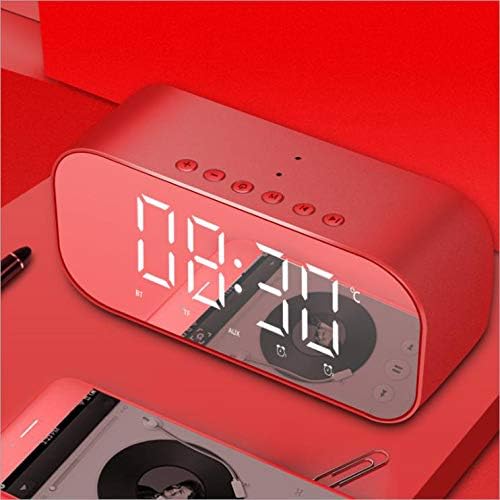
Image: Front view of the YAYUSI Bluetooth Alarm Clock Speaker, displaying time and various mode indicators.
Control Buttons and Ports

Image: Diagram illustrating the dimensions and the layout of control buttons on the top panel of the device.
Refer to the diagram above for the location of the following controls:
- Power Button: Turns the device on/off.
- Mode Button (M): Switches between Bluetooth, FM Radio, TF Card, and AUX modes.
- Volume Up (+): Increases volume.
- Volume Down (-): Decreases volume.
- Previous Track/Station (<<): Skips to the previous track or FM station.
- Next Track/Station (>>): Skips to the next track or FM station.
- Play/Pause Button: Plays or pauses audio. Also used for answering/ending calls.
- Alarm Set Button (Bell icon): Enters alarm setting mode.
- Time Set Button (Clock icon): Enters time setting mode.

Image: Rear view of the device highlighting the TF card slot, USB charging port, and AUX input port.
The rear panel includes:
- TF Card Slot: For playing MP3 files from a Micro SD card.
- DC 5V Charging Port: For charging the device using the provided USB cable.
- USB Output Port (OUT): For charging external devices like smartphones.
- AUX Input Port: For connecting external audio sources via the 3.5mm audio cable.
Setup
Charging the Device
- Connect the provided USB charging cable to the DC 5V charging port on the back of the alarm clock.
- Connect the other end of the USB cable to a USB power adapter (not included) or a computer's USB port.
- The charging indicator will illuminate. A full charge typically takes approximately 3 hours.
- Once fully charged, the indicator light may change or turn off. The device has a built-in 2200mAh lithium battery, offering up to 8 hours of music playback or 72 hours of standby time.
Initial Power On
Press and hold the Power Button on the top panel to turn the device on. The LED display will light up.
Setting the Time
- Press and hold the Time Set Button (Clock icon) until the hour digits begin to flash.
- Use the Previous Track (<<) or Next Track (>>) buttons to adjust the hour.
- Press the Time Set Button again to switch to minute adjustment.
- Use the Previous Track (<<) or Next Track (>>) buttons to adjust the minutes.
- Press the Time Set Button once more to confirm and exit time setting mode.
Note: This device may display time in a 24-hour format (military time) and temperature in Celsius, which may not be user-adjustable.
Setting the Alarm
The device supports dual alarms.
- Press and hold the Alarm Set Button (Bell icon) to enter Alarm 1 setting mode. The alarm hour digits will flash.
- Use the Previous Track (<<) or Next Track (>>) buttons to adjust the alarm hour.
- Press the Alarm Set Button again to switch to alarm minute adjustment.
- Use the Previous Track (<<) or Next Track (>>) buttons to adjust the alarm minutes.
- Press the Alarm Set Button again to select an alarm melody (there are 5 gentle songs). Use Previous Track (<<) or Next Track (>>) to cycle through them.
- Press the Alarm Set Button once more to confirm Alarm 1 settings.
- Repeat steps 1-6 for Alarm 2 by pressing the Alarm Set Button twice initially.
Operating Instructions
Bluetooth Speaker Mode
- Turn on the alarm clock. Press the Mode Button (M) until 'BT' appears on the display, indicating Bluetooth mode.
- On your mobile device, enable Bluetooth and search for available devices.
- Select 'YAYUSI' from the list of devices to pair. A confirmation sound will indicate successful pairing.
- You can now play audio from your device through the alarm clock speaker. Use the Play/Pause, Previous Track (<<), Next Track (>>), Volume Up (+), and Volume Down (-) buttons to control playback.
FM Radio Mode
- Press the Mode Button (M) until 'FM' appears on the display.
- Press and hold the Play/Pause button to automatically scan and save available FM stations.
- Use the Previous Track (<<) or Next Track (>>) buttons to navigate between saved stations.
MP3 Player Mode (TF Card)
- Insert a Micro SD (TF) card with MP3 audio files into the TF Card Slot on the rear panel.
- The device should automatically switch to TF card mode. If not, press the Mode Button (M) until 'TF' appears.
- Use the Play/Pause, Previous Track (<<), Next Track (>>), Volume Up (+), and Volume Down (-) buttons to control playback.
AUX Mode
- Connect one end of the 3.5 mm Standard Audio Cable to the AUX Input Port on the rear panel of the alarm clock.
- Connect the other end of the cable to the audio output jack of your external audio device (e.g., smartphone, MP3 player).
- Press the Mode Button (M) until 'AUX' appears on the display.
- Control audio playback from your external device. Volume can be adjusted on both the alarm clock and the external device.
Using Alarm Functions
- Activating/Deactivating Alarm: Briefly press the Alarm Set Button (Bell icon) to toggle Alarm 1 on/off. A small alarm icon will appear/disappear on the display. Repeat for Alarm 2.
- Snooze Function: When the alarm sounds, press any button (except the Power Button) to activate snooze. The alarm will sound again after approximately 5 minutes.
- Stopping Alarm: To turn off the alarm completely, press the Power Button when the alarm is sounding.
USB Charging Port (Output)
The USB port labeled 'OUT' on the rear panel can be used to charge other smart devices, such as mobile phones or tablets. Connect your device's charging cable to this port.
Temperature Display
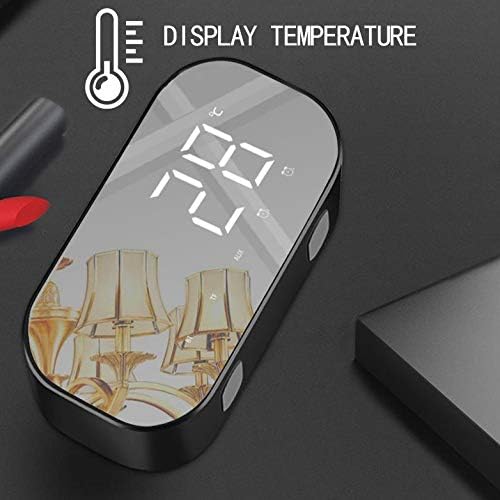
Image: The device displaying the current room temperature on its LED screen.
The alarm clock features a sensitive indoor thermometer that displays the ambient temperature on the LED screen. This display is typically in Celsius and is not user-adjustable.
Mirror Function

Image: The device showcasing its reflective surface, which can be used as a mirror.
The large LED screen has a reflective surface, allowing it to function as a convenient makeup mirror when not actively displaying time or other information.
Maintenance
- Cleaning: Use a soft, dry cloth to clean the device. Do not use abrasive cleaners or solvents, as they may damage the surface.
- Storage: Store the device in a cool, dry place away from direct sunlight and extreme temperatures.
- Battery Care: To prolong battery life, avoid fully discharging the battery frequently. Charge the device regularly, even if not in use for extended periods.
- Water Exposure: This device is not waterproof. Avoid exposure to water or high humidity.
Troubleshooting
| Problem | Possible Cause | Solution |
|---|---|---|
| Device does not power on. | Battery is depleted. | Connect the device to a power source using the USB charging cable and allow it to charge for at least 30 minutes before attempting to power on again. |
| Bluetooth pairing fails. | Device is not in Bluetooth mode; Bluetooth on mobile device is off; device is too far from mobile device. | Ensure the alarm clock is in Bluetooth mode ('BT' displayed). Turn on Bluetooth on your mobile device. Keep devices within 10 meters (33 feet) of each other. |
| Time or temperature display is incorrect or cannot be changed from 24-hour/Celsius. | The device's design may default to 24-hour time and Celsius temperature, which might not be user-configurable. | Follow the time setting instructions carefully. If unable to change format, this may be a fixed feature of the product. |
| Alarm does not sound. | Alarm is not activated; volume is too low. | Ensure the alarm icon is visible on the display. Increase the device's volume. |
| Poor FM radio reception. | Weak signal; interference. | Relocate the device to an area with better reception. Avoid placing near other electronic devices that may cause interference. |
Specifications
| Feature | Detail |
|---|---|
| Bluetooth Version | V4.2 |
| Output Power | 3W * 2 |
| Battery Capacity | 2200mAh Lithium Battery |
| Charge Time | Approximately 3 hours |
| Music Playback Time | Up to 8 hours |
| Standby Time | Up to 72 hours |
| Material | Engineering Plastic |
| Product Dimensions (W x H) | 3.15" x 5.51" (approximately 8cm x 14cm) |
| Item Weight | 10.6 ounces |
| Display Type | Digital LED |
| Special Features | Alarm, Radio, Thermometer, Mirror Display, USB Charging Output |
Warranty and Support
For warranty information, technical support, or service inquiries, please refer to the documentation included with your purchase or contact the retailer where the product was acquired. You may also visit the official yAyusi brand website for further assistance.
