
Product Overview
The ALLIMITY XRS331-C is a replacement remote control designed for various VIZIO Soundbar models. This remote provides direct functionality without the need for complex programming.
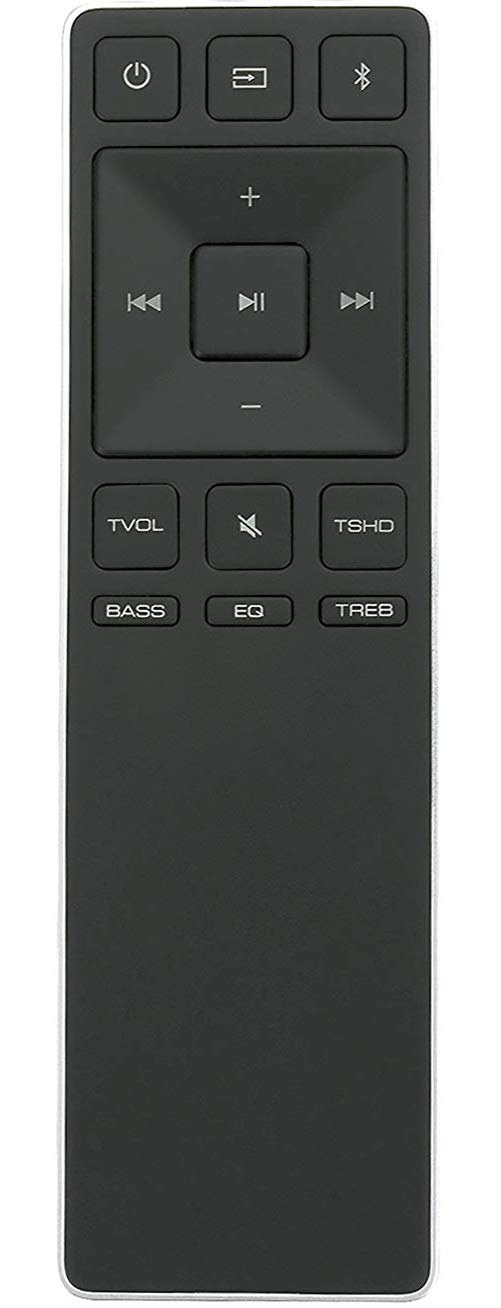
Image: The ALLIMITY XRS331-C replacement remote control, showing its button layout and design.
Compatible VIZIO Soundbar Models:
- S2121WD0, S2121W-D0
- S2920W-C0
- S3820W-C0, S3821W-C0
- SB2920-C6, SB2920-D6
- SB3820-C6, SB3821-C6
- SB3830-C6M, SB3831-C6M
- SS2520-C6, SS2521-C6
Setup
The ALLIMITY XRS331-C remote control requires no programming. Simply insert batteries to begin operation.
Battery Installation
- Locate the battery compartment on the back of the remote control.
- Slide the battery compartment cover downwards or outwards to open it.
- Insert two (2) AAA alkaline batteries, ensuring the positive (+) and negative (-) terminals match the diagrams inside the compartment.
- Replace the battery compartment cover by sliding it back into place until it clicks securely.
Note: AAA batteries are required and are not typically included with the remote control.
Operating Instructions
Once batteries are installed, the remote is ready for immediate use with your compatible VIZIO Soundbar. Point the remote directly at the soundbar's sensor.
Basic Functions
- Power Button: Turns the soundbar on or off.
- Volume Up/Down: Adjusts the soundbar's volume level.
- Mute Button: Silences or restores the sound.
- Input/Source Button: Cycles through available audio input sources (e.g., Bluetooth, Optical, AUX).
- Other Buttons: Depending on your specific VIZIO soundbar model, other buttons on the remote may control functions such as bass, treble, surround sound modes, or playback controls for connected devices. Refer to your soundbar's original manual for specific button functionalities.
Maintenance
Proper maintenance ensures the longevity and optimal performance of your remote control.
- Cleaning: Wipe the remote control with a soft, dry cloth. Do not use liquid cleaners or abrasive materials.
- Battery Replacement: Replace batteries when the remote's response becomes sluggish or stops working. Always replace both batteries at the same time with new ones.
- Storage: Store the remote in a dry place, away from direct sunlight and extreme temperatures.
- Avoid Drops: Protect the remote from physical impact, as drops can damage internal components.
Troubleshooting
If you experience issues with your remote control, try the following steps:
- Remote Not Responding:
- Check if the batteries are inserted correctly with the correct polarity (+/-).
- Replace old batteries with new AAA alkaline batteries.
- Ensure there are no obstructions between the remote control and the soundbar's sensor.
- Make sure you are within the effective range of the soundbar's infrared receiver.
- Specific Button Not Working:
- Ensure the button is not stuck.
- Confirm that the function is supported by your specific VIZIO soundbar model.
Specifications
| Model Number | XRS331-C |
| Brand | ALLIMITY |
| Compatible Devices | VIZIO Soundbars (specific models listed in Product Overview) |
| Connectivity Technology | Infrared (IR) |
| Batteries Required | 2 x AAA (not included) |
| Special Feature | No Programming Required |
| Product Dimensions | 2 x 0.6 x 7 inches (approximately) |
| Item Weight | 1 ounce (approximately) |
| Max Number of Supported Devices | 20 (This refers to the remote's internal capability, not simultaneous control) |
Warranty Information
This ALLIMITY XRS331-C remote control is covered by a 90-day warranty from the date of purchase. This warranty covers manufacturing defects. Please retain your proof of purchase for warranty claims.
Support
For further assistance or inquiries regarding your ALLIMITY XRS331-C remote control, please contact the seller or manufacturer directly through the platform where the purchase was made. Provide your order details and a clear description of the issue for efficient support.
