
1. Introduction
This manual provides essential information for the safe and effective use of your WYMECT IEC C14 to C13 90-Degree Down Angled Power Adapter. This adapter is designed to convert an IEC C14 male connector to an IEC C13 female connector with a 90-degree downward angle, optimizing cable management, especially for wall-mounted devices.

Figure 1.1: WYMECT IEC C14 to C13 90-Degree Down Angled Power Adapter.
2. Safety Information
- Always ensure the adapter's voltage and current ratings match or exceed the requirements of the connected devices.
- Do not exceed the maximum rated power of 2500W.
- Avoid using the adapter in wet or damp conditions.
- Do not attempt to disassemble or modify the adapter.
- Keep out of reach of children.
- Ensure secure connections to prevent electrical hazards.
3. Package Contents
Your package should contain the following:
- 2 x WYMECT IEC C14 Male to C13 Female 90-Degree Down Angled Power Adapters
4. Product Features
- Plug Type: IEC 320 C14 Male to IEC 320 C13 Female
- Design: 90-degree down angled for efficient cable routing
- Material: Durable PVC & PC plastic
- Certifications: CE & RoHS compliant for safety
- Compatibility: Ideal for LCD/LED wall-mounted TVs, PDU units, and other devices requiring C14/C13 connections

Figure 4.1: Close-up of the IEC C14 Male connector.
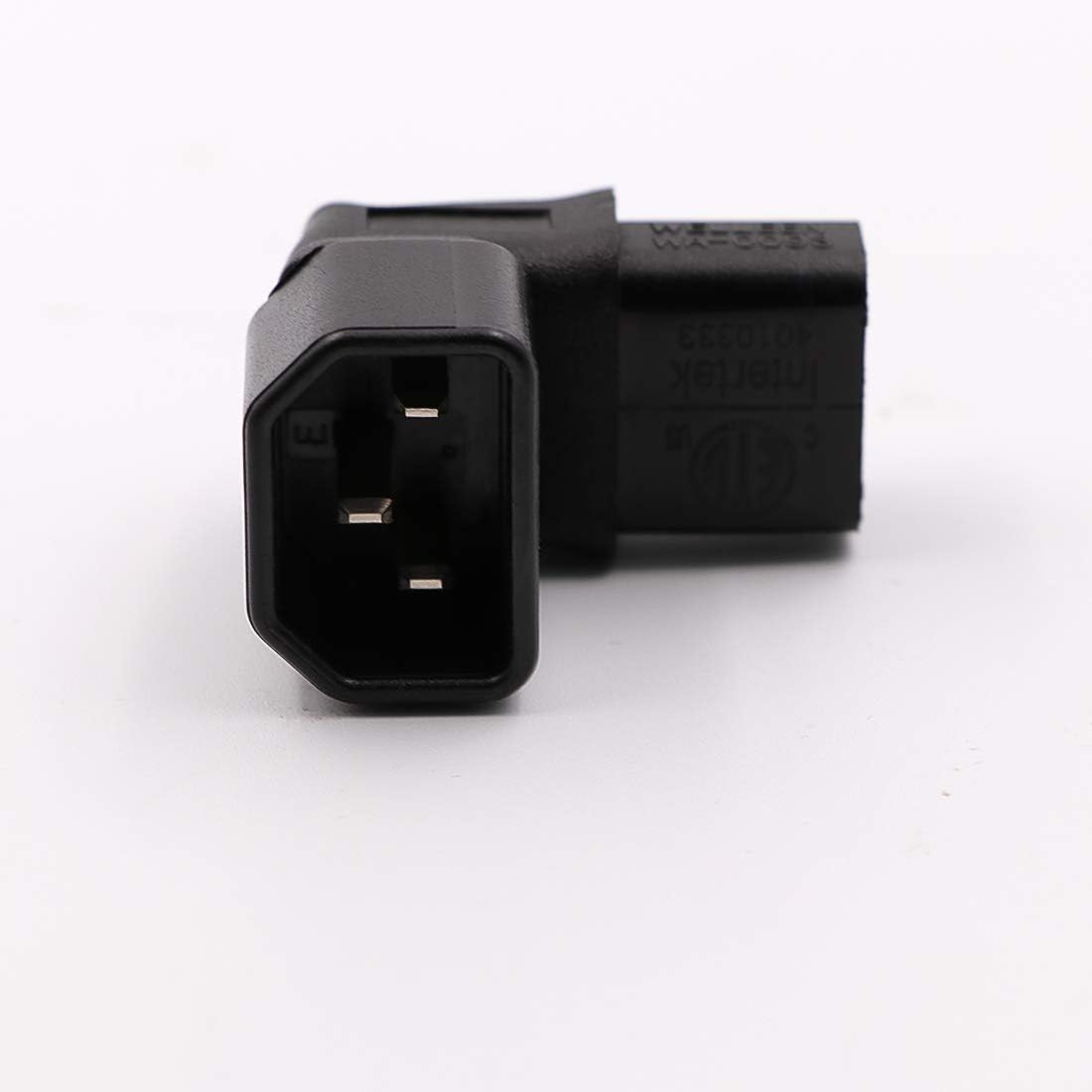
Figure 4.2: Close-up of the IEC C13 Female connector.

Figure 4.3: Side view illustrating the 90-degree down angle.
5. Setup and Installation
- Identify Connectors: Locate the IEC C14 male port on your device (e.g., TV, monitor, PDU) and the IEC C13 female end of your power cable.
- Connect Adapter to Device: Insert the IEC C14 male end of the WYMECT adapter into the IEC C14 port on your device. Ensure it is fully seated.
- Connect Power Cable to Adapter: Insert the IEC C13 female end of your power cable into the IEC C13 female port of the WYMECT adapter. The cable will now exit downwards, parallel to the device's surface.
- Secure Connections: Verify that both connections are firm and secure.
This adapter is particularly useful for wall-mounted televisions or equipment in tight spaces, allowing the power cable to run flush against the wall or equipment, reducing strain and improving aesthetics.
6. Operating Instructions
Once properly installed, the WYMECT IEC C14 to C13 90-Degree Down Angled Power Adapter operates passively. It simply redirects the power connection. No additional operation is required. Ensure your device is powered on as usual after connecting the adapter and power cable.
7. Maintenance
- Cleaning: Disconnect the adapter from all power sources before cleaning. Use a dry, soft cloth to wipe the exterior. Do not use liquid cleaners or solvents.
- Inspection: Periodically inspect the adapter for any signs of damage, such as cracks, frayed wires, or loose connections. Discontinue use if any damage is observed.
- Storage: Store the adapter in a cool, dry place away from direct sunlight and extreme temperatures when not in use.
8. Troubleshooting
- No Power to Device:
- Ensure both ends of the adapter are fully and securely plugged into the device and the power cable.
- Check the power cable itself for damage.
- Verify the power outlet is functional.
- Loose Connection:
- Gently push the adapter and power cable connections firmly into place. If connections remain loose, the adapter or cable may be incompatible or damaged.
9. Specifications
| Model Number | XZT001582-2PC |
| Connector Type | IEC C14 Male to IEC C13 Female |
| Rated Voltage | 125V-250V AC |
| Rated Current | 10A-15A |
| Rated Power | 2500W |
| Material | PVC & PC |
| Color | Black |
| Product Dimensions | 5 x 4 x 0.7 inches |
| Item Weight | 2.46 ounces |
| Certifications | CE, RoHS |
10. Warranty and Support
Specific warranty information for this product is not provided in the available data. For warranty claims or technical support, please contact your retailer or the manufacturer, WYMECT, directly through their official website or customer service channels.
Manufacturer: WYMECT
Date First Available: December 1, 2018
