
1. Product Overview
The ETHERMA eTOUCH-eco Thermostat is an advanced, touch-sensitive device designed for precise temperature control in your living spaces. Its sleek, high-gloss white design integrates seamlessly into modern interiors, while its robust construction ensures long-lasting performance. This thermostat is specifically engineered for flush-mount installation and adheres to Ecodesign guidelines for energy efficiency.
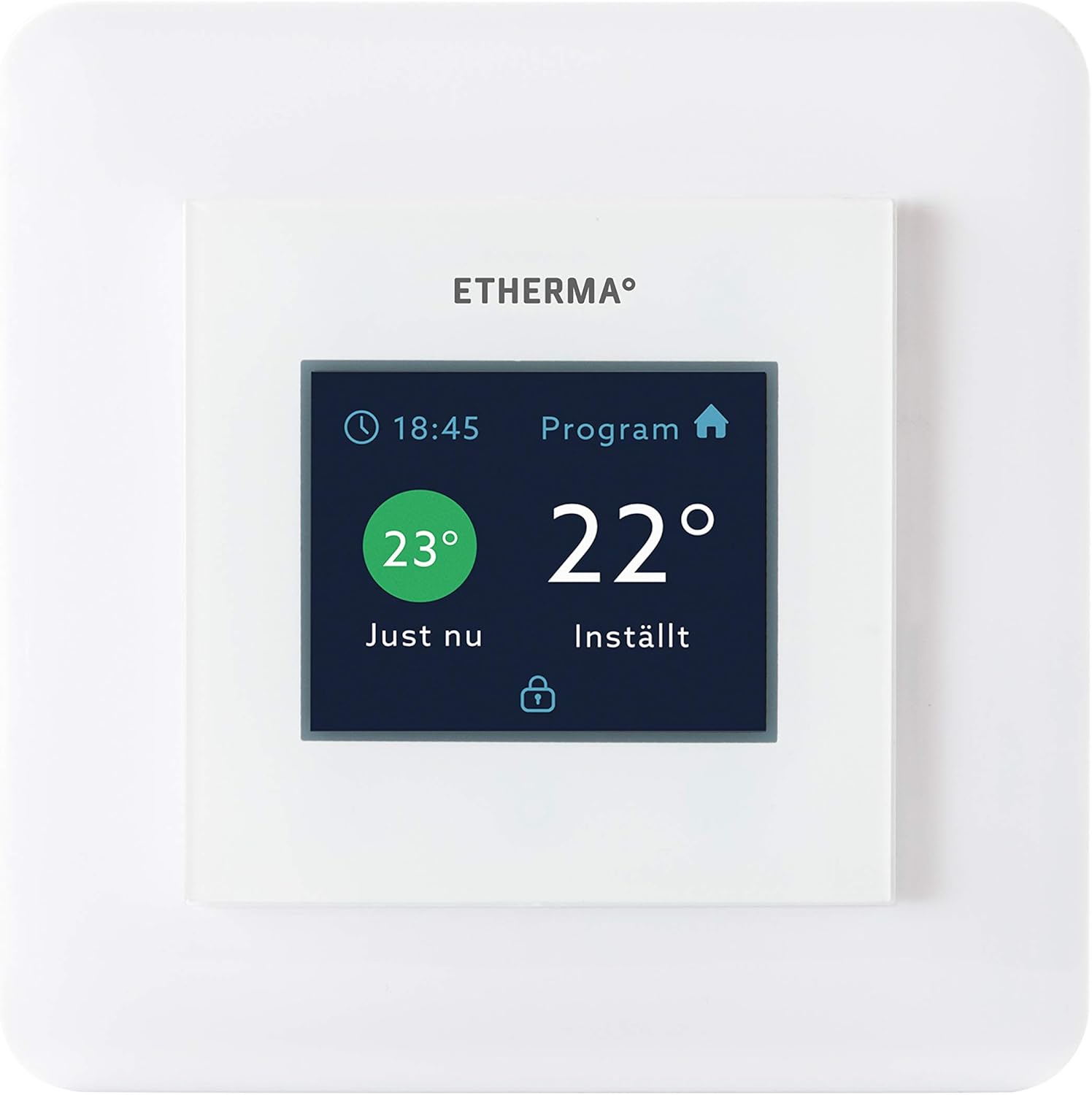
Figure 1: Front view of the ETHERMA eTOUCH-eco Thermostat, displaying its intuitive touch interface.
Key features include:
- Touchpad Interface: Easy and intuitive temperature adjustment and program navigation.
- Wide Temperature Range: Capable of controlling temperatures from 5 to 35 degrees Celsius.
- Ecodesign Compliant: Designed for energy efficiency and environmental responsibility.
- Durable Construction: Built for reliability and longevity.

Figure 2: The ETHERMA eTOUCH-eco Thermostat seamlessly integrated into a contemporary living space.
2. Setup
2.1 Unpacking
Carefully remove the thermostat from its packaging. Verify that all components are present and undamaged. If any items are missing or damaged, contact your retailer immediately.
2.2 Installation
The ETHERMA eTOUCH-eco Thermostat is designed for flush-mount installation. Due to the electrical nature of this device, professional installation by a qualified electrician is strongly recommended to ensure safety and proper functionality. Ensure the power supply to the installation area is disconnected before beginning any work.
- Mounting Location: Choose a location on an interior wall, away from direct sunlight, drafts, or heat sources that could affect temperature readings.
- Wiring: Follow the wiring diagram provided with the product packaging. Connect the thermostat to a 230 Volt power supply.
- Dimensions: The thermostat is designed to fit standard switch boxes, with dimensions of approximately 55 x 55 mm for the visible face. The overall product dimensions are 33 x 34 x 13 cm.
2.3 Initial Power-On
Once installed and wired correctly, restore power to the circuit. The thermostat display should illuminate, and it may prompt you to set the date, time, and initial temperature settings. Follow the on-screen instructions.
3. Operating Instructions
The eTOUCH-eco Thermostat features a user-friendly touchpad interface for all operations.
3.1 Basic Temperature Adjustment
To manually adjust the temperature, simply touch the temperature display area. Use the up/down arrows or slide gestures (if supported by the model) to set your desired temperature. The new setting will typically be applied immediately or after a short confirmation period.
3.2 Programming Schedules
The thermostat allows for programmable heating schedules to optimize comfort and energy savings. Access the 'Program' menu (as indicated on the display, see Figure 1) to set daily or weekly heating schedules. You can typically define different temperature settings for various times of the day (e.g., morning, day, evening, night).
- Accessing Program Menu: Tap the 'Program' icon or text on the display.
- Setting Time Periods: Define specific time blocks for each day.
- Assigning Temperatures: Set the desired temperature for each time block.
- Saving Settings: Ensure you save your programmed schedule before exiting the menu.
3.3 Operating Modes
Your thermostat may offer various operating modes, such as:
- Comfort Mode: Maintains your preferred comfort temperature.
- Economy Mode: Sets a lower, energy-saving temperature.
- Frost Protection Mode: Prevents temperatures from dropping below a critical point (e.g., 5°C) to protect pipes.
- Holiday Mode: Allows you to set a specific temperature for an extended period while you are away.
Refer to the on-screen menu for specific mode selection and configuration.
4. Maintenance
4.1 Cleaning
To maintain the appearance and functionality of your thermostat, clean it regularly. Use a soft, dry, or slightly damp cloth. Do not use abrasive cleaners, solvents, or chemical sprays, as these can damage the display and casing.
4.2 General Care
Avoid exposing the thermostat to extreme temperatures, direct sunlight for prolonged periods, or excessive moisture. Do not attempt to open the thermostat casing, as this may void the warranty and expose you to electrical hazards. All internal servicing should be performed by qualified personnel.
5. Troubleshooting
If you encounter issues with your ETHERMA eTOUCH-eco Thermostat, refer to the following common problems and solutions:
| Problem | Possible Cause | Solution |
|---|---|---|
| Thermostat display is blank. | No power supply. | Check circuit breaker. Ensure proper wiring connections (consult an electrician). |
| Incorrect temperature reading. | Thermostat exposed to drafts or heat sources. | Relocate thermostat if possible, or shield it from external influences. |
| Heating not turning on/off. | Incorrect program settings or wiring issue. | Verify program schedule and temperature settings. Check wiring (professional assistance recommended). |
| Touchpad unresponsive. | Temporary software glitch. | Try restarting the thermostat by temporarily cutting power at the circuit breaker. |
If the problem persists after attempting these solutions, please contact customer support or a qualified technician.
6. Specifications
| Attribute | Value |
|---|---|
| Brand | Etherma |
| Model Number | 40511 |
| Article Number | 9120061393444 |
| Color | White (Hochglanz) |
| Product Dimensions | 33 x 34 x 13 cm |
| Item Weight | 260 Grams |
| Voltage | 230 Volt |
| Temperature Range | 5-35 Degrees Celsius |
| Display Type | LED |
| Controller Type | Touchpad / Push Button |
| Mounting Type | Wall Mount (Flush-mount) |
7. Warranty
Your ETHERMA eTOUCH-eco Thermostat is covered by a manufacturer's warranty. Please refer to the warranty information provided with your purchase documentation for specific terms, conditions, and duration. Keep your proof of purchase for any warranty claims.
8. Support
For technical assistance, troubleshooting beyond this manual, or warranty inquiries, please contact your authorized ETHERMA retailer or visit the official Etherma website. Ensure you have your product model number (40511) and purchase details ready when contacting support.
Etherma Official Website: www.etherma.com


