
Product Overview
The HuiNa 1594 RC Excavator is a professional-grade, 1:14 scale remote control construction vehicle designed for enthusiasts. This model combines features from the Huina 1580 and 1593 excavators, offering robust performance and realistic operation. It is equipped with metal components for enhanced durability and digging capability.

Figure 1: The HuiNa 1594 RC Excavator, showcasing the main unit, remote control, two rechargeable batteries, and four interchangeable attachments.
Key Features:
- Practical Metal Alloy Construction: Features metal tracks, gears, wheels, gearbox, and bucket for stability and powerful digging.
- Advanced 22-Channel 2.4GHz Radio Remote Control: Offers a range of up to 100 feet for precise control.
- Lead Screw Drive: Provides smooth and powerful arm movements.
- Twin Motor Independent Drive: Enables robust and independent track movement.
- Realistic Details: Includes LED lights in the cabin, simulated sounds, and continuous turret rotation.
- Proportional Control: Allows for precise control of the boom, arm, and bucket.
- Long Playtime: Powered by two 7.4V 2000mAh Li-ion rechargeable batteries, providing up to 50 minutes of operation per full charge.
- Multiple Attachments: Comes with four exchangeable attachments for versatile operations.
What's in the Box
Upon opening the package, please verify that all the following components are included:
- 1 x HuiNa 1594 RC Excavator
- 1 x 2.4GHz Remote Control
- 2 x 7.4V 2000mAh Li-ion Rechargeable Batteries
- 4 x Exchangeable Attachments (e.g., bucket, grapple, hammer, wood grab)
- 1 x USB Charging Cable
- 1 x Instruction Manual (this document)

Figure 2: All components included in the HuiNa 1594 RC Excavator package, neatly arranged in its protective suitcase box.
Specifications
| Feature | Detail |
|---|---|
| Product Name | Huina 1594 RC Excavator |
| Color | White |
| Product Size (L*W*H) | 68.5 cm * 18.6 cm * 46.6 cm (approx. 27 in * 7.3 in * 18.3 in) |
| Package Dimensions | 68 cm * 27.5 cm * 32.5 cm (approx. 26.8 in * 10.8 in * 12.8 in) |
| Excavator Weight | 9.9 lbs (4.5 kg) |
| Rechargeable Battery | 7.4V 2000 mAh Lithium-ion (x2) |
| Play Time | 40-50 minutes per battery per full charge |
| Charging Time | 5-7 hours |
| Remote Control Frequency | 2.4GHz |
| Remote Control Channels | 22 Channels |
| Remote Control Distance | Up to 30 meters (approx. 100 feet) |
| Remote Control Battery | AA*3 (not included) |
| Scale | 1:14 |
| Recommended Age | 14 years and up |

Figure 3: Key dimensions of the HuiNa 1594 RC Excavator, including extended height, stretch length, width, and overall length.
Safety Information
Please read and understand all safety warnings and precautions before operating the RC excavator. Failure to do so may result in injury or damage to the product.
- Adult Supervision: This product is recommended for ages 14 and up. Adult supervision is advised, especially during initial setup and operation.
- Battery Safety:
- Use only the provided charger and batteries.
- Do not overcharge or short-circuit batteries.
- Do not expose batteries to extreme temperatures or direct sunlight.
- If batteries leak, avoid contact with skin and eyes. Dispose of properly.
- Remove batteries from the remote control and excavator when not in use for extended periods.
- Operating Environment:
- Operate the excavator in open, clear areas, away from people, pets, and obstacles.
- Avoid operating near water, electrical wires, or fragile objects.
- Do not operate in strong winds or adverse weather conditions.
- Moving Parts: Keep fingers, hair, and loose clothing away from moving parts such as tracks, arms, and attachments to prevent entanglement or injury.
- Attachments: Ensure attachments are securely fastened before operation. Do not attempt to lift objects heavier than the excavator's capacity.
- Cleaning: Disconnect power and remove batteries before cleaning. Use a dry cloth; avoid water or harsh chemicals.
Setup
1. Battery Installation
Excavator Battery:
- Locate the battery compartment on the underside of the excavator.
- Open the battery compartment cover.
- Connect the 7.4V 2000mAh Li-ion battery to the excavator's power connector.
- Carefully place the battery inside the compartment and close the cover securely.
Remote Control Battery:
- Open the battery cover on the back of the remote control.
- Insert 3 x AA batteries (not included) into the compartment, ensuring correct polarity (+/-).
- Close the battery cover.

Figure 4: Detailed view of the excavator's battery compartment and other structural elements.
2. Charging the Battery
Before first use, fully charge the excavator's battery.
- Connect the excavator battery to the provided USB charging cable.
- Plug the USB charging cable into a suitable USB power adapter (e.g., computer USB port, wall adapter).
- The charging indicator light on the USB cable will show the charging status (refer to charger instructions for specific light behavior).
- Charging typically takes 5-7 hours. Do not leave charging unattended.
- Once fully charged, disconnect the battery from the charger.
3. Remote Control Pairing
The excavator and remote control are usually pre-paired. If pairing is lost or for initial setup:
- Ensure both the excavator and remote control have fresh batteries installed.
- Turn on the excavator's power switch.
- Turn on the remote control's power switch.
- The remote control's indicator light should blink and then become solid, indicating successful pairing. If not, turn both off and repeat the process.
4. Attaching/Changing Attachments
The HuiNa 1594 comes with multiple interchangeable attachments. To change them:
- Ensure the excavator is powered off.
- Carefully detach the current attachment by releasing its locking pins or mechanism.
- Align the desired new attachment with the arm's connection points.
- Securely fasten the attachment using the locking pins or mechanism until it clicks into place.
- Gently tug on the attachment to ensure it is firmly secured before operation.

Figure 5: The excavator highlighting its lead screw drive, metal tracks, metal bucket, and rechargeable battery system.
Operating the Excavator
Familiarize yourself with the remote control layout and functions before operating the excavator.

Figure 6: The 22-channel remote control and the HuiNa 1594 RC Excavator, emphasizing its advanced control capabilities.
Remote Control Functions:
The 22-channel remote control allows for precise and independent movements. Refer to the remote control diagram (not provided in this text, but typically found in a physical manual) for exact button mapping.
- Left Joystick: Controls forward/backward movement of the tracks and left/right rotation of the turret.
- Right Joystick: Controls the main boom (up/down) and the arm (in/out).
- Buttons/Switches:
- Bucket/Attachment Control: Opens and closes the bucket or operates other attachments.
- Lights: Turns the cabin LED lights on/off.
- Sounds: Activates/deactivates simulated engine and operation sounds.
- Demo Mode: Initiates a pre-programmed demonstration sequence.
- Turret Rotation: Continuous 360-degree rotation.
Basic Operation:
- Power On: Turn on the excavator and then the remote control.
- Movement: Use the left joystick to drive the excavator forward, backward, and turn.
- Turret Rotation: Use the left joystick (or dedicated button) to rotate the upper body of the excavator.
- Arm and Bucket Control: Use the right joystick to raise/lower the main boom, extend/retract the arm, and operate the bucket/attachment.
- Digging: Position the excavator, lower the boom and arm, then use the bucket control to scoop material. Lift the boom and arm to dump.
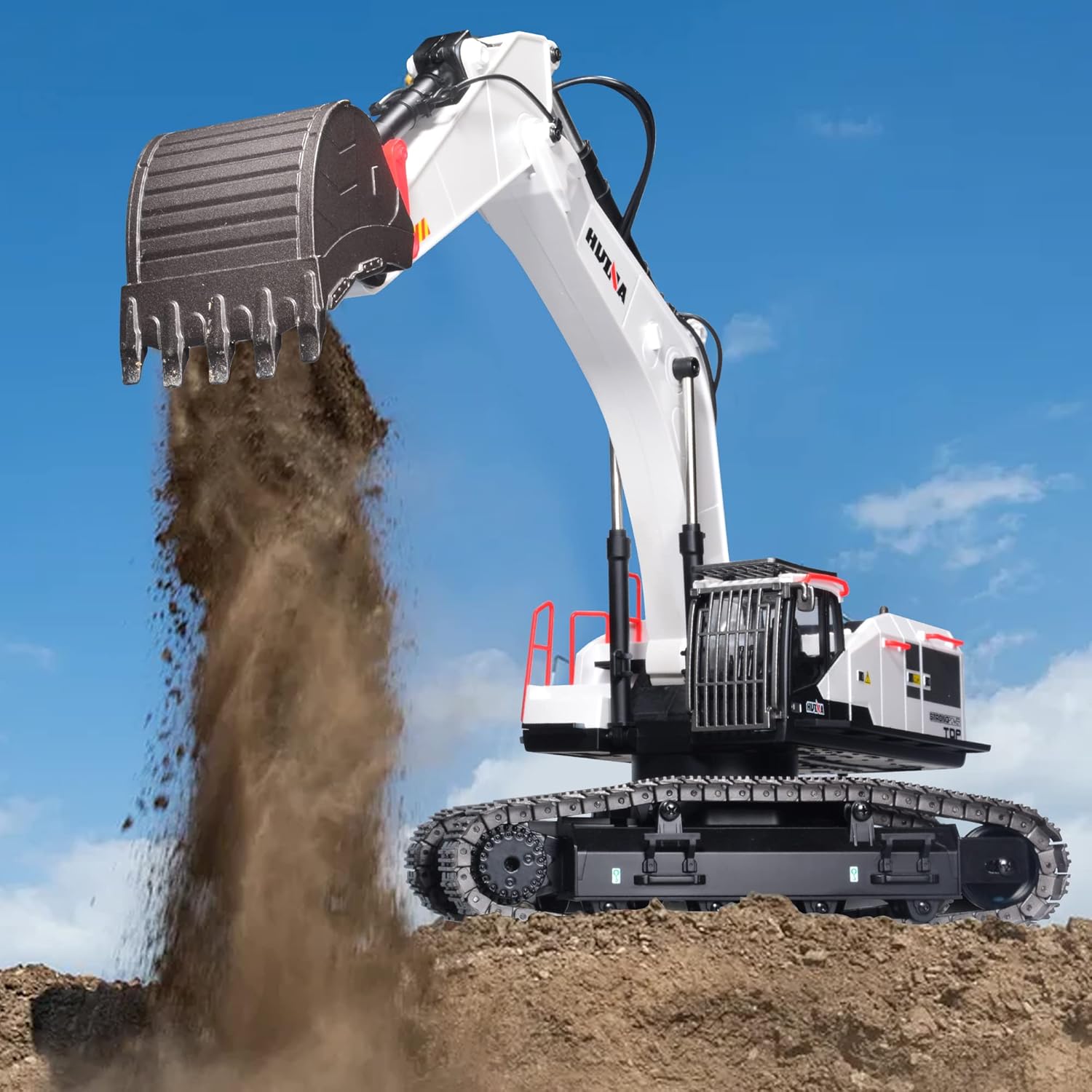
Figure 7: The HuiNa 1594 RC Excavator demonstrating its digging capability, moving loose material with its metal bucket.
Maintenance
Proper maintenance will extend the lifespan of your RC excavator.
- Cleaning:
- After each use, especially if operated in dirt or sand, gently brush off any debris from the tracks, gears, and body.
- Use a soft, dry cloth to wipe down the exterior. Avoid water or cleaning solutions directly on electronic components.
- Ensure no foreign objects are lodged in the tracks or moving parts.
- Battery Care:
- Always fully charge batteries before storage if storing for an extended period.
- Store batteries in a cool, dry place, away from direct sunlight and extreme temperatures.
- Do not store fully depleted batteries.
- If not used for a long time, periodically charge the batteries to maintain their health.
- Storage: Store the excavator in its original packaging or a protective case to prevent dust and damage.
- Lubrication: Periodically check moving metal parts for smooth operation. If necessary, apply a small amount of RC-safe lubricant to pivot points, avoiding electrical components.
Troubleshooting
If you encounter issues with your HuiNa 1594 RC Excavator, refer to the following common problems and solutions:
| Problem | Possible Cause | Solution |
|---|---|---|
| Excavator does not turn on. | Battery not charged or incorrectly installed. Power switch off. | Ensure battery is fully charged and correctly connected. Turn on the excavator's power switch. |
| Remote control does not respond. | Remote control batteries low or incorrectly installed. Not paired with excavator. | Replace AA batteries in the remote control. Re-pair the remote control and excavator (see Setup section). |
| Excavator moves slowly or has weak power. | Excavator battery low. Obstruction in tracks or gears. | Recharge the excavator battery. Check for and remove any debris from tracks and gears. |
| Arm/Bucket/Turret not moving correctly. | Obstruction in moving parts. Attachment not properly secured. | Check for and remove any obstructions. Ensure attachments are securely fastened. |
| Short operating time. | Battery not fully charged. Old battery. | Ensure battery is fully charged (5-7 hours). Consider replacing the battery if it's old and capacity has degraded. |
If the problem persists after trying these solutions, please contact customer support.
Warranty & Support
For warranty information, please refer to the documentation provided at the time of purchase or contact your retailer. For technical support, spare parts, or further assistance, please visit the official HuiNa website or contact their customer service department.
HuiNa Official Store: Visit the HuiNa Store on Amazon