
Introduction
The Laney MINI-BASS-NX is a battery-powered bass amplifier designed for portability and versatile performance. Styled after the iconic Laney NEXUS range, it offers a super compact solution for bass tone and performance anywhere. This manual provides essential information for setting up, operating, and maintaining your MINI-BASS-NX amplifier.
Key Features:
- Ideal partner for the TONEBRIDGE app
- Battery powered - 6 x AA
- Lightweight and portable
- 6 Watts output power
Setup
Before using your Laney MINI-BASS-NX, please follow these setup instructions:
Powering the Amplifier:
The MINI-BASS-NX can be powered by 6 x AA batteries or an optional 9V DC power supply (not included). Ensure batteries are inserted correctly, observing polarity, or connect a compatible power supply to the DC input.
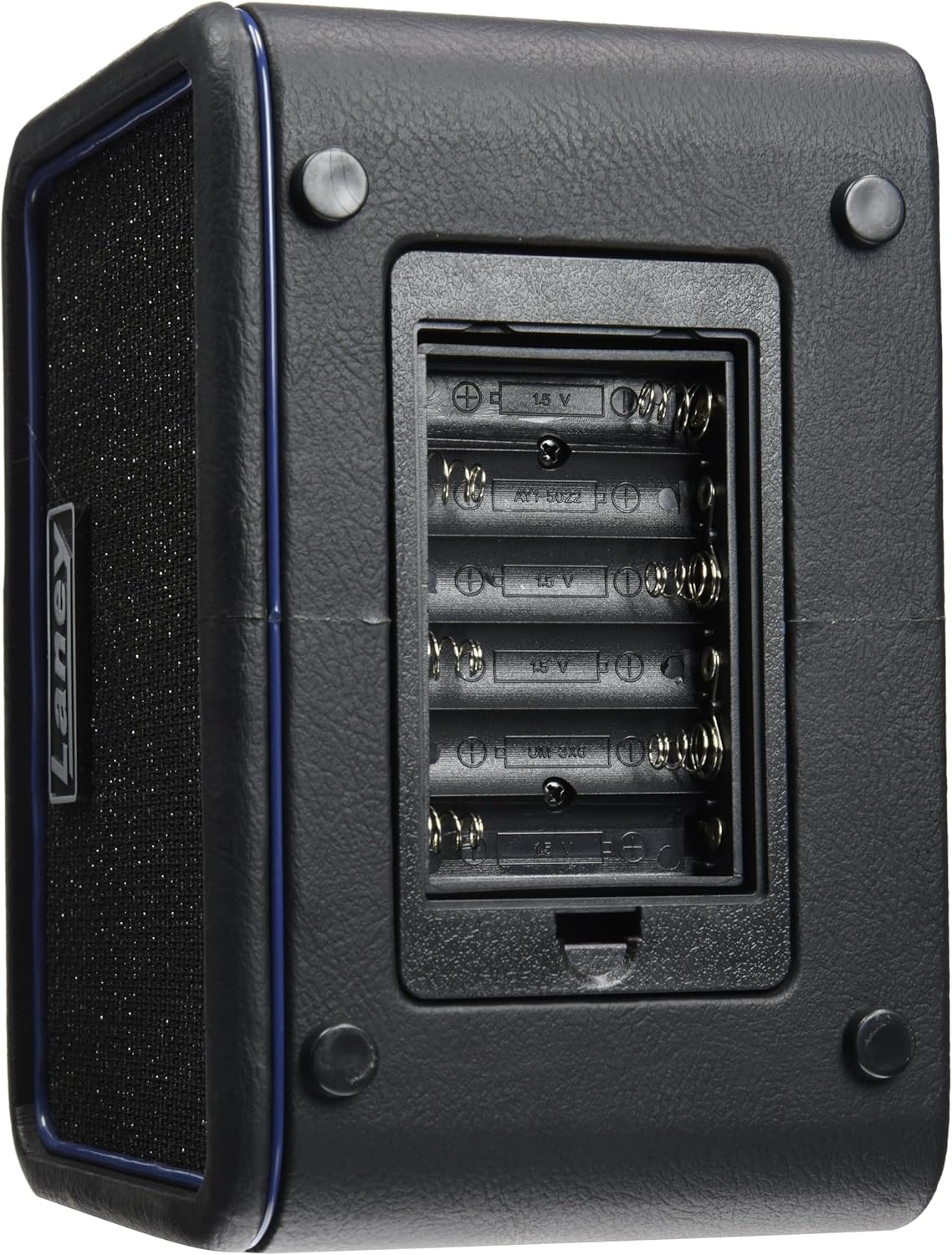
Image: Rear view of the Laney MINI-BASS-NX amplifier with the battery compartment open, showing slots for six AA batteries.
Initial Connection:
- Connect your bass guitar to the INPUT jack using a standard 1/4-inch instrument cable.
- Ensure the VOLUME knob is set to a low level before powering on.
- Press the POWER button to turn on the amplifier. The power indicator LED will illuminate.
Controls and Features
The Laney MINI-BASS-NX features a user-friendly control panel for shaping your bass tone:
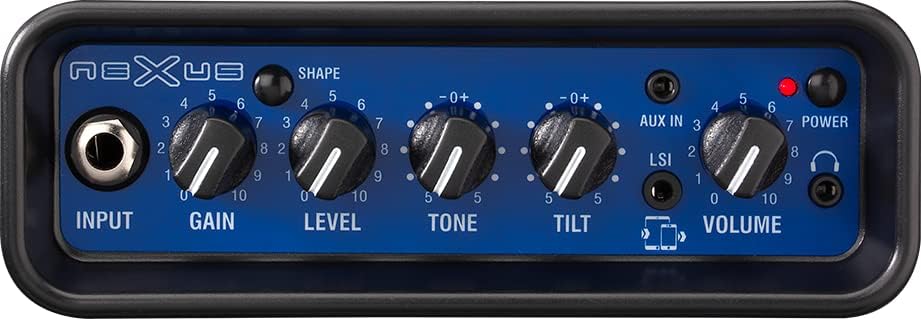
Image: Close-up of the control panel of the Laney MINI-BASS-NX, showing the input jack, various control knobs, and auxiliary ports.
- INPUT: 1/4-inch jack for connecting your bass guitar.
- GAIN: Controls the input sensitivity and amount of drive.
- LEVEL: Adjusts the overall output level of the amplifier.
- TONE: A global tone control to brighten or darken your sound.
- TILT: Provides a unique EQ shaping control for further tonal adjustments.
- AUX IN: 3.5mm stereo input for connecting external audio devices (e.g., MP3 player, phone) to play along with.
- LSI (Laney Smartphone Insert): 3.5mm jack for connecting your smartphone to use tone-generating apps like TONEBRIDGE.
- VOLUME: Master volume control for the amplifier output.
- POWER: On/off switch for the amplifier.
- HEADPHONE: 3.5mm stereo output for silent practice with headphones.
Operating Instructions
Playing Your Bass:
After connecting your bass and powering on the amplifier, adjust the GAIN and LEVEL knobs to achieve your desired volume and drive. Use the TONE and TILT controls to shape your sound.

Image: The Laney MINI-BASS-NX amplifier with a bass guitar connected via a 1/4-inch cable to the input jack.
Using the LSI (Laney Smartphone Insert):
The LSI allows you to connect your smartphone and use tone-generating apps. Connect your smartphone to the LSI jack using a compatible cable. This integrates your app's effects and tones directly into your amplifier's output.
Connecting External Audio:
Plug your external audio device (e.g., MP3 player, phone) into the AUX IN jack using a 3.5mm stereo cable. You can then play along with your favorite tracks through the amplifier.
Silent Practice:
For silent practice, connect your headphones to the HEADPHONE jack. The main speaker output will be muted, allowing you to practice without disturbing others.
Maintenance
To ensure the longevity and optimal performance of your Laney MINI-BASS-NX, follow these maintenance guidelines:
- Cleaning: Use a soft, dry cloth to clean the exterior of the amplifier. Avoid using abrasive cleaners or solvents.
- Battery Care: If using batteries, remove them if the amplifier will not be used for an extended period to prevent leakage and damage.
- Storage: Store the amplifier in a cool, dry place away from direct sunlight and extreme temperatures.
- Handling: Handle the amplifier with care to avoid physical damage.
Troubleshooting
If you encounter any issues with your MINI-BASS-NX, refer to the following troubleshooting tips:
- No Sound:
- Check if the amplifier is powered on and the power indicator LED is lit.
- Ensure batteries are fresh or the power supply is correctly connected.
- Verify that your bass guitar is properly connected to the INPUT jack.
- Check the VOLUME and LEVEL knobs are not set to zero.
- If headphones are connected, disconnect them to check the main speaker output.
- Distorted Sound:
- Reduce the GAIN knob setting.
- Lower the volume of your bass guitar.
- Check for faulty cables.
- Bluetooth Connectivity Issues:
- Ensure your smartphone's Bluetooth is enabled and discoverable.
- Refer to your smartphone's manual for specific Bluetooth pairing instructions.
Specifications
- Model: MINI-BASS-NX
- Output Wattage: 6 Watts
- Power Source: Battery Powered (6 x AA)
- Voltage: 9 Volts
- Item Weight: 3 pounds
- Product Dimensions: 5.12 x 8.07 x 5.75 inches
- Material Type: 2 x 3" full ranged drivers
- Compatible Devices: All bass guitars
- Connector Type: 3.5mm Jack
- Hardware Interface: 1/4-inch Audio, 3.5mm Audio
- Color: Black
Warranty and Support
For warranty information, technical support, or service inquiries, please refer to the documentation provided with your purchase or visit the official Laney website. Keep your proof of purchase for warranty claims.

