
1. Introduction
Thank you for choosing the Edillas Digital Kids Watch. This watch is designed for children, featuring a durable and comfortable design with multiple functions. It includes a stopwatch, alarm, 12/24-hour display, and LED backlight, all within a 50-meter water-resistant casing. Please read this manual carefully to understand how to operate and maintain your watch.

Image: A child wearing the Edillas Digital Kids Watch, demonstrating its suitability for young users.
2. Product Overview
Familiarize yourself with the buttons and display of your Edillas Digital Kids Watch.

Image: A detailed diagram showing the Edillas Digital Kids Watch with labels for each button and display area. The buttons are: LIGHT (top left), MODE (bottom left), START (top right), and RESET (bottom right). The display shows Week, Alarm, Hour, Minute, and Second.
- LIGHT Button (Top Left): Activates the LED backlight.
- MODE Button (Bottom Left): Cycles through different modes (Time, Alarm, Stopwatch).
- START Button (Top Right): Used to start/stop stopwatch, adjust values in setting mode.
- RESET Button (Bottom Right): Used to reset stopwatch, select items in setting mode.
3. Setup: Initial Time and Date Setting
- From the normal time display, press the MODE button three times to enter the time setting mode. The seconds will flash.
- Press the RESET button to select the item you wish to adjust (seconds, hours, minutes, month, date, week).
- While an item is flashing, press the START button to adjust the value. Hold the START button to change values faster.
- To switch between 12-hour and 24-hour format, press the START button when the hour is flashing. 'A' or 'P' will indicate AM/PM in 12-hour format.
- Once all settings are correct, press the MODE button to exit the setting mode and return to the normal time display.
4. Operating Instructions
4.1. Using the Backlight
Press the LIGHT button (top left) to illuminate the display. The backlight will stay on for a few seconds, allowing you to read the time in dark conditions.

Image: A side-by-side comparison of the watch display in normal light and with the cold LED backlight activated, showing improved visibility in darkness.
4.2. Alarm Function
- From the normal time display, press the MODE button once to enter the Alarm mode. The alarm time will be displayed.
- Press the RESET button to select the hour or minute to adjust.
- Press the START button to adjust the flashing hour or minute.
- To turn the alarm ON/OFF, press the START and RESET buttons simultaneously in Alarm mode. An alarm icon will appear/disappear on the display.
- Press the MODE button to return to the normal time display.
4.3. Stopwatch Function
- From the normal time display, press the MODE button twice to enter the Stopwatch mode. The display will show "00:00:00".
- Press the START button to begin timing.
- Press the START button again to pause timing.
- Press the RESET button to reset the stopwatch to "00:00:00" while it is paused.
- Press the MODE button to return to the normal time display.
5. Maintenance
5.1. Water Resistance
This watch is 50-meter water-resistant, suitable for daily use, hand washing, showering, and swimming. However, it is not recommended for diving or prolonged underwater activities. Do not press any buttons while the watch is submerged in water. Excessive exposure to water or extreme temperatures (hot or cold) can reduce the watch's lifespan.

Image: The Edillas Digital Kids Watch partially submerged in water, illustrating its 30M water-resistant capability for activities like hand washing, showering, and swimming.
5.2. Cleaning
To maintain the watch's appearance and hygiene, regularly clean the strap with a soft, damp cloth. Avoid using harsh chemicals or abrasive materials.
5.3. Battery Replacement
The watch uses a high-capacity battery designed for long-lasting performance. When the display becomes dim or functions are erratic, it may be time for a battery replacement. It is recommended to have the battery replaced by a qualified watch technician to ensure proper sealing and water resistance.
6. Troubleshooting
- Watch not displaying time or functions: Check if the battery needs replacement.
- Display is dim: The battery may be low. Replace the battery.
- Buttons are unresponsive: Ensure the watch is not submerged in water. If the issue persists, contact customer support.
- Time is inaccurate: Re-set the time following the "Initial Time and Date Setting" instructions. If inaccuracy continues, the battery may be weak or the internal module may require service.
- Alarm sounds at every hour (hourly chime): Some watches have an hourly chime feature. To disable it, typically in the alarm setting mode, there might be an option to toggle the hourly chime on/off. Refer to the specific alarm setting instructions or try pressing START/RESET buttons in alarm mode to find this option.
7. Specifications
| Feature | Detail |
|---|---|
| Display Type | Digital |
| Movement Type | Automatic |
| Water Resistance Depth | 50 Meters |
| Case Material | Resin |
| Band Material | Silicone |
| Dial Window Material | Plastic |
| Case Diameter | 34 mm |
| Case Thickness | 10 mm |
| Band Width | 14 mm |
| Band Length | 22 cm |
| Minimum Wrist Circumference | 14 cm (5.51 in) |
| Maximum Wrist Circumference | 20 cm (7.85 in) |
| Product Weight | 24g (0.85 oz) |
| Model Number | XINJIA-22 |
| UPC | 799649842316 |
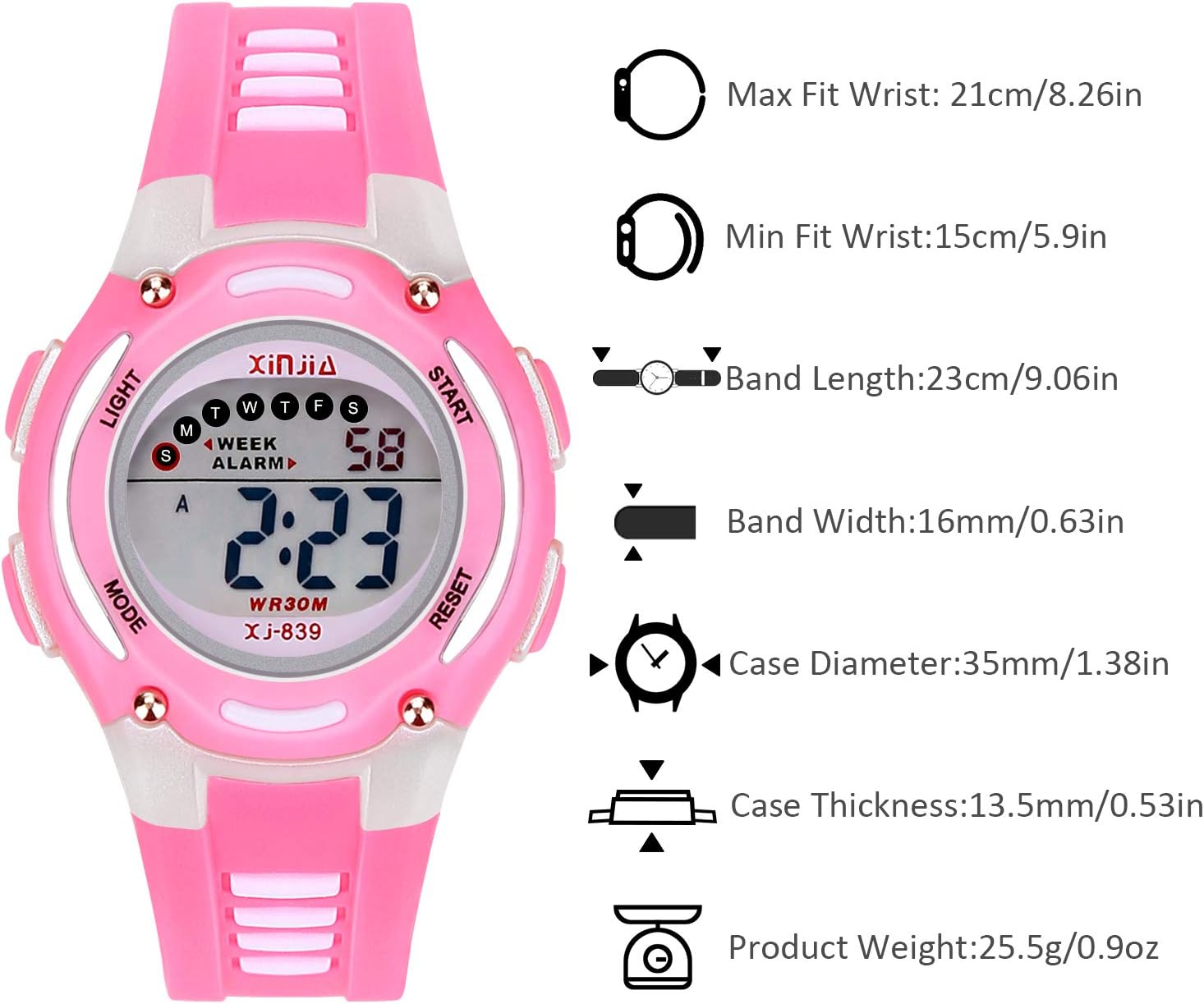
Image: A diagram illustrating the key dimensions of the Edillas Digital Kids Watch, including maximum and minimum wrist fit, band length, band width, case diameter, case thickness, and product weight.
8. Warranty and Support
Edillas is committed to providing quality products. If you encounter any issues with your watch, please do not hesitate to contact us. We will do our best to resolve your problem.
For support, please refer to the contact information provided with your purchase or visit the official Edillas store on Amazon: Edillas Amazon Store.
Please note that damage caused by improper use, such as pressing buttons underwater or exposure to extreme temperatures, may not be covered under warranty.


