
1. Introduction
This manual provides essential instructions for the setup, operation, and maintenance of your Easytry123 replacement remote control. This remote is designed to function as a direct replacement for specific Hannspree LCD LED HDTV TV models. Please read this manual thoroughly to ensure proper use and to maximize the lifespan of your device.
2. Compatibility
This Easytry123 remote control is compatible with the following Hannspree LCD LED HDTV TV models:
- RC00147P
- ST28FMMR
- SV28LMMB
- ST554MAB
- SK42TMNB
- SV25LMMB
- ST19CMAB
Important: Please verify your TV's model number against this list to ensure full compatibility. While this remote is a replacement, some advanced or specific functions of your original remote may not be fully supported.
3. Safety Information
- Do not expose the remote control to direct sunlight, heat sources, or extreme temperatures.
- Avoid dropping the remote or subjecting it to strong impacts.
- Do not immerse the remote control in water or any other liquid.
- When replacing batteries, ensure correct polarity (+/-) to prevent damage.
- Remove batteries if the remote control will not be used for an extended period to prevent leakage.
- Keep batteries out of reach of children.
4. Setup
4.1 Installing Batteries
- Locate the battery compartment on the back of the remote control.
- Slide the battery cover downwards or press the latch and lift to open.
- Insert two (2) AAA batteries, ensuring the positive (+) and negative (-) terminals align correctly with the markings inside the compartment.
- Replace the battery cover by sliding it back into place until it clicks securely.

Figure 1: Back view of the remote control with the battery compartment. The compartment is located at the bottom rear, designed for easy access to insert or replace two AAA batteries.
4.2 Initial Use
Once batteries are installed, the remote control is ready for immediate use with your compatible Hannspree TV. No programming or pairing is typically required for this infrared (IR) replacement remote. Simply point the remote directly at your TV's IR receiver.
5. Operating Instructions
5.1 Button Functions Overview
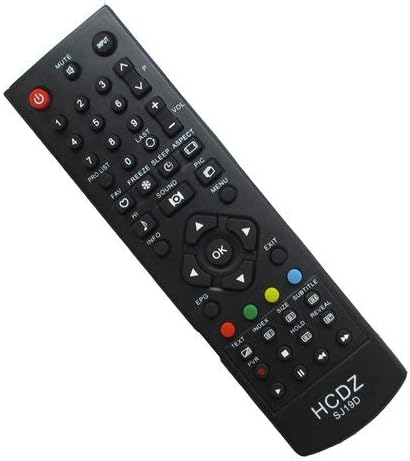
Figure 2: Front view of the Easytry123 remote control. This image displays the full layout of buttons, including power, number keys, navigation, volume, channel, and various function buttons for TV operation.
The remote control features a standard layout for TV operation. Below is a general guide to common button functions:
- Power (Red Button): Turns the TV on or off.
- Mute: Silences or restores the TV audio.
- Input: Cycles through available input sources (HDMI, AV, etc.).
- Number Buttons (0-9): Directly select channels.
- CH +/- (Channel Up/Down): Changes the TV channel sequentially.
- VOL +/- (Volume Up/Down): Adjusts the TV volume.
- Menu: Accesses the TV's main menu.
- Navigation Buttons (Up, Down, Left, Right, OK): Used to navigate menus and confirm selections.
- Exit: Exits the current menu or on-screen display.
- Info: Displays information about the current program or input.
- EPG (Electronic Program Guide): Opens the program guide (if supported by TV).
- Colored Buttons (Red, Green, Yellow, Blue): Functionality varies by TV model and context, often used for specific menu options or teletext.
5.2 Basic Operation
To operate your TV, point the remote control directly at the TV's infrared sensor. Ensure there are no obstructions between the remote and the TV. Press the desired button to perform the corresponding function.
6. Maintenance
- Cleaning: Wipe the remote control with a soft, dry cloth. Do not use abrasive cleaners or solvents.
- Storage: Store the remote in a cool, dry place away from direct sunlight and moisture.
- Battery Replacement: Replace batteries when the remote's response becomes sluggish or stops working. Always replace both batteries at the same time with new ones of the same type (AAA).
7. Troubleshooting
- Remote not working:
- Check if the batteries are inserted correctly with the correct polarity.
- Replace old batteries with new AAA batteries.
- Ensure there is a clear line of sight between the remote and the TV's IR sensor.
- Confirm that the remote is compatible with your specific TV model.
- Some functions do not work:
- As a replacement remote, certain advanced or unique functions of your original TV remote may not be supported. Refer to your TV's original manual for specific feature operation.
- Short operating range:
- Replace batteries.
- Ensure no strong light sources (like direct sunlight) are interfering with the IR signal.
8. Specifications
- Model Number: Easytry4768
- Brand: Easytry123
- Connectivity Technology: Infrared (IR)
- Compatible Devices: Television (Specific Hannspree models listed in Section 2)
- Batteries Required: 2 x AAA (not included)
- Special Feature: Ergonomic design
- Controller Type: Button Control
9. Warranty and Support
For information regarding warranty coverage or technical support, please refer to the retailer or manufacturer's official website where the product was purchased. Keep your proof of purchase for any warranty claims.