
1. Introduction
This manual provides essential information for the proper setup, operation, and maintenance of your eufy Security eufyCam E Wireless Home Security Camera System. Please read this manual thoroughly before using the product to ensure optimal performance and safety.

Image: The eufyCam E HomeBase and two eufyCam E cameras, showcasing the primary components of the system.
2. What's Included
The eufy Security eufyCam E system package includes the following items:
- 2x eufyCam E Cameras
- 1x HomeBase Station (Region A)
- 2x Magnetic Indoor Mounts
- 2x Secure Outdoor Mounts
- 1x 16GB microSD Card (pre-inserted in HomeBase)
- 1x Ethernet Cable
- 1x Micro USB Charging Cable
- 1x AC Power Adapter
- 1x Warning Sticker
- 1x Owner's Manual
- 1x Happy Card
3. Setup
3.1 HomeBase Setup
- Connect the HomeBase to your router using the provided Ethernet cable.
- Plug the AC power adapter into the HomeBase and a power outlet.
- Wait for the LED indicator on the HomeBase to turn solid blue, indicating it's ready for pairing.
3.2 Camera Setup and Installation
The eufyCam E offers flexible installation options:
- Screw onto the Outdoor Mount: For permanent outdoor installations, use the secure outdoor mount and screws.
- Stick onto the Magnetic Mount: For easy repositioning, use the magnetic indoor mount on flat surfaces.
- Stick on metallic surfaces: The camera itself has a magnetic base for direct attachment to suitable metallic surfaces.

Image: A eufyCam E camera installed on an outdoor wall, demonstrating its wire-free surveillance capability.
After physical installation, pair the cameras with the HomeBase using the eufy Security app. Follow the in-app instructions to sync each camera.
4. Operating Instructions
4.1 Full HD Surveillance (1080p)
The eufyCam E records video in 1080p Full HD resolution, ensuring clear and detailed footage. Access live streams and recorded events via the eufy Security app.

Image: A visual comparison highlighting the superior detail of 1080p Full HD video captured by the eufyCam E versus 720p.
4.2 Night Vision
Equipped with advanced night vision technology, the camera provides clear video recordings even in low-light conditions, ensuring round-the-clock monitoring.
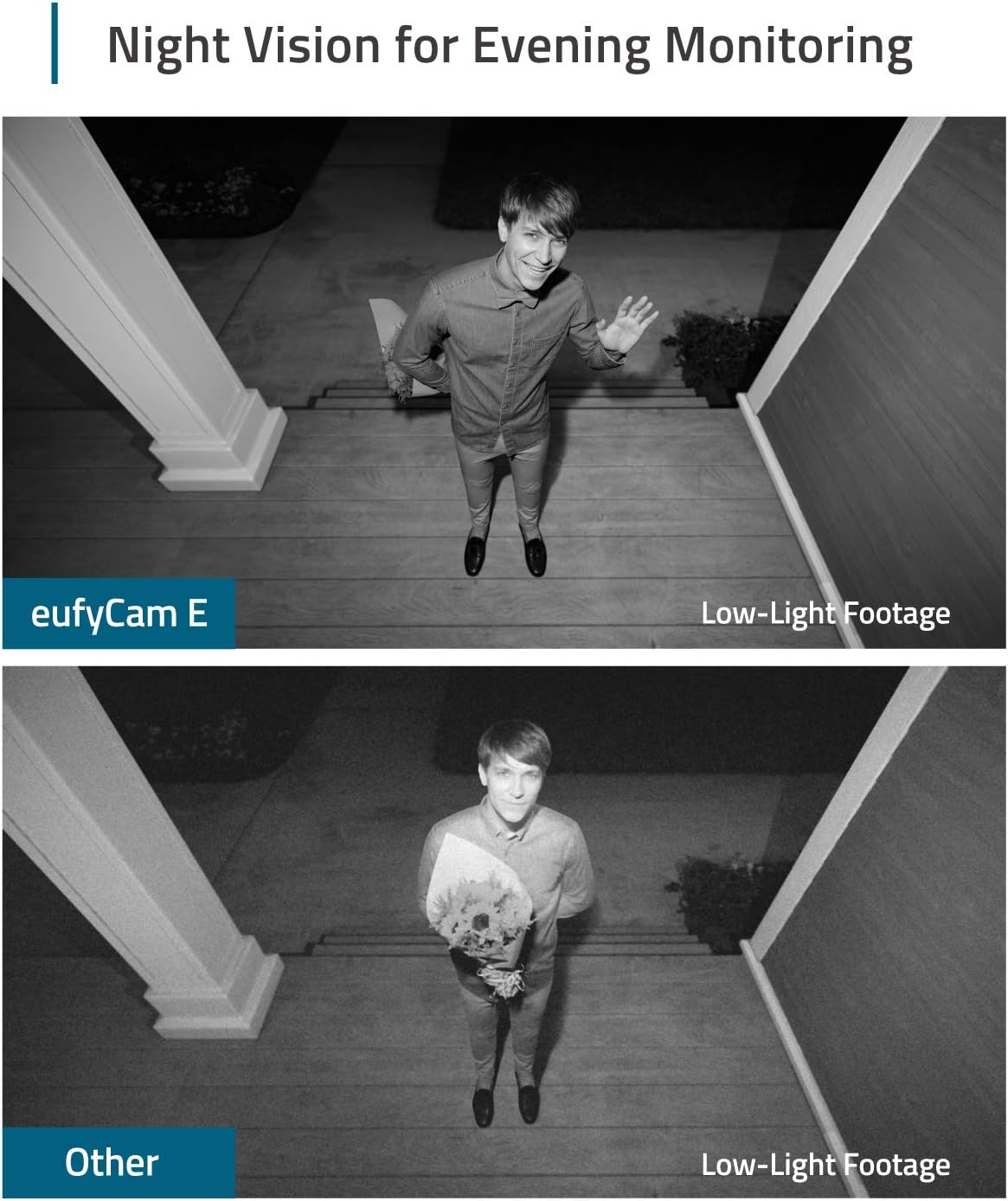
Image: A side-by-side comparison showing the clarity of eufyCam E's night vision footage against standard low-light footage from another camera.
4.3 Two-Way Audio
Utilize the built-in microphone and speaker to communicate with visitors or deter intruders directly through the eufy Security app.
4.4 Motion Detection
The camera features motion detection to alert you to activity. You can customize sensitivity settings and activity zones within the app to reduce false alarms.
4.5 Local Storage (No Monthly Fees)
The HomeBase includes a 16GB microSD card for local storage of recorded events, eliminating the need for monthly cloud storage fees. This provides up to one year of recordings (based on 30-second footage, 10 times per day per camera).

Image: The eufy HomeBase and a smartphone showing the eufy Security app interface, emphasizing the absence of monthly fees.
4.6 Compatibility
The eufyCam E is compatible with Amazon Alexa, allowing you to livestream footage on Echo Show, Echo Spot, and other Alexa-compatible display devices. It also supports RTSP for streaming videos to a Synology NAS with surveillance function.
Video: An official eufy Security video showcasing the features and benefits of the eufyCam E Wireless Security Camera System, including its 1-year battery life and 1080p resolution without monthly fees.
5. Maintenance
5.1 Battery Life and Charging
The eufyCam E boasts a 365-day battery life on a single charge (or 3 years in Standby Mode). When the battery is low, recharge the camera using the Micro USB Charging Cable connected to the HomeBase or a compatible USB power adapter.
5.2 Weatherproofing
The camera is IP65 weatherproof-rated, making it suitable for both indoor and outdoor use. This rating ensures protection against dust and low-pressure water jets.
6. Troubleshooting
- Motion Detection Range: Depending on height and angle, the sensor can detect objects moving as far as 25-30ft (8-10m) away. Adjust camera placement and sensitivity settings in the app for optimal performance.
- Router Compatibility: The eufyCam E requires the eufy HomeBase to function. It cannot be used with your own router directly for its primary operation.
- False Motion Alerts: Adjust the motion sensitivity and activity zones within the eufy Security app to minimize unwanted notifications from environmental factors like reflections or moving foliage.
- Connectivity Issues: Ensure the HomeBase is connected to your network via Ethernet or configured for Wi-Fi (2.4GHz only). Check the signal strength between the cameras and the HomeBase in the app.
7. Specifications
| Model Number | AK-T88021D4 |
| Video Capture Resolution | 1080p Full HD |
| Battery Life | 365 days (or 3 years in Standby Mode) |
| Weatherproof Rating | IP65 |
| Field Of View | 140 Degrees |
| Connectivity Technology | Wireless (Wi-Fi), Ethernet |
| Storage | 16GB microSD card (local storage) |
| Compatible Devices | Amazon Alexa |
| Item Dimensions (L x W x H) | 9 x 7 x 7 inches |
| Item Weight | 2.26 pounds |
8. Warranty and Support
For warranty information, technical support, or customer service inquiries, please refer to the official eufy Security website or contact their customer support channels. Details are typically provided on the Happy Card included in your product packaging.


