
Introduction
The Denon DHT-S316 is a home theater soundbar system designed to enhance your television's audio experience. It features a low-profile, wall-mountable soundbar with two-way speakers and a wireless subwoofer. This system incorporates Denon Virtual Surround technology, Dolby Digital, and DTS Decoding to deliver a realistic home theater sound. The Denon-proprietary Dialogue Enhancer ensures clear dialogue at any volume. Its slim design allows it to fit in most spaces without obstructing your TV's bottom edge or IR remote sensor. Connectivity options include HDMI with Audio Return Channel (ARC) and an Optical input, with included cables for easy setup. Bluetooth compatibility enables wireless music streaming from your devices.
Setup
1. Unboxing and Component Check
Carefully remove all components from the packaging. Ensure the following items are present:
- Soundbar (DHT-S316)
- Wireless Subwoofer
- Remote Control
- AAA Battery (2 included)
- HDMI Cable
- Optical Cable
- Wall Mount Template
- Wall Mount Spacers
- Power Cords (for soundbar and subwoofer)

Figure 1: Denon DHT-S316 Soundbar and Wireless Subwoofer. The soundbar is a long, slim black unit, and the subwoofer is a rectangular black box with a circular port on the front.

Figure 2: Close-up view of the Denon DHT-S316 wireless subwoofer, highlighting its compact design and front-firing port.
2. Placement
Place the soundbar directly below your TV. Its low-profile design (under 2 inches tall) ensures it will not block the TV screen or the IR remote sensor. The wireless subwoofer can be placed anywhere in the room, ideally in a location that provides optimal bass response without obstruction.
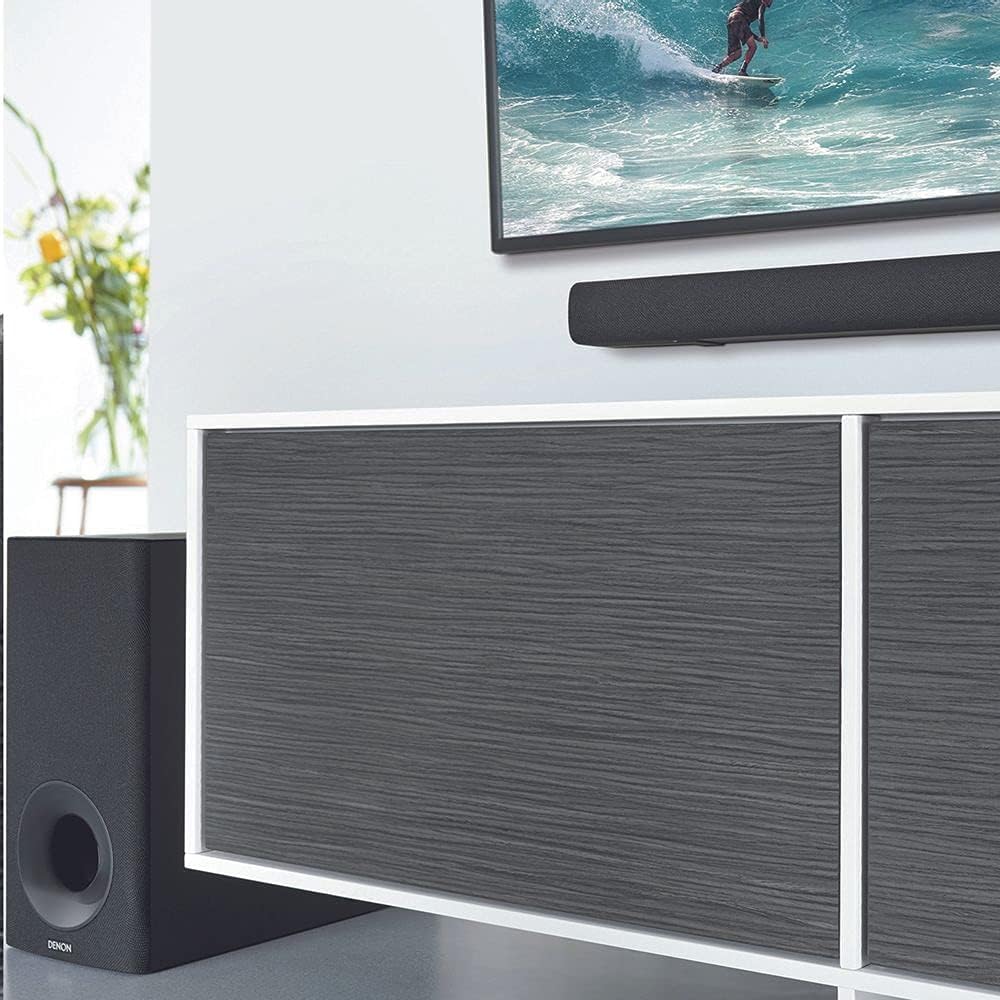
Figure 3: Example of the soundbar placed below a wall-mounted TV and the wireless subwoofer positioned next to a media console.
3. Connections
The DHT-S316 offers multiple connectivity options for your TV and other devices.
- HDMI ARC (Recommended): Connect the included HDMI cable from the HDMI ARC port on your TV to the HDMI ARC port on the soundbar. This allows audio from your TV to be sent to the soundbar and enables control of the soundbar via your TV's remote.
- Optical: If your TV does not have an HDMI ARC port, use the included optical cable to connect the TV's optical digital output to the soundbar's optical input.
- AUX: For connecting other audio devices, use a 3.5mm audio cable (not included) to the AUX input.

Figure 4: Close-up view of the soundbar's rear panel, showing the AUX, TV (OPTICAL), and TV (HDMI ARC) input ports.

Figure 5: Illustrates the HDMI with Audio Return Channel (ARC) feature, showing the HDMI ARC port on the soundbar and its connection to a TV.
4. Power Connection
Connect the provided power cords to the soundbar and the wireless subwoofer, then plug them into a wall outlet.
5. Wall-Mounting (Optional)
If you choose to wall-mount the soundbar, use the included wall mount template and spacers for proper installation. Ensure the mounting surface can support the weight of the soundbar.
Operating Instructions
1. Power On/Off
Press the Power button on the soundbar's top panel or the remote control to turn the system on or off. The soundbar will automatically power on when it detects an audio signal from the connected TV via HDMI ARC.
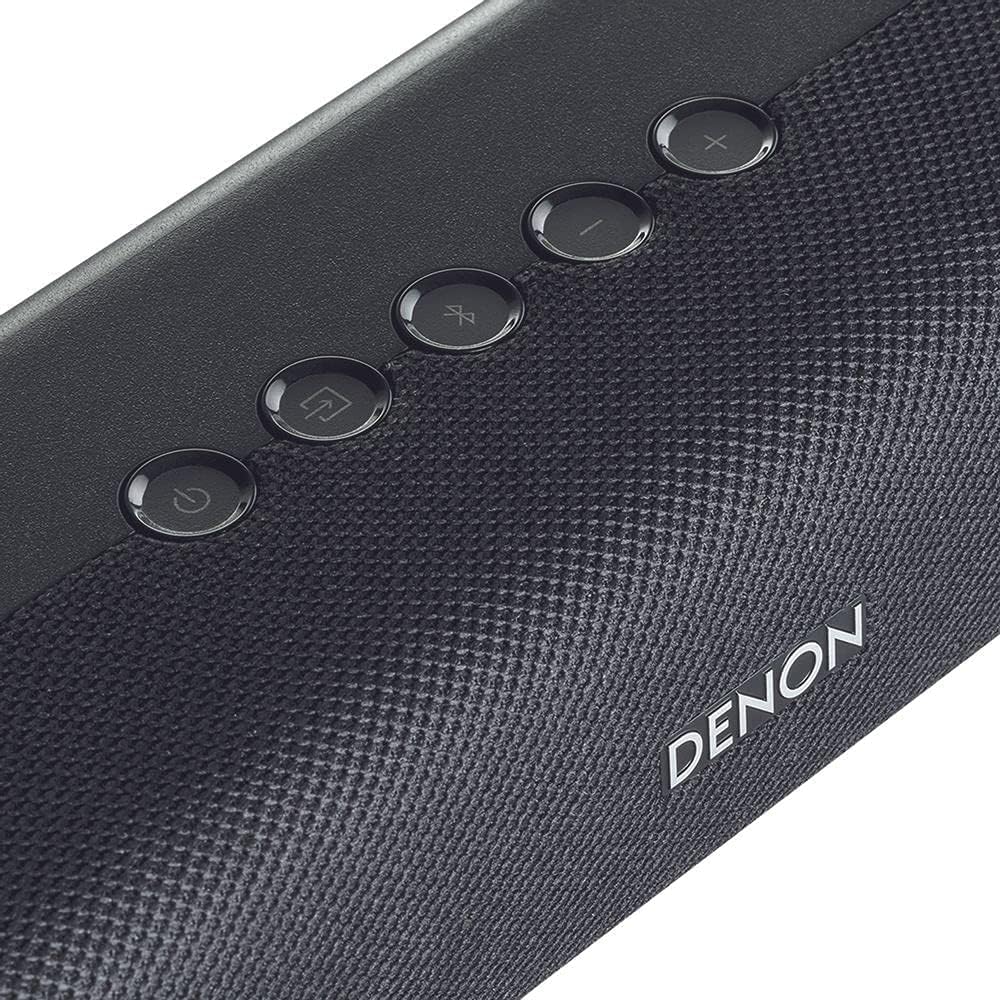
Figure 6: Close-up of the soundbar's top panel, showing the power, input, Bluetooth, and volume control buttons.
2. Input Selection
Press the Input button on the soundbar or remote to cycle through available audio sources: HDMI ARC, Optical, and AUX. The corresponding indicator light on the soundbar will illuminate.
3. Volume Control
Use the Volume Up (+) and Volume Down (-) buttons on the soundbar or remote to adjust the overall system volume. If connected via HDMI ARC, your TV remote may also control the soundbar's volume.
4. Bluetooth Pairing
To stream audio wirelessly, press the Bluetooth button on the soundbar's top panel or the remote control. The Bluetooth indicator will flash, indicating pairing mode. On your smartphone or tablet, search for "Denon DHT-S316" in the Bluetooth settings and select it to pair. Once paired, the indicator will glow solid.

Figure 7: Depicts the wireless music streaming capability, showing a close-up of the soundbar's controls with the Bluetooth logo, indicating easy pairing with smart devices.
5. Sound Modes and Enhancements
The DHT-S316 offers various sound modes to optimize your listening experience:
- Movie Mode: Enhances cinematic sound with virtual surround effects.
- Music Mode: Optimizes audio for music playback.
- Night Mode: Reduces dynamic range for late-night listening, ensuring clear dialogue while minimizing loud sounds.
- Dialogue Enhancer: Improves dialogue clarity without affecting overall volume. Press the Dialogue Enhancer button on the remote to activate or adjust levels.

Figure 8: Highlights the Dolby Digital and DTS Decoding capabilities, showing a soundbar and subwoofer setup in a living room with a TV displaying a dynamic scene, emphasizing immersive sound.

Figure 9: Illustrates the Denon Dialogue Enhancer feature, showing a person watching TV with the soundbar, emphasizing improved voice clarity.
Maintenance
To ensure the longevity and optimal performance of your Denon DHT-S316 system, follow these maintenance guidelines:
- Cleaning: Gently wipe the surfaces of the soundbar and subwoofer with a soft, dry cloth. Avoid using liquid cleaners, aerosols, or abrasive materials, as they may damage the finish.
- Ventilation: Ensure that the soundbar and subwoofer have adequate ventilation. Do not block any ventilation openings.
- Power: Disconnect the power cords from the wall outlet if the system will not be used for an extended period.
Troubleshooting
If you encounter issues with your DHT-S316, refer to the following common troubleshooting steps:
| Problem | Possible Cause | Solution |
|---|---|---|
| No Sound | Incorrect input selected; cables not connected properly; system muted or volume too low. | Verify correct input source. Check all cable connections (HDMI ARC, Optical). Ensure system is not muted and volume is increased. |
| Subwoofer Not Working | Subwoofer not powered on; wireless connection lost. | Ensure subwoofer is plugged in and powered on. Re-establish wireless connection if necessary (refer to manual for pairing steps). |
| Bluetooth Pairing Issues | Device too far; soundbar not in pairing mode; interference. | Ensure device is within 10 meters. Put soundbar into Bluetooth pairing mode. Move away from other wireless devices. |
| Remote Control Not Working | Batteries depleted; obstruction between remote and soundbar. | Replace AAA batteries. Ensure no objects are blocking the remote's line of sight to the soundbar. |
Specifications
| Feature | Detail |
|---|---|
| Model Name | DHT-S316 |
| Speaker Type | Soundbar with Wireless Subwoofer |
| Surround Sound Channel Configuration | 2.1 |
| Connectivity Technology | Wired (HDMI ARC, Optical, AUX), Wireless (Bluetooth) |
| Bluetooth Range | 10 Meters |
| Special Features | Bass Boost, Dolby Enabled, Dialogue Enhancer |
| Mounting Type | Wall Mount, Tabletop |
| Product Dimensions (Soundbar) | 38.19"W x 18.9"D x 9.84"H (Overall package dimensions, soundbar is slim-profile) |
| Item Weight | 11.02 pounds (5000 Grams) |
| Included Components | Remote, AAA Battery, HDMI Cable, Optical Cable, Wall Mount Template, Wall Mount Spacers, Power Cords |
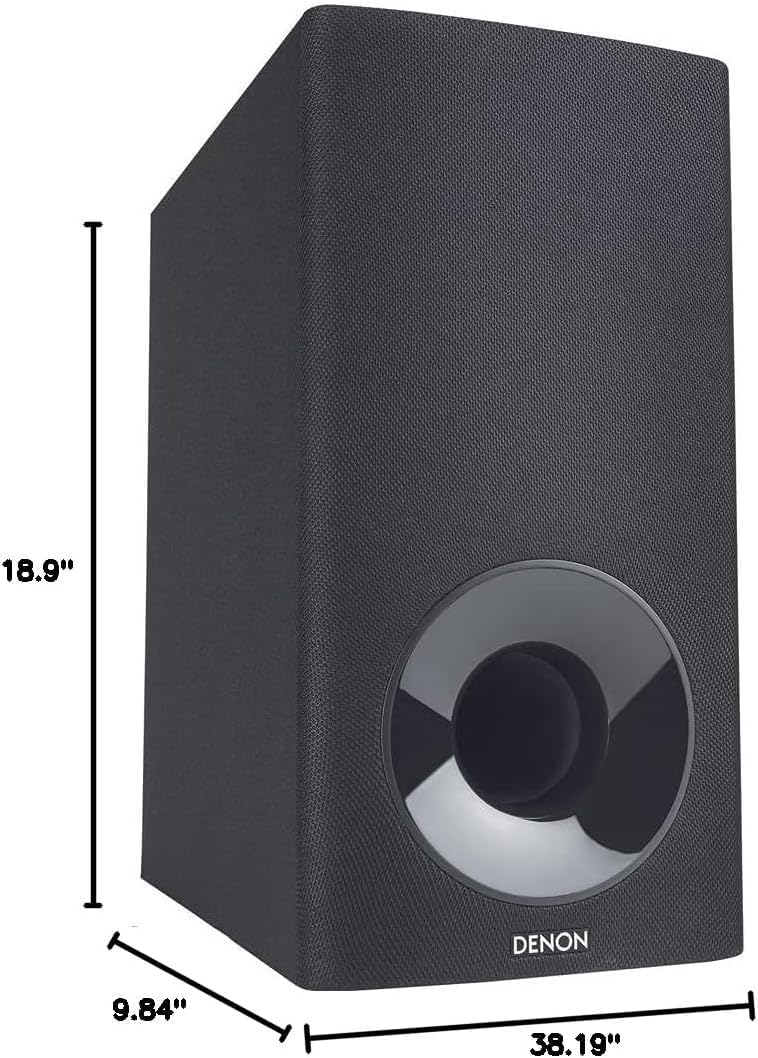
Figure 10: Visual representation of the product dimensions, showing the soundbar and subwoofer with their respective measurements.
Warranty Information
The Denon DHT-S316 Home Theater Soundbar System comes with a Full Warranty. For specific terms, conditions, and duration of the warranty, please refer to the warranty card included in your product packaging or visit the official Denon website.
Support
For further assistance, technical support, or service inquiries regarding your Denon DHT-S316, please contact Denon customer support through their official website or the contact information provided in your product documentation. You can also visit the official Denon Store on Amazon for additional resources and product information.
Official Denon Store: Denon Electronics US LLC


