

Product Overview
The TOSING 016 Karaoke Microphone is a versatile 2-in-1 device combining a high-quality microphone with a powerful 20W Bluetooth speaker system. Designed for adults, singers, vocal teachers, and enthusiasts, it offers a portable and integrated solution for karaoke, podcasting, and general audio playback. Its dual 58mm PA woofers deliver professional-grade bass and clear sound, suitable for both indoor and outdoor use.

Image: The TOSING 016 Karaoke Microphone, showcasing its gold and white design with integrated speakers.
Key Features:
- 20W 2.0CH Audio System: Integrated microphone and dual speakers for rich, stereo sound.
- Professional 58mm Dual Woofers: Delivers powerful bass and clear audio projection.
- Long-lasting Battery: Dual 2000mAh batteries (total 4000mAh) provide 5-10 hours of playback on a single charge.
- Versatile Connectivity: Supports Bluetooth 5.0, 3.5mm Aux in/out, and TF card playback.
- Wide Compatibility: Connects with Smart TVs, tablets, home audio systems, PCs, smartphones, and car audio.
- Portable Design: Handheld form factor with a secure silicone base for stability and protection.
Setup Guide
1. Unboxing and Initial Charge:
Carefully remove the microphone and included accessories (USB cable, warranty card) from the packaging. Before first use, fully charge the device using the provided USB cable. The battery indicator lights will show charging progress.

Image: Illustration of the 4000mAh built-in battery and its charge indicator.
2. Powering On/Off:
Press and hold the Power/Play/Pause button (usually indicated by a power symbol or play/pause icon) for a few seconds to turn the microphone on or off. A voice prompt will confirm the status.
3. Bluetooth Pairing:
- Ensure the microphone is powered on and in Bluetooth pairing mode (indicated by a flashing Bluetooth light or voice prompt).
- On your smartphone, tablet, or other Bluetooth-enabled device, navigate to the Bluetooth settings.
- Search for available devices and select "TOSING 016" (or similar name).
- Once connected, a voice prompt will confirm successful pairing.

Image: The TOSING 016 microphone connected via Bluetooth inside a car, demonstrating wireless audio streaming.
4. Understanding Controls and Ports:
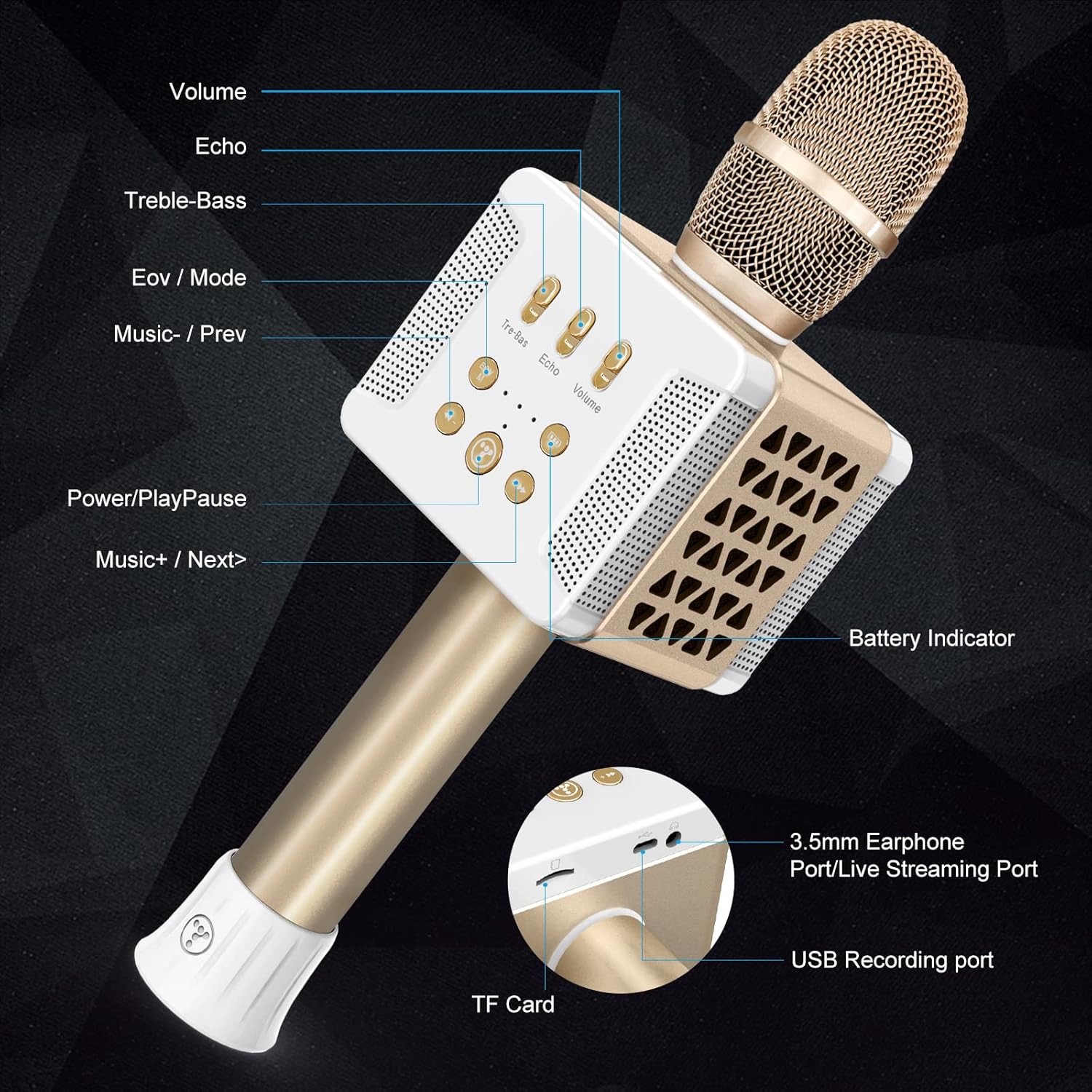
Image: A detailed diagram labeling the various buttons and ports on the TOSING 016 microphone, including Volume, Echo, Treble-Bass, EOV/Mode, Music-/Prev, Power/Play/Pause, Music+/Next, Battery Indicator, 3.5mm Earphone Port/Live Streaming Port, TF Card slot, and USB Recording Port.
- Volume: Adjusts the overall speaker output volume.
- Echo: Controls the echo effect on your voice.
- Treble-Bass: Adjusts the treble and bass levels of the audio output.
- EOV / Mode: Switches between different operating modes (e.g., Bluetooth, TF card) or vocal effects.
- Music - / Prev: Decreases music volume or skips to the previous track.
- Power / Play / Pause: Powers the device on/off, plays, or pauses music.
- Music + / Next: Increases music volume or skips to the next track.
- TF Card Slot: For inserting a TransFlash (microSD) card for direct music playback.
- 3.5mm Earphone Port / Live Streaming Port: For connecting headphones or outputting audio for live streaming.
- USB Recording Port: For connecting to a computer or other device for recording audio.
Operating Instructions
1. Karaoke Function:
Once connected via Bluetooth to your device, open your preferred karaoke app or music player. Play your chosen song and sing along into the microphone. Adjust the microphone volume, echo, treble, and bass controls on the microphone itself to achieve your desired vocal effect.

Image: A collage of individuals and groups using the TOSING 016 microphone for karaoke and singing activities.
2. TF Card Playback:
Insert a TF (microSD) card loaded with MP3 or other compatible audio files into the TF card slot. The microphone will automatically switch to TF card mode and begin playing music. Use the Music +/- and Prev/Next buttons to control playback.
3. Aux-in/Aux-out Connection:
Use a 3.5mm audio cable to connect the microphone to external audio sources (Aux-in) like a non-Bluetooth device, or to external speakers/headphones (Aux-out) for a different audio experience or live streaming.
4. Recording Function:
Connect the microphone to a computer or recording device via the USB Recording Port. Follow the instructions of your recording software to capture audio from the microphone.
5. Compatibility:
The TOSING 016 is designed for broad compatibility. It can be used with:
- Smartphones (iOS, Android)
- Tablets
- Personal Computers (PC)
- Smart TVs
- Home Audio Systems
- Car Audio Systems

Image: An illustration highlighting the TOSING 016's compatibility with various devices (Smartphones, Smart TV, Computers, Tablet, Car) and showcasing its secure silicone base designed for protection against wear, dust, and water.
Maintenance
1. Cleaning:
Wipe the microphone's exterior with a soft, dry cloth. Do not use abrasive cleaners or allow liquids to enter the microphone grille or ports. For the microphone head, a soft brush can be used to gently remove dust.
2. Battery Care:
- Avoid fully discharging the battery frequently.
- Charge the device regularly, even if not in use, to maintain battery health.
- Store the microphone in a cool, dry place when not in use for extended periods.
3. Storage:
Store the microphone in its original packaging or a protective case to prevent damage from drops or impacts. Keep it away from extreme temperatures and direct sunlight.
Troubleshooting
| Problem | Possible Cause | Solution |
|---|---|---|
| No power/Device won't turn on | Low battery; Power button not pressed correctly. | Charge the microphone fully. Press and hold the Power button for 3-5 seconds. |
| No sound from speakers | Volume too low; Device not connected; Incorrect mode. | Increase the microphone's volume. Ensure Bluetooth is connected or TF card is inserted correctly. Check the mode setting. |
| Microphone volume too low or no vocal output | Microphone volume setting; Echo/Treble-Bass settings; Distance from mouth. | Adjust the microphone's volume controls. Experiment with Echo/Treble-Bass. Speak closer to the microphone head. |
| Bluetooth connection issues | Microphone not in pairing mode; Device too far; Interference. | Ensure microphone is in pairing mode. Move devices closer. Turn off other Bluetooth devices. Try unpairing and re-pairing. |
| Sound quality is poor/distorted | Volume too high (clipping); Echo/Treble-Bass settings; Environmental factors. | Reduce the volume. Adjust Echo, Treble, and Bass settings. Ensure no obstructions near speakers. |
| TF card not recognized | Card inserted incorrectly; Incompatible format; Corrupted card. | Reinsert the TF card correctly. Ensure audio files are in a compatible format (e.g., MP3). Try a different TF card. |
Specifications
| Feature | Specification |
|---|---|
| Model Number | K068 |
| Audio Output Power | 20W (10W left channel + 10W right channel) |
| Speaker Size | Dual 58mm PA Woofers |
| Battery Capacity | 4000mAh (Dual 2000mAh Lithium Ion) |
| Playback Time | 5-10 hours (approx.) |
| Charging Time | 2-3 hours (approx.) |
| Connectivity Technology | Bluetooth 5.0, 3.5mm Aux in/out, TF Card |
| Microphone Form Factor | Handheld |
| Audio Sensitivity | 125 Decibels |
| Signal-to-Noise Ratio | 120 dB |
| Frequency Response | 10 KHz |
| Dimensions (L x W x H) | 10 x 3.5 x 3.5 inches |
| Item Weight | 0.88 Pounds (14.1 ounces) |
| Material | Acrylonitrile Butadiene Styrene (ABS) |
| Color | Gold |
| Included Components | Battery, USB Cable, Warranty Card |
Warranty and Support
TOSING provides quality assurance for its products. The TOSING 016 Karaoke Microphone comes with a 1-year warranty for free replacement in case of manufacturing defects or dissatisfaction. The product holds RoHS, UL, CE, SGS, and FCC certifications, ensuring compliance with international safety and quality standards.
For technical support, warranty claims, or further inquiries, please refer to the contact information provided on the warranty card included with your product or visit the official TOSING store online: TOSING Official Store.

