
1. Introduction
The VESSEL Electric Ball Grip Screwdriver 220USB-1 is a versatile tool designed for various tasks, from electrical work to equipment maintenance and DIY projects. It combines the convenience of an electric screwdriver with the reliability of a manual one, featuring a comfortable ball grip and a replaceable bit system. This manual provides essential information for safe and effective use, setup, operation, and maintenance of your screwdriver.
2. Key Features
- Dual Functionality: Operates as an electric screwdriver for quick fastening and as a manual screwdriver for final tightening or loosening.
- Ergonomic Ball Grip: Designed for comfortable handling and reduced fatigue during extended use.
- USB Rechargeable: Easy charging via a Micro USB-Type B port.
- LED Light: Integrated LED for improved visibility in dimly lit areas.
- Replaceable Bits: Compatible with 6.35 mm hex bits, allowing for versatility across different screw types.
- Battery Indicator: Includes a lamp to show battery charging status.
3. Included Components
- VESSEL Electric Ball Grip Screwdriver Unit
- 1 x (+) 2 x 100 mm Bit
- USB Charging Cable (3.3 ft / 1 m)
- Instruction Manual
4. Setup
4.1. Charging the Battery
The screwdriver is powered by a Li-Ion 3.6 V, 800 mAh battery. Before first use, fully charge the battery.
- Locate the protective cap covering the charging port on the screwdriver. Remove the cap.
- Connect the supplied USB charging cable to the screwdriver's Micro USB-Type B port.
- Connect the other end of the USB cable to a compatible USB power source (e.g., computer USB port, USB wall adapter 5V-1A).
- The battery charging lamp will illuminate during charging. A full charge takes approximately 60 minutes.
- Once fully charged, disconnect the cable and replace the protective cap.
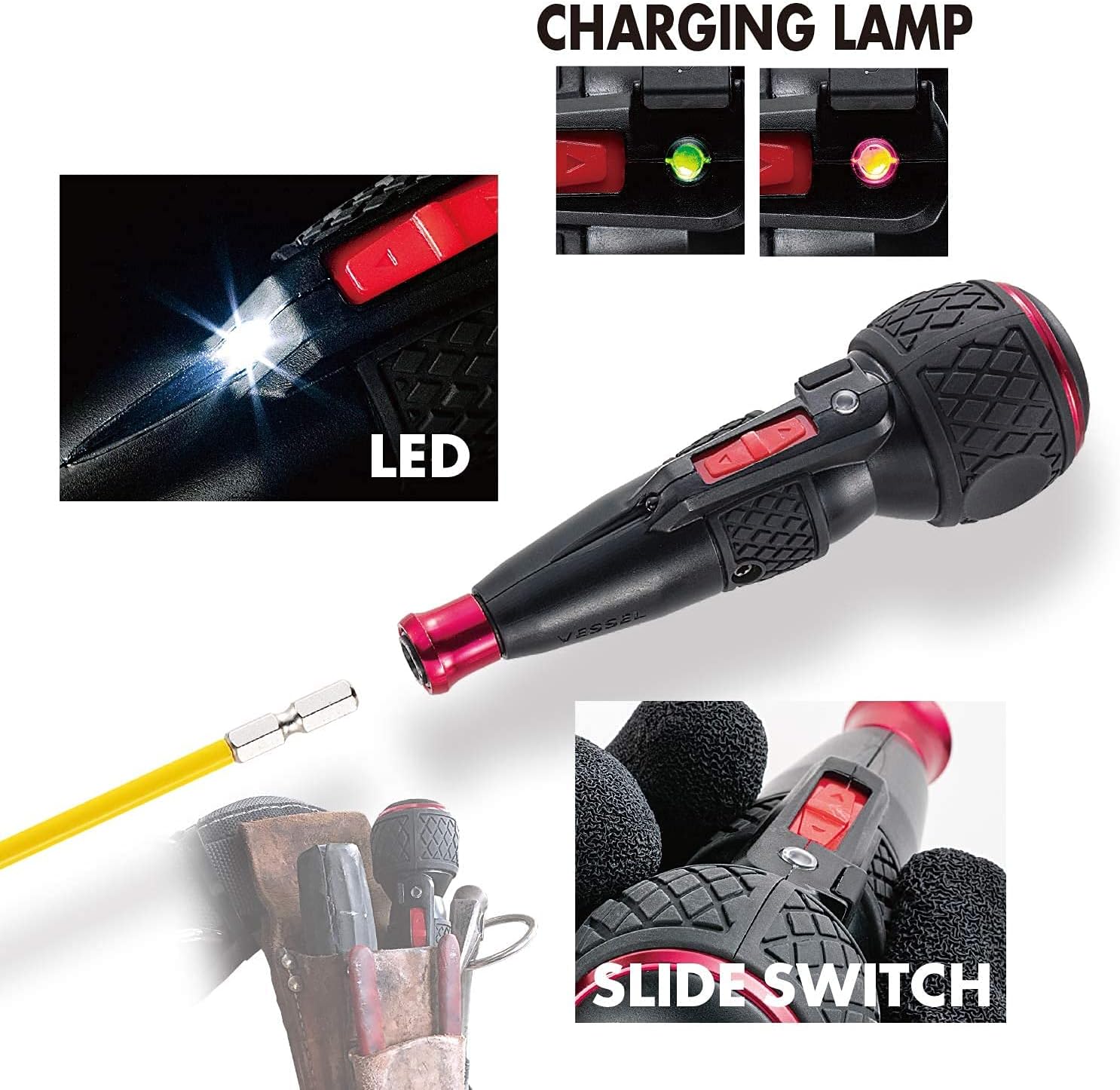
Figure 1: LED light and charging lamp location.
4.2. Installing a Bit
The screwdriver uses 6.35 mm hex bits.
- Pull the aluminum sleeve chuck forward.
- Insert the desired bit into the chuck.
- Release the sleeve chuck to secure the bit in place. Ensure the bit is firmly seated before operation.

Figure 2: Bit installation diagram from packaging.
5. Operation
5.1. Electric Mode
To use the screwdriver in electric mode:
- Select the appropriate bit and install it securely.
- Position the screwdriver bit onto the screw head.
- Push the slide switch forward for tightening (clockwise rotation) or backward for loosening (counter-clockwise rotation).
- The screwdriver will operate electrically. Release the switch to stop.

Figure 3: Screwdriver in use for electrical tasks.
5.2. Manual Mode
For initial screw starting, final tightening, or when the electric torque is insufficient (up to 10 Nm endurance torque), use the manual mode.
- With the bit engaged in the screw, simply turn the screwdriver handle manually. The motor will disengage, allowing for manual torque application.
- Caution: Avoid excessive manual tightening or loosening beyond the specified 10 Nm endurance torque, as this may lead to tool damage.

Figure 4: Screwdriver used for overhead fastening.
5.3. LED Light
The integrated LED light activates automatically when the screwdriver is in operation, illuminating the work area.
6. Maintenance
6.1. Battery Care
- Charge the battery regularly, even if not in frequent use, to maintain battery health.
- Avoid completely draining the battery before recharging.
- Store the screwdriver in a cool, dry place when not in use.
6.2. Cleaning
- Wipe the screwdriver body with a soft, dry cloth.
- Do not use harsh chemicals or abrasive cleaners.
- Keep the bit chuck free from debris.
6.3. Bit Care
- Ensure bits are clean and free from rust or damage.
- Replace worn or damaged bits to prevent cam-out and damage to screw heads.
7. Troubleshooting
| Problem | Possible Cause | Solution |
|---|---|---|
| Screwdriver does not operate electrically. | Battery is discharged. | Charge the battery fully. |
| Screwdriver lacks power. | Low battery charge. | Recharge the battery. |
| Bit slips from screw head (cam-out). | Incorrect bit size or worn bit. | Use the correct bit size for the screw. Replace worn bits. |
| Bit is difficult to insert/remove. | Debris in chuck or damaged chuck. | Clean the chuck. If problem persists, contact support. |
8. Specifications
| Feature | Specification |
|---|---|
| Model Number | 220USB-1 |
| Grip Length | 140 mm (5.5 inches) |
| Grip Diameter | 45 mm (1.8 inches) |
| Item Weight | 160 g (5.6 oz) |
| Sleeve Size | 6.35 mm (0.2 inches) Aluminum sleeve chuck |
| Battery Capacity | Li-Ion 3.6 V, 800 mAh |
| No-load Rotation Speed | 280 min-1 |
| Electric Torque (Max) | 2 Nm (2.6 lb/m) |
| Manual Endurance Torque | 10 Nm |
| Charging Time | Approx. 60 min |
| Number of Charges | Approx. 500 times |
| Continuous Usage Time (no load) | Approx. 40 minutes |
| Charging Method | Micro USB-Type B USB charging |
| Number of Screw Fastening Times | Approx. 200 (M4 x 20mm) |
| Compatible Screws | Up to M6 (+3 does not support M8) |
| Material | Metal |
| Color | Black |
| Country of Origin | Japan |

Figure 5: Product dimensions.
9. Warranty and Support
9.1. Warranty Information
This product comes with a warranty valid for 6 months from the purchase date. Please retain your receipt or proof of purchase for warranty claims. The warranty is valid only in Japan.
9.2. Product Support
For additional information, product registration, or support, please visit the official VESSEL website:
10. Additional Resources
10.1. Product Video
Video 1: VESSEL Impact Ball, Dual Absorbing function. This video demonstrates the shock-absorbing technology in VESSEL bits, which can be used with this screwdriver.
