
1. Introduction
The Retekess T129 Wireless Tour Guide System is designed for effective communication in various settings such as guided tours, simultaneous interpretation, factory visits, and teaching. This system ensures clear audio transmission from a single speaker (transmitter) to multiple listeners (receivers), enhancing the overall experience for participants.
This manual provides detailed instructions for the proper setup, operation, and maintenance of your T129 system. Please read it thoroughly before use to ensure optimal performance and longevity of the product.
2. Package Contents
Upon opening your Retekess T129 Wireless Tour Guide System package, please verify that all the following items are included:
- 1 x T129 Transmitter
- 9 x T129 Receiver
- 1 x Headset Microphone
- 9 x Earphones
- 1 x English User Manual
- 10 x Lanyards

Image: All components included in the Retekess T129 Wireless Tour Guide System package.
3. Product Overview
3.1. T129 Transmitter
The transmitter is the central unit used by the speaker to broadcast audio. It features a clear display, channel selection, and volume controls.

Image: Front view of the T129 Transmitter.
- Display: Shows the current channel number.
- Antenna: For wireless signal transmission.
- DC IN Port: For external power or charging.
- ON/OFF Switch: Powers the unit on or off.
- VOL+/VOL- Buttons: Adjusts the microphone input volume.
- CH+ Button: Changes the transmission channel.
- 3.5mm Input Jack: Connects to the headset microphone or other audio sources.

Image: Battery compartment of the T129 Transmitter.

Image: 3.5mm input jack for connecting external audio sources to the transmitter.
3.2. T129 Receiver
The receivers are carried by the listeners to hear the audio transmitted from the speaker. Each receiver has an earphone jack and volume controls.

Image: Front view of the T129 Receiver with earphone.
- Display: Shows the current channel number.
- Antenna: For wireless signal reception.
- Earphone Jack: Connects to the provided earphone.
- Volume Control: Adjusts the listening volume.
- ON/OFF Switch: Powers the unit on or off.
- CH+ Button: Changes the reception channel.
3.3. Headset Microphone
The headset microphone provides clear audio input for the transmitter. It features a flexible design for comfortable wear.

Image: Details of the Headset Microphone.
- Flexible Gooseneck Design: Allows for easy adjustment of microphone position.
- High Sensitivity Mic Head: Captures clear voice audio.
- 3.5mm Connector: Plugs into the transmitter's input jack.
3.4. Earphones
The earphones are designed for comfortable listening with the receivers.
4. Setup
Follow these steps to set up your Retekess T129 Wireless Tour Guide System:
- Install Batteries:
- Open the battery compartment on both the transmitter and each receiver.
- Insert two AA batteries into each unit, ensuring correct polarity (+/-).
- Close the battery compartments securely.
- Connect Microphone to Transmitter:
- Plug the 3.5mm connector of the headset microphone into the 'INPUT' jack on the transmitter.
- Connect Earphones to Receivers:
- Plug the earphone into the earphone jack on each receiver.
- Power On Units:
- Slide the 'ON/OFF' switch on the transmitter to the 'ON' position. The display will light up.
- Slide the 'ON/OFF' switch on each receiver to the 'ON' position. Their displays will also light up.
- Select and Synchronize Channels:
- On the transmitter, press the 'CH+' button to select your desired transmission channel. The channel number will be displayed.
- On each receiver, press the 'CH+' button until the displayed channel number matches the transmitter's channel. This synchronizes the units.
5. Operating Instructions
5.1. Using the Transmitter
- Ensure the headset microphone is properly connected and positioned near your mouth for clear audio capture.
- Adjust the microphone input volume using the 'VOL+' and 'VOL-' buttons on the transmitter. Speak into the microphone to test the audio level.
- Confirm that the transmitter and all receivers are set to the same channel.
- Speak clearly into the microphone. The audio will be broadcast to all synchronized receivers.
5.2. Using the Receivers
- Ensure earphones are properly connected and worn comfortably.
- Adjust the listening volume on each receiver using its volume control buttons to a comfortable level.
- Confirm that the receiver is set to the same channel as the transmitter.
- Listen to the transmitted audio.
5.3. Application Scenarios
The Retekess T129 system is versatile and suitable for various environments:

Image: Examples of T129 system usage in different settings.
- Guided Tours: For museums, historical sites, or city tours.
- Factory Visits: Allows visitors to hear guides clearly in noisy industrial environments.
- Simultaneous Interpretation: Facilitates multi-language communication in conferences or church services.
- Teaching & Training: Ideal for classrooms, lectures, or outdoor training sessions.
- Assistive Listening: Provides clear audio for individuals with hearing impairments.

Image: Example of a multi-language translation setup using the T129 system.
5.4. Audio Mute Function & Noise Elimination
The T129 transmitter incorporates an audio mute function and noise elimination technology to ensure clear sound transmission, reducing background interference for listeners.

Image: Visual representation of noise reduction capability.
6. Maintenance
Proper maintenance ensures the longevity and optimal performance of your T129 system:
- Cleaning: Use a soft, dry cloth to clean the exterior of the transmitter and receivers. Do not use liquid cleaners or solvents.
- Battery Care: Remove batteries from units if they will not be used for an extended period to prevent leakage. Use high-quality AA batteries.
- Storage: Store the system in a cool, dry place away from direct sunlight and extreme temperatures.
- Handling: Avoid dropping or subjecting the units to strong impacts.
7. Troubleshooting
If you encounter issues with your T129 system, refer to the following common problems and solutions:
| Problem | Possible Cause | Solution |
|---|---|---|
| No sound from receiver |
|
|
| Poor sound quality / Static |
|
|
| Transmitter not powering on |
|
|
If the problem persists after trying these solutions, please contact customer support.
8. Specifications
Key technical specifications for the Retekess T129 Wireless Tour Guide System:
- Model Number: FF9421A-F9422AX8
- Item Weight: 3.31 pounds (total package)
- Product Dimensions: 5.91 x 5.91 x 3.94 inches (package)
- Transmitter Dimensions: Approximately 118mm (4.6in) x 48mm (1.9in) x 135mm (5.3in)
- Power Source: AA Batteries (not included)
- Frequency Band: 2.4GHz (Digital Wireless)
- Channels: Multiple selectable channels
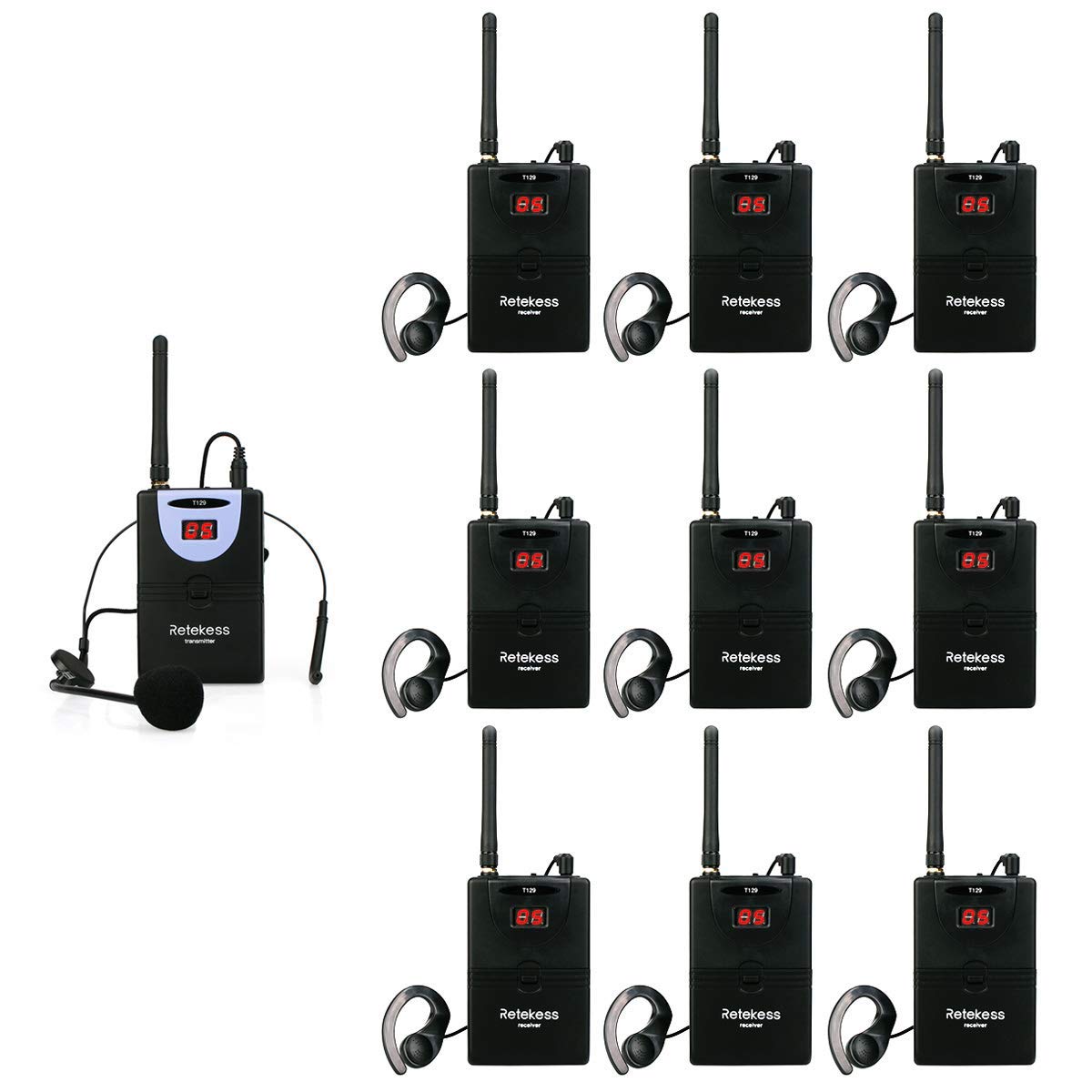
Image: T129 Transmitter dimensions and wearing options.

Image: Detailed dimensions of the T129 Transmitter.
9. Warranty & Support
Retekess products are manufactured to high-quality standards. For specific warranty information, please refer to the warranty card included with your product or visit the official Retekess website. If you require technical assistance or have questions not covered in this manual, please contact Retekess customer support through their official channels.
No official product videos from the seller are available for embedding at this time.


