
IBELL CROWN200Y
IBELL CROWN200Y 2200W Induction Cooktop User Manual
Model: CROWN200Y
1. Introduction
Thank you for choosing the IBELL CROWN200Y 2200W Induction Cooktop. This manual provides essential information for the safe and efficient operation, maintenance, and troubleshooting of your appliance. Please read it thoroughly before first use and keep it for future reference.
2. Important Safety Instructions
WARNING: To reduce the risk of fire, electric shock, injury to persons, or damage to the appliance, observe the following safety precautions:
- Read all instructions before using the appliance.
- Do not touch hot surfaces. Use handles or knobs.
- To protect against electric shock, do not immerse cord, plugs, or the appliance in water or other liquid.
- Close supervision is necessary when any appliance is used by or near children.
- Unplug from outlet when not in use and before cleaning. Allow to cool before putting on or taking off parts.
- Do not operate any appliance with a damaged cord or plug, or after the appliance malfunctions or has been damaged in any manner. Contact customer service for examination, repair, or adjustment.
- The use of accessory attachments not recommended by the appliance manufacturer may cause injuries.
- Do not use outdoors.
- Do not let cord hang over edge of table or counter, or touch hot surfaces.
- Do not place on or near a hot gas or electric burner, or in a heated oven.
- Extreme caution must be used when moving an appliance containing hot oil or other hot liquids.
- Always attach plug to appliance first, then plug cord into the wall outlet. To disconnect, turn any control to "off", then remove plug from wall outlet.
- Do not use appliance for other than intended use.
- Ensure adequate ventilation around the cooktop during operation.
- Only use induction-compatible cookware.
- Do not place metallic objects such as knives, forks, spoons, lids, cans, or aluminum foil on the cooktop surface as they can become hot.
- Individuals with pacemakers or similar medical devices should consult their physician before using an induction cooktop.
3. Product Overview
The IBELL CROWN200Y Induction Cooktop features a sleek crystal glass top and intuitive touch controls for efficient cooking.
3.1 Components and Controls
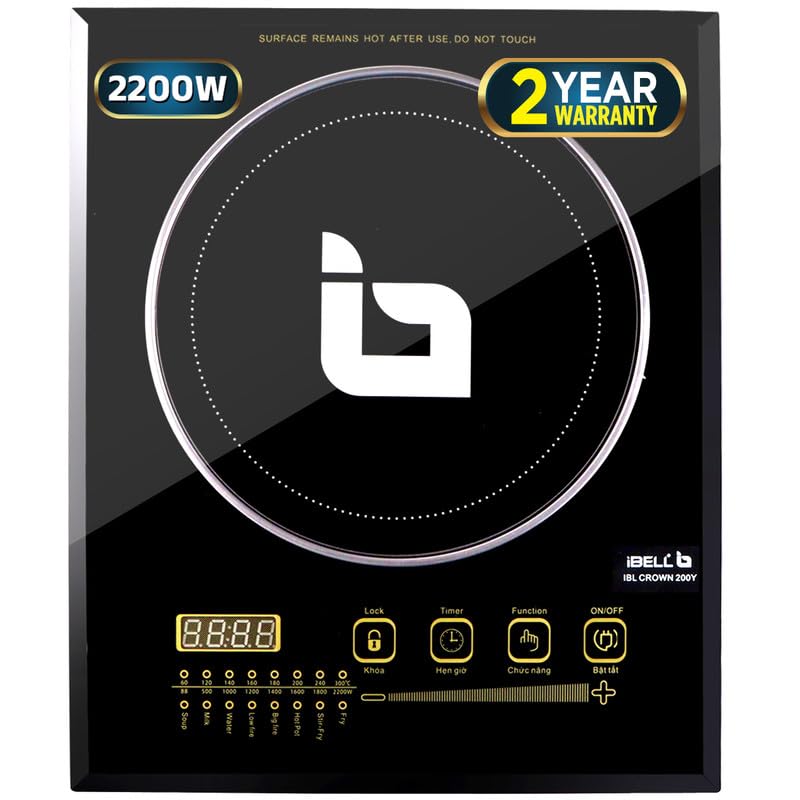
Image 1: Front view of the IBELL CROWN200Y Induction Cooktop, showing the main cooking zone, LED display, and touch control panel.

Image 2: Detailed view of the control panel, highlighting the LED display, Lock, Timer, Function, and On/Off buttons, along with power level indicators and preset cooking modes.
- Crystal Glass Top: Durable and easy-to-clean cooking surface.
- LED Display: Shows power level, temperature, and timer settings.
- Touch Button Controls: Responsive controls for various functions.
- On/Off Button: Powers the cooktop on or off.
- Function Button: Selects from 8 preset cooking modes (e.g., Soup, Milk, Water, Congee, Big Fire, Stir-fry, Hot Pot, Fry).
- Power/Temperature Adjustment: Use '+' and '-' buttons to increase or decrease power/temperature.
- Timer Button: Sets the cooking timer.
- Lock Button: Prevents accidental changes to settings during operation.
4. Setup
- Unpacking: Carefully remove the cooktop from its packaging. Retain packaging materials for future transport or storage.
- Placement: Place the induction cooktop on a flat, stable, and heat-resistant surface. Ensure there is adequate ventilation around the appliance (at least 10-15 cm clearance from walls or other objects) to prevent overheating. Do not block the air vents located on the bottom or sides.
- Power Connection: Plug the power cord into a grounded electrical outlet. Ensure the voltage and frequency of your power supply match the specifications of the cooktop (220V, 50Hz).
- Initial Cleaning: Before first use, wipe the glass surface with a soft, damp cloth.
5. Operating Instructions
5.1 Compatible Cookware
The IBELL CROWN200Y Induction Cooktop requires induction-compatible cookware. Look for cookware with a flat bottom and made of magnetic materials such as cast iron, enameled iron, or stainless steel with a magnetic base. Cookware with a diameter between 12 cm and 26 cm is recommended.
Note:
- Non-magnetic materials like glass, ceramic, aluminum, or copper will not work unless they have an induction-compatible base.
- Cookware with uneven or rounded bottoms will not heat efficiently.
5.2 Basic Operation
- Place induction-compatible cookware containing food or liquid on the center of the cooktop's cooking zone.
- Plug the cooktop into a power outlet. The display will show "----" or similar standby indicator.
- Press the On/Off button to turn on the cooktop. The display will illuminate.
- Select a cooking mode by pressing the Function button repeatedly until the desired mode is selected, or use the '+' and '-' buttons to adjust the power level manually.
- To adjust power/temperature, press the + or - buttons. The display will show the current power level or temperature.
- To set a timer, press the Timer button, then use the + or - buttons to set the desired cooking time. The timer will count down, and the cooktop will automatically shut off when the time expires.
- To activate the child lock, press the Lock button. This will prevent accidental changes to settings. Press it again to unlock.
- After cooking, press the On/Off button to turn off the cooktop. The fan may continue to run for a short period to cool down internal components.
6. Care and Maintenance
Proper care and maintenance will ensure the longevity and optimal performance of your induction cooktop.
- Cleaning the Glass Surface:
- Always ensure the cooktop is unplugged and completely cool before cleaning.
- Wipe the crystal glass surface with a soft, damp cloth and mild detergent.
- For stubborn stains, use a non-abrasive ceramic cooktop cleaner.
- Do not use abrasive pads, harsh chemicals, or steel wool, as these can scratch or damage the surface.
- Cleaning the Body: Wipe the exterior body with a soft, damp cloth. Do not immerse the cooktop in water.
- Air Vents: Periodically check and clean the air vents to ensure proper airflow and prevent overheating. Use a soft brush or vacuum cleaner to remove dust.
- Storage: If storing the cooktop for an extended period, ensure it is clean and dry. Store it in its original packaging or a protective cover in a cool, dry place.
7. Troubleshooting
If you encounter issues with your IBELL CROWN200Y Induction Cooktop, refer to the following table for common problems and solutions.
| Problem | Possible Cause | Solution |
|---|---|---|
| Cooktop does not turn on. |
|
|
| Cooktop turns on but does not heat. |
|
|
| Display shows an error code (e.g., E0, E1, E2). |
|
|
| Fan continues to run after turning off. | Normal operation. | This is normal. The fan will continue to cool internal components until a safe temperature is reached, then it will automatically shut off. |
If the problem persists after attempting these solutions, please contact IBELL customer support.
8. Specifications
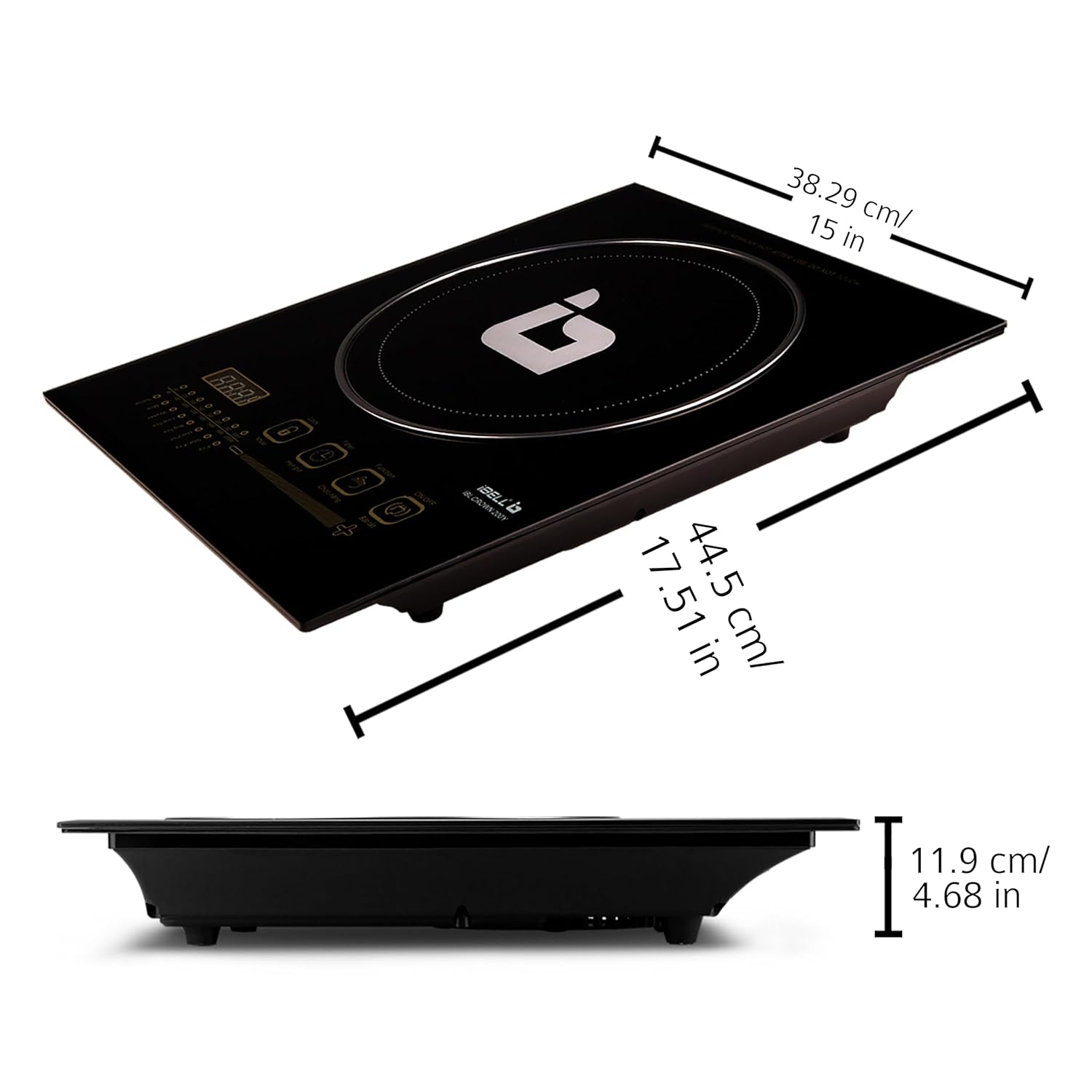
Image 3: Dimensions of the IBELL CROWN200Y Induction Cooktop, showing length, width, and height measurements.
| Brand: | IBELL |
| Model: | CROWN200Y |
| Power Output: | 2200 Watts |
| Voltage: | 220 Volts |
| Control Type: | Touch Button |
| Number of Heating Elements: | 1 |
| Material: | Crystal Glass |
| Item Dimensions (LxWxH): | 44.5 x 38.29 x 11.9 Centimeters (approx. 17.51 x 15 x 4.68 inches) |
| Item Weight: | 3 kg 500 g |
| Special Features: | Auto Shut-Off, Overheat Protection, 8 Cooking Modes |
9. Warranty and Support
IBELL provides comprehensive warranty and support for your CROWN200Y Induction Cooktop.
- Warranty Period: The product comes with a 1-year standard warranty. An additional 1-year warranty can be availed upon free registration.
- Warranty Registration: To avail the additional warranty, registration must be completed within 30 days from the date of purchase/delivery.
- Customer Support: For any warranty claims, technical assistance, or product-related inquiries, please contact IBELL customer service.
IBELL Customer Service:
- Phone: 1800-2020-260
- Email: connect@ibellstore.com
Please have your purchase details and product model number (CROWN200Y) ready when contacting support.
Related documentsCROWN200Y


Ask a question about this manual
Ask about setup, troubleshooting, compatibility, parts, safety, or missing instructions. Manuals+ will review the question and use this page’s manual context to help answer it.