
1. Introduction
This manual provides comprehensive instructions for the operation, maintenance, and troubleshooting of your Goolsky Wltoys XK 12429 RC Car Crawler. This 1:12 scale, 4WD electric off-road vehicle is designed for high-speed performance and excellent climbing capabilities. Please read this manual thoroughly before operating the vehicle to ensure safe and optimal performance.
Safety Information: This product contains small parts and is not suitable for children under 14 years of age due to choking hazard. Adult supervision is recommended during operation.
2. Package Contents
Verify that all items listed below are included in your package. If any items are missing or damaged, please contact customer support.
- 1 x Goolsky Wltoys XK 12429 RC Car Crawler
- 1 x Remote Controller
- 1 x 7.4V 1500mAh LiPo Battery
- 1 x USB Charger
- 1 x Tool (likely a wrench or screwdriver)
- 1 x English Manual

Figure 2.1: Included components of the Goolsky Wltoys XK 12429 RC Car package.
3. Specifications
Detailed technical specifications for the Goolsky Wltoys XK 12429 RC Car Crawler.
| Feature | Specification |
|---|---|
| Model | 12429 |
| Scale | 1:12 |
| Color | White |
| Material | PA Plastic |
| Frequency | 2.4GHz |
| Remote Distance | Approx. 100 meters |
| Charging Time | 2 hours |
| Working Time | 15 minutes |
| Speed | 40km/H |
| Driver System | Four-wheel drive (4WD) |
| Motor | 540 Brush Motor |
| Car Battery | 7.4V 1500mAh Li-Ion battery |
| Remote Control Battery | 4 * AA battery (not included) |
| Wheel Diameter | 110mm |
| Product Dimensions | 38.5 * 26 * 20.5 cm (approx. 15.16 x 10.24 x 8.07 inches) |
| Item Weight | Approx. 6 pounds (2.72 kg) |
| Recommended Age | 14 years and up |
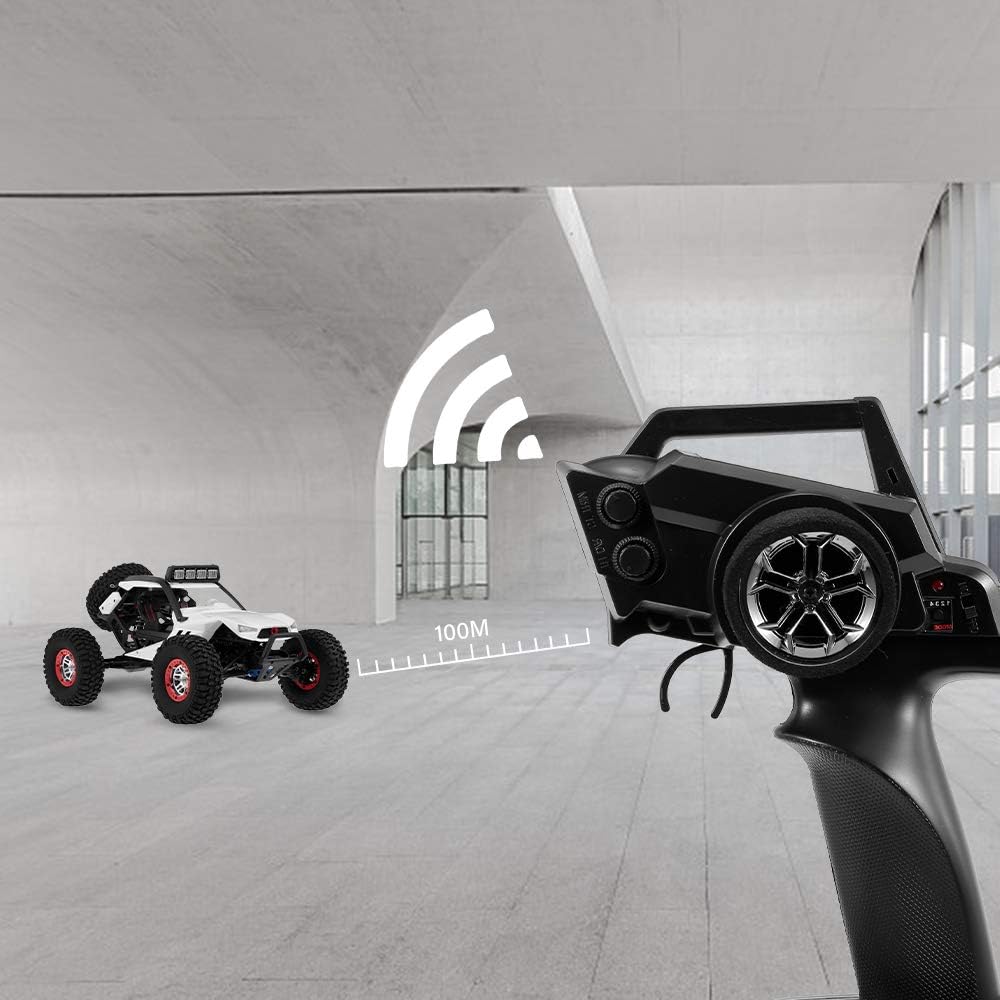
Figure 3.1: Key features and specifications of the RC Car.
4. Setup
4.1 Charging the Car Battery
- Connect the 7.4V 1500mAh Li-Ion battery to the provided USB charger.
- Plug the USB charger into a compatible USB power source (e.g., computer USB port, USB wall adapter).
- The charging indicator light on the charger will illuminate (color may vary) during charging.
- Charging typically takes approximately 2 hours. The indicator light will change or turn off when charging is complete.
- Disconnect the battery from the charger once fully charged. Do not overcharge the battery.
4.2 Installing Batteries in the Remote Controller
- Locate the battery compartment on the back of the remote controller.
- Open the battery compartment cover.
- Insert 4 AA batteries (not included) into the compartment, ensuring correct polarity (+/-).
- Close the battery compartment cover securely.
4.3 Installing the Car Battery
- Locate the battery compartment on the RC car. This is typically on the underside or within the chassis, accessible by removing a cover or clips.
- Carefully insert the charged 7.4V 1500mAh Li-Ion battery into the compartment.
- Connect the battery connector to the car's power connector, ensuring a secure fit.
- Close the battery compartment cover or secure the clips.
5. Operating Instructions
5.1 Powering On and Pairing
- Ensure both the RC car and the remote controller have charged batteries installed.
- Turn on the RC car by sliding its power switch to the "ON" position. The car's indicator light will flash.
- Turn on the remote controller by sliding its power switch to the "ON" position.
- The remote controller and car will automatically pair. The indicator lights on both devices will become solid when pairing is successful.
- If pairing fails, turn off both devices and repeat the process.
5.2 Basic Controls

Figure 5.1: Remote controller for the RC Car.
- Throttle Trigger:
- Pull the trigger towards you to move the car forward.
- Push the trigger away from you to move the car backward (reverse).
- Steering Wheel:
- Turn the wheel left to steer the car left.
- Turn the wheel right to steer the car right.
- Steering Trim Dial: Adjust this dial if the car does not drive straight when the steering wheel is centered.
- Throttle Trim Dial: Adjust this dial if the car moves forward or backward without throttle input.
- Headlights: The car is equipped with bright headlights for visibility, especially in low-light conditions. These typically activate automatically when the car is powered on.
5.3 Driving Tips
- Operate the RC car on flat, open surfaces initially to familiarize yourself with the controls.
- The 4WD system and high chassis allow for excellent performance on various terrains, including sand, grass, and wet mud.
- The car has a high speed of 40km/H. Exercise caution, especially in confined spaces or near obstacles.
- The vehicle is designed as a crawler, capable of climbing slopes up to 45 degrees.

Figure 5.2: The RC Car demonstrating its climbing ability on a 45-degree incline.

Figure 5.3: The RC Car performing on sandy terrain.

Figure 5.4: The RC Car's design for climbing performance, featuring large wheels and a high chassis.
6. Maintenance
Regular maintenance will extend the lifespan and performance of your RC car.
- Cleaning: After each use, especially in dirty or wet conditions, clean the car to remove dirt, dust, and debris. Use a soft brush or cloth. Avoid using water directly on electronic components.
- Battery Care:
- Always fully charge the Li-Ion battery before use.
- Do not overcharge or completely discharge the battery.
- Store the battery in a cool, dry place away from direct sunlight and extreme temperatures.
- If storing for extended periods, charge the battery to approximately 50% capacity.
- Motor and Gears: Periodically inspect the motor and gears for any signs of wear or obstruction. Keep them free of debris.
- Suspension and Wheels: Check the suspension components and wheels for damage or loose connections. Ensure the wheels spin freely.
- Storage: When not in use, turn off both the car and the remote controller. Remove batteries from the remote controller if storing for a long time.
7. Troubleshooting
This section addresses common issues you might encounter with your Goolsky Wltoys XK 12429 RC Car.
| Problem | Possible Cause | Solution |
|---|---|---|
| Car does not respond to remote. |
|
|
| Car drives crooked. | Steering trim needs adjustment. | Adjust the steering trim dial on the remote controller. |
| Short operating time. |
|
|
| Car loses power or stops suddenly. |
|
|
8. Warranty and Support
For warranty information or technical support, please refer to the contact details provided by your retailer or visit the official Goolsky brand store.