
1. Introduction
This manual provides essential information for the safe and efficient installation, operation, and maintenance of your Legrand Green'up Premium 059001 Electric Vehicle Charging Station. Please read this manual thoroughly before using the product and retain it for future reference.
1.1. Safety Information
- Installation must be performed by a qualified electrician in accordance with all local and national electrical codes and regulations.
- Do not attempt to open, disassemble, or modify the charging station.
- Ensure the charging station is properly grounded.
- Keep children and unauthorized personnel away from the charging station during operation.
- Do not use the charging station if it is damaged, wet, or shows signs of malfunction.
2. Setup and Installation
The Legrand Green'up Premium 059001 is a wall-mounted charging station. For floor mounting, an optional stand (reference 0 590 52) is required. All electrical connections and mounting procedures must be carried out by a certified professional.
2.1. Mounting Options
The charging station can be installed directly on a suitable wall surface or on a dedicated floor-standing pedestal.

This image displays the Legrand Green'up Premium 059001 charging station, a wall-mounted unit designed for electric vehicles. It features a clean white and dark grey design with an integrated Type 2 socket and a control panel on the front.
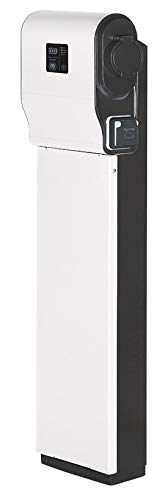
This image illustrates the Legrand Green'up Premium 059001 charging station installed on its optional floor-standing pedestal. This configuration allows for flexible placement when wall mounting is not preferred or possible.
2.2. Electrical Connection
The Green'up Premium 059001 is a single-phase (1P+N+T) Mode 3 charging station, equipped with a Type 2 socket with shutters (T2S) and a pilot wire. Ensure the electrical supply meets the station's requirements (7.4kW, 32A) and is protected by appropriate circuit breakers and residual current devices (RCDs).
3. Operating Instructions
The Legrand Green'up Premium 059001 charging station is designed for straightforward operation.
3.1. Initiating a Charge
- Ensure the charging station is powered on and the status indicator shows 'Ready'.
- Connect the Type 2 charging cable to your electric vehicle's charging port.
- Insert the other end of the Type 2 charging cable into the charging station's socket.
- The charging process will typically begin automatically. The status indicator will change to 'Charging'.
3.2. Delayed Charging
The charging station features a physical switch to delay the charging process. You can select a delay of +3 hours, +6 hours, or +9 hours from the current time. This feature is useful for optimizing charging during off-peak electricity hours.
3.3. App Control (Bluetooth)
The charging station can be controlled via a dedicated mobile application using Bluetooth connectivity. This allows you to:
- Program the charging start time.
- Limit the charging current (e.g., 16A, 20A, 25A, or 32A) to manage power consumption.
- View the energy consumption of the last charge session.
Note: Integrated Wi-Fi functionality is not included and requires an additional purchase for remote connectivity beyond Bluetooth range.
3.4. Status Indicators
The front panel of the charging station includes indicators for its operational status:
- Ready: The station is powered and ready to charge.
- Connecting: The station is establishing communication with the vehicle.
- Charging: The vehicle is actively charging.
- Full: The vehicle's battery is fully charged.
- Error: An issue has occurred. Refer to the troubleshooting section.
4. Maintenance
Regular maintenance ensures the longevity and safe operation of your charging station.
4.1. Cleaning
- Disconnect the charging station from the power supply before cleaning.
- Use a soft, damp cloth to wipe the exterior surfaces.
- Do not use abrasive cleaners, solvents, or harsh chemicals.
- Ensure the Type 2 socket is free from dust and debris.
4.2. Regular Checks
- Periodically inspect the charging cable and connectors for any signs of wear or damage.
- Check the charging station's housing for cracks or physical damage.
- Ensure all mounting screws are secure.
- If any damage is observed, discontinue use and contact a qualified technician.
5. Troubleshooting
If you encounter issues with your charging station, refer to the following common problems and solutions. For persistent issues, contact a qualified electrician or Legrand customer support.
- No Power: Check the circuit breaker in your electrical panel. Ensure the charging station is properly connected to the main power supply.
- Charging Not Starting: Ensure the charging cable is securely connected to both the vehicle and the charging station. Check the vehicle's charging settings. Verify the charging station's status indicator is 'Ready'.
- Error Indicator On: Disconnect the charging cable from both ends, then reconnect. If the error persists, power cycle the charging station by turning off and on its dedicated circuit breaker.
- Bluetooth Connectivity Issues: Ensure your mobile device's Bluetooth is enabled and within range of the charging station. Restart the app and try pairing again.
6. Technical Specifications

This image presents a comparison between the Legrand Green'up Premium 059001 charging station (left) and a standalone Type 2 charging socket (right). The charging station is a complete unit, while the separate socket is for integration into a custom setup.
| Feature | Specification |
|---|---|
| Model Number | 059001 |
| Brand | Legrand |
| Charging Capacity | 7.4 kW |
| Current Rating | 32 A |
| Operating Mode | Mode 3 |
| Socket Type | Type 2 with shutters (T2S) |
| Phase | Single-phase (1P+N+T with pilot wire) |
| Material | Plastic |
| Product Dimensions (L x W x H) | 14 x 29.5 x 36.5 cm |
| Weight | 3.6 kg |
| International Protection Rating | IP44 |
| Control Method | Bluetooth, Local Buttons |
| Volume | 20.40 dm³ |
| International Article Code | 03414970955548 |
7. Warranty and Support
For warranty information, technical support, or spare parts availability, please contact Legrand customer service or refer to the official Legrand website. Keep your proof of purchase for warranty claims.


