
1. Introduction and Overview
Thank you for choosing the Remax RB-M23 Wireless Super Bass Stereo Speaker. This manual provides essential information for setting up, operating, and maintaining your device. Please read it carefully before use.
Key Features:
- UFO-shaped aluminum alloy base with touch control and silicone pad.
- Constructed with wood texture and iron mesh materials.
- Bluetooth Version: V4.2 for stable wireless connectivity.
- Signal-to-noise ratio: ≥75dB for clear audio.
- Effective wireless distance: >10 meters.
- Output power: 2 x 3W.
- Charging voltage: 5V-1A.
- Supports Bluetooth, NFC, and AUX input.
- Compact and portable design.
- Compatible with a wide range of devices.
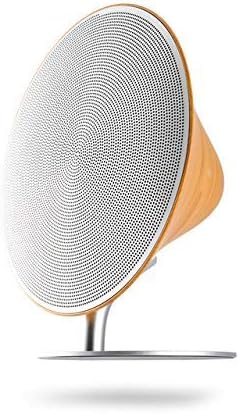
This image displays the Remax RB-M23 Wireless Super Bass Stereo Speaker. It features a distinctive round design with a white speaker grille and a light wood-textured casing. The speaker is supported by a sleek silver stand, indicating its tabletop mount design.
2. Setup
2.1 Unpacking
Carefully remove the speaker and all accessories from the packaging. Ensure all components are present:
- Remax RB-M23 Speaker
- USB Charging Cable
- AUX Cable (if included)
- User Manual
2.2 Charging the Speaker
Before first use, fully charge the speaker.
- Connect the small end of the USB charging cable to the charging port on the speaker.
- Connect the large end of the USB cable to a USB power adapter (5V-1A recommended) or a computer's USB port.
- The charging indicator light will illuminate. It will turn off or change color once charging is complete.
3. Operating Instructions
3.1 Power On/Off
Locate the power button, usually on the base or side of the speaker. Press and hold to power on or off.
3.2 Bluetooth Pairing
To connect your speaker wirelessly via Bluetooth:
- Ensure the speaker is powered on and in Bluetooth pairing mode (indicated by a flashing LED).
- On your device (smartphone, tablet, computer), enable Bluetooth and search for available devices.
- Select "Remax RB-M23" from the list of devices.
- Once connected, the LED indicator will become solid, and you may hear a confirmation tone.
3.3 NFC Connection (Near Field Communication)
For devices with NFC capability:
- Ensure NFC is enabled on your device and the speaker is powered on.
- Gently tap your NFC-enabled device to the NFC area on the speaker (refer to the product diagram for exact location).
- Your device should automatically prompt to connect to the speaker. Confirm the connection.
3.4 AUX Input
To connect via AUX cable:
- Connect one end of the 3.5mm AUX cable to the AUX port on the speaker.
- Connect the other end to the headphone jack or audio output port of your audio device.
- The speaker will automatically switch to AUX mode.
3.5 Music Playback and Controls
Use the touch controls on the speaker's UFO-shaped base or your connected device to manage playback:
- Play/Pause: Tap the center of the touch control area.
- Volume Up/Down: Swipe or tap specific areas on the touch control (refer to product diagram for details).
- Next/Previous Track: Swipe or tap specific areas on the touch control (refer to product diagram for details).
4. Maintenance
4.1 Cleaning
To maintain the appearance and functionality of your speaker:
- Wipe the speaker with a soft, dry, lint-free cloth.
- Do not use abrasive cleaners, waxes, or solvents.
- Avoid getting moisture into any openings.
4.2 Storage
When not in use for extended periods:
- Store the speaker in a cool, dry place, away from direct sunlight and extreme temperatures.
- It is recommended to charge the battery at least once every three months to prolong its lifespan.
5. Troubleshooting
If you encounter issues with your Remax RB-M23 speaker, refer to the following common problems and solutions:
| Problem | Possible Cause | Solution |
|---|---|---|
| Speaker does not power on. | Battery is depleted. | Charge the speaker fully. |
| No sound. | Volume is too low; Device not connected; Incorrect input mode. | Increase volume on speaker and device; Re-pair Bluetooth or check AUX connection; Ensure correct input mode is selected. |
| Bluetooth connection unstable. | Device is too far from speaker; Interference. | Move device closer to speaker (within 10m); Avoid obstacles; Turn off other Bluetooth devices. |
| NFC connection fails. | NFC not enabled on device; Incorrect tapping area. | Ensure NFC is enabled on your device; Tap your device directly onto the NFC logo/area on the speaker. |
6. Specifications
| Feature | Detail |
|---|---|
| Product Dimensions | 21 x 7 x 3 cm |
| Item Weight | 81 grams |
| First Available Date | May 31, 2021 |
| Manufacturer | Remax |
| Item Model Number | RB-M23-SILVER |
| Brand Name | Remax |
| Connectivity Technology | Bluetooth |
| Audio Output Mode | Surround |
| Mounting Type | Tabletop Mount |
| Speaker Type | Bluetooth Speakers |
| Special Features | Bluetooth, Wireless |
| Compatible Devices | All devices |
| Controller Type | Touchpad |
| Color | Silver |
7. Warranty and Support
This product is covered by a limited warranty provided by Remax. Please refer to the warranty card included in your product packaging for specific terms and conditions, including warranty period and coverage details.
For technical support, service, or warranty claims, please contact Remax customer service through their official website or the contact information provided in your product documentation. Keep your purchase receipt as proof of purchase.


