
Singing Machine SDL9040
Singing Machine SDL9040 Fiesta Voice Karaoke System
User Manual
Introduction
The Singing Machine SDL9040 Fiesta Voice Karaoke System is designed to provide an immersive and entertaining karaoke experience. This system features a 7-inch color LCD monitor, Bluetooth connectivity, a powerful speaker system, and various vocal effects, making it suitable for both indoor and outdoor use. Its portable design with a retractable handle and wheels ensures easy transport. This manual provides essential information for setting up, operating, maintaining, and troubleshooting your device.
Safety Information
- Read all instructions before operating the device.
- Keep the unit away from water or excessive moisture.
- Do not block ventilation openings.
- Use only the AC adapter provided by the manufacturer.
- Do not attempt to disassemble or repair the unit yourself. Refer all servicing to qualified personnel.
- Protect the power cord from being walked on or pinched.
- Unplug the unit during lightning storms or when unused for long periods.
Package Contents
Ensure all items listed below are present in your package:
- Fiesta Voice HD Karaoke System Model SDL9040
- 1 wired Mic-Remote control
- 1 wired microphone
- 1 8GB Singing Machine Flash Drive
- AC adapter
- Welcome Kit with instructions for free songs
Product Overview
The Singing Machine SDL9040 Fiesta Voice Karaoke System features a comprehensive control panel, integrated display, and various input/output ports. Familiarize yourself with the different parts of the system for optimal use.

Figure 1: Front view of the SDL9040 system, showcasing the LCD monitor, control panel, and illuminated main speaker.

Figure 2: The SDL9040 system demonstrating Bluetooth connectivity with an external tablet for streaming audio and lyrics.

Figure 3: Angled view highlighting the multi-colored LED lighting on the main speaker and the top disco dome light.

Figure 4: Side profile of the SDL9040, illustrating the integrated microphone holder and the mobility wheels.

Figure 5: Illustration of wireless digital audio streaming via Bluetooth from compatible devices.
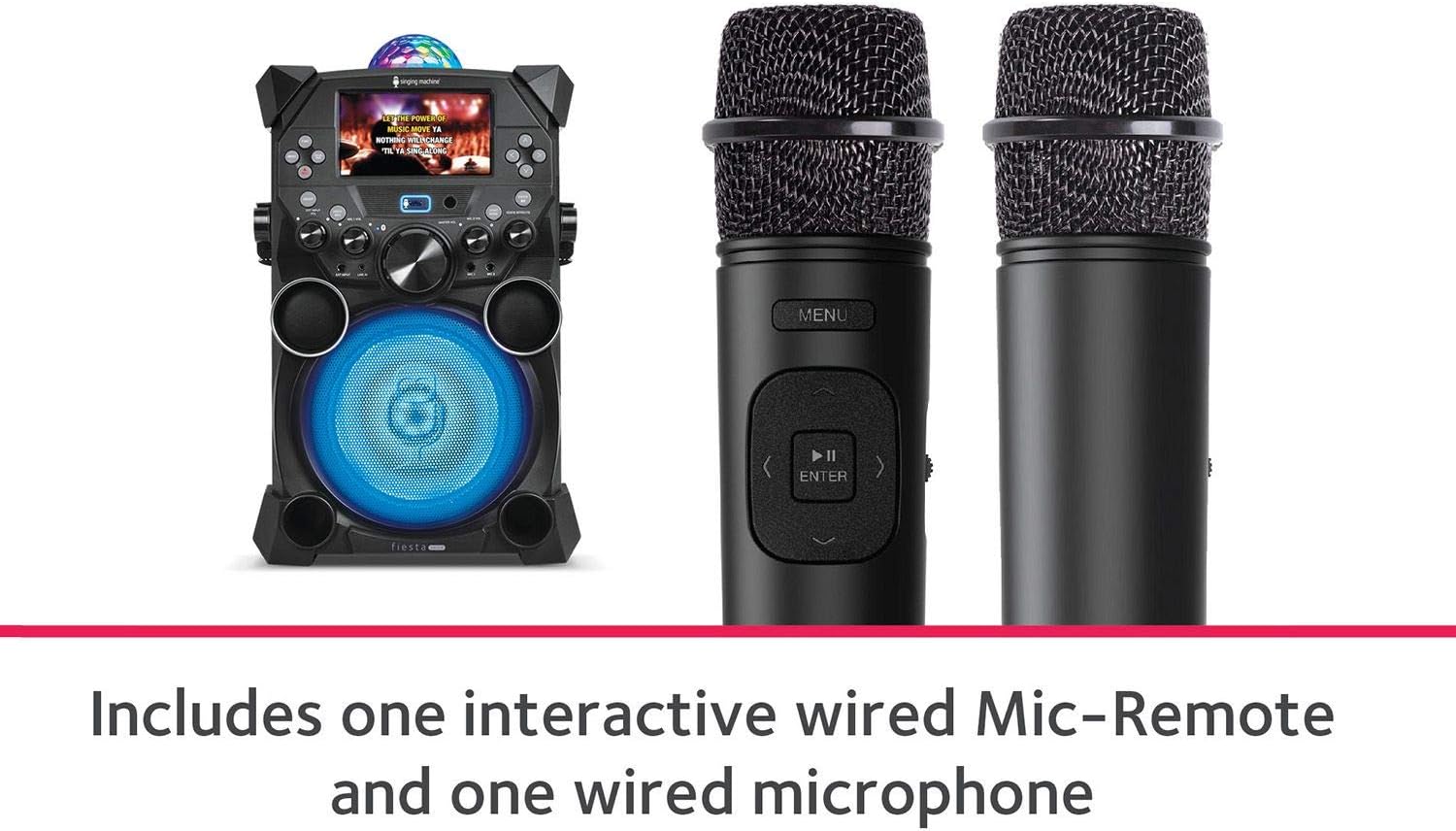
Figure 6: The two included microphones: one interactive wired Mic-Remote and one standard wired microphone.

Figure 7: The multi-colored dome LED Disco Lights rotating and illuminating the ceiling for a party atmosphere.
Control Panel Features:
- 7" Color LCD Monitor: Displays karaoke video lyrics from USB.
- Function Buttons: Menu, Func, Enter, Navigation (Up/Down/Left/Right).
- Power ON/OFF Button: Controls the main power of the unit.
- EXT INPUT VOL: Adjusts volume for external audio devices connected via Line-in.
- MIC 1 VOL / MIC 2 VOL: Individual volume controls for Microphone 1 and Microphone 2.
- MASTER VOL: Overall volume control for the system.
- LIGHT MODE Button: Cycles through different disco light patterns.
- VOICE EFFECTS Knob: Selects from six voice-changing effects (Echo, Male, Female, Robot, Chipmunk, Radio).
- USB Port: For connecting the included 8GB USB flash drive with karaoke videos.
- EXT INPUT / LINE IN Jack: For connecting external audio devices (smartphones, tablets, MP3 players).
- MIC 1 / MIC 2 Jacks: For connecting wired microphones.
- KEYBOARD/GUITAR Input Jack: For connecting accessory instruments with separate volume control.
- HDMI Output: For connecting to a TV for scrolling lyrics.
Setup
- Power Connection:
Connect the supplied AC adapter to the DC IN jack on the back of the unit and plug the other end into a standard wall outlet. The unit can operate on AC power or its built-in rechargeable battery.
- Charging the Battery:
For first-time use, fully charge the battery for approximately 8-10 hours. The battery indicator light will show charging status. A full charge provides hours of fun on a single charge. Actual battery life varies based on usage.
- Microphone Connection:
Insert the plugs of the wired microphones into the MIC 1 and MIC 2 jacks on the front panel. Ensure they are securely connected.
- USB Flash Drive:
Insert the included 8GB Singing Machine Flash Drive into the USB port. This drive can store Hi-Def karaoke videos and recorded performances.
- Connecting to a TV (Optional):
For displaying lyrics on a larger screen, connect an HDMI cable (not included) from the HDMI output on the unit to an HDMI input on your television.
Operating Instructions
- Powering On/Off:
Press the ON/OFF button to turn the unit on or off. The LCD monitor will illuminate upon power-on.
- Bluetooth Pairing:
To stream audio wirelessly, activate Bluetooth on your compatible device (e.g., smartphone, tablet). Select "Singing Machine" from the list of available devices. Once paired, you can play music from your device through the karaoke system.
- Playing Karaoke:
- From USB: Ensure the 8GB USB flash drive with karaoke videos is inserted. Use the navigation buttons and ENTER to select and play videos from the menu on the LCD screen.
- From Mobile App: Download the Singing Machine Free Mobile Karaoke App (iOS/Android). Connect your mobile device via Bluetooth. Stream thousands of karaoke songs on demand through the app.
- From External Device (Line-in): Connect your smartphone, tablet, or MP3 player to the LINE IN jack using an audio cable (not included). Adjust the EXT INPUT VOL knob.
- Adjusting Volume:
Use the MASTER VOL knob to control the overall system volume. Adjust MIC 1 VOL and MIC 2 VOL for individual microphone volumes. For external devices, use EXT INPUT VOL.
- Voice Effects:
Turn the VOICE EFFECTS knob to select from six entertaining vocal effects: Echo, Male, Female, Robot, Chipmunk, and Radio.
- Recording Performances:
To record your audio performance, ensure the 8GB USB flash drive is inserted. Follow the on-screen instructions or refer to the Welcome Kit for specific recording steps. Recorded files will be saved to the USB drive for playback and sharing.
- Disco Lights:
Press the LIGHT MODE button to cycle through various multi-colored dome LED Disco Light patterns and front panel LED light synchronizations. These lights rotate and illuminate your ceiling for a fun party atmosphere.
- Lead Vocal ON/OFF:
Use the LEAD VOCAL ON/OFF button to remove or restore the lead vocals from compatible karaoke tracks.
- Keyboard/Guitar Input:
Connect an accessory instrument (sold separately) to the KEYBOARD/GUITAR input jack. Adjust its volume using the dedicated volume control.
Maintenance
- Cleaning:
Wipe the unit with a soft, dry cloth. Do not use abrasive cleaners or solvents. Ensure the unit is unplugged before cleaning.
- Battery Care:
To prolong battery life, avoid fully discharging the battery frequently. Recharge the battery regularly, even if the unit is not in use for extended periods (e.g., once every 3 months).
- Storage:
Store the unit in a cool, dry place away from direct sunlight and extreme temperatures. Ensure all cables are neatly coiled to prevent damage.
Troubleshooting
| Problem | Possible Cause | Solution |
|---|---|---|
| Unit does not power on. | AC adapter not connected or faulty; Battery discharged. | Ensure AC adapter is securely plugged into the unit and a working outlet. Charge the battery for several hours. |
| No sound from microphones. | Microphones not connected properly; MIC VOL knobs too low; Lead Vocal ON/OFF engaged. | Ensure microphones are fully inserted into their jacks. Increase MIC 1 VOL and MIC 2 VOL. Check if Lead Vocal ON/OFF is active and disable if necessary. |
| Bluetooth device cannot pair. | Bluetooth not enabled on device; Unit not in pairing mode; Device too far. | Ensure Bluetooth is enabled on your device. Make sure the karaoke system is discoverable. Move your device closer to the system. |
| Lyrics not displaying on LCD or TV. | USB flash drive not inserted or corrupted; HDMI cable not connected or faulty. | Ensure the USB flash drive is properly inserted and contains compatible karaoke video files. Check HDMI cable connection to TV and unit. |
| Sound distortion or poor audio quality. | Volume too high; Source audio quality is poor. | Reduce MASTER VOL. Ensure the audio source (USB, Bluetooth, Line-in) has good quality. |
Specifications
| Feature | Detail |
|---|---|
| Model Number | SDL9040 |
| Product Dimensions | 13.38” W x 14.17” L x 22.0” H |
| Item Weight | 19.18lbs |
| Display | 7" Color LCD Monitor |
| Connectivity | Bluetooth, USB, Line-in, HDMI Out |
| Speaker Output | Up to 150 Watts Peak Power (8" speaker + two 2.5" tweeters) |
| Voice Effects | Echo, Male, Female, Robot, Chipmunk, Radio |
| Battery | Built-in Rechargeable Battery |
| Special Features | Multi-colored Dome LED Disco Lights, Front Panel LED Lights, Retractable Handle & Wheels, Record Function |
| Included Accessories | Wired Mic-Remote, Wired Microphone, 8GB USB Flash Drive, AC Adapter |
Warranty Information
For detailed warranty information, please refer to the documentation included in your product packaging or visit the official Singing Machine website. Keep your proof of purchase for warranty claims.
Customer Support
If you encounter any issues not covered in this manual or require further assistance, please contact Singing Machine customer support. Visit the official Singing Machine website for contact details, FAQs, and additional resources.
Official Website: www.singingmachine.com
Related documentsSDL9040


Ask a question about this manual
Ask about setup, troubleshooting, compatibility, parts, safety, or missing instructions. Manuals+ will review the question and use this page’s manual context to help answer it.