
Targus THZ74403GL
Targus VersaVu Classic Case for 11-Inch iPad Pro User Manual
Model: THZ74403GL
Introduction

Image: Front view of the Targus VersaVu Classic Case in Red.
The Targus VersaVu Classic Case for 11-inch iPad Pro (Model THZ74403GL) is designed to provide robust protection and versatile functionality for your device. This case features military-grade drop protection, a patented 360-degree rotation mechanism for multiple viewing angles, and an integrated holder for your Apple Pencil. Its secure magnetic closure ensures your device remains protected when not in use.
Package Contents
- 1 x Targus VersaVu Classic Case (Red)
Setup
Follow these steps to properly install your iPad Pro into the Targus VersaVu Classic Case:
- Open the Case: Lay the case flat on a clean, stable surface with the interior facing upwards.
- Align the iPad: Carefully align your 11-inch iPad Pro with the custom-molded tray inside the case. Ensure the camera cutout and all ports align correctly with the case's openings.
- Secure the iPad: Gently press the iPad into the tray until it snaps securely into place. The reinforced corners of the tray are designed to hold the device firmly and enhance impact protection.
- Close the Case: Fold the front cover over the iPad. The magnetic closure will secure the case shut.

Image: Interior of the case with the custom-molded tray designed for secure iPad placement.
Operating Instructions
Angled View Adjustment
The case allows for multiple viewing angles to suit your needs for watching, typing, or browsing. Simply adjust the iPad's position within the cover's grooves to achieve your desired angle.
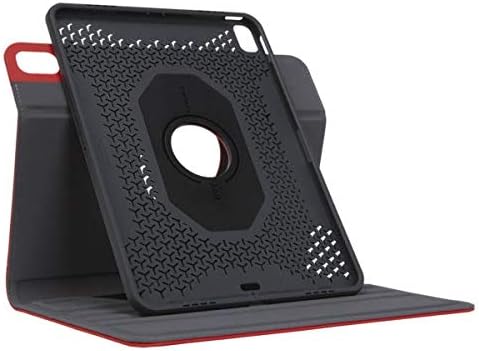
Image: The case configured for an angled viewing position.
Patented 360° Rotation
The unique 360-degree rotation feature allows for quick switching between portrait and landscape viewing without removing the iPad from the case. Gently rotate the iPad within its frame to change orientation.

Image: Rear view of the case highlighting the circular rotation mechanism.
Integrated Apple Pencil/Stylus Holder
The case includes a dedicated holder for your Apple Pencil or stylus, ensuring it is always accessible and securely stored. This holder also supports Apple Pencil charging when placed correctly.
Integrated Hand-Holding Strap
For comfortable and secure handheld use, the case features an integrated strap. Slide your hand through the strap to maintain a firm grip on your iPad, reducing the risk of accidental drops.
Secure Magnetic Closure
The case is equipped with a strong magnetic closure that keeps the cover securely shut when not in use, protecting your iPad's screen from scratches and impacts.
Precise Camera Cutout
The case features a precise cutout for the iPad's camera, allowing you to take photos and videos without needing to remove the device from the case.
Official Product Video
Video: A demonstration of the Targus VersaVu Classic Case features, including angled view adjustment, Apple Pencil charging, 360-degree rotation, integrated hand-holding strap, secure magnetic closure, and precise camera cutout.
Maintenance
To ensure the longevity and appearance of your Targus VersaVu Classic Case, follow these maintenance guidelines:
- Cleaning: Wipe the exterior of the case with a soft, damp cloth. For stubborn stains, a mild soap solution can be used, but avoid harsh chemicals or abrasive cleaners.
- Drying: Allow the case to air dry completely before reinserting your iPad. Do not use direct heat sources.
- Storage: When not in use, store the case in a cool, dry place away from direct sunlight and extreme temperatures.
- Avoid Overstuffing: Do not force objects into the case alongside your iPad, as this can deform the case or damage your device.
Troubleshooting
If you encounter any issues with your Targus VersaVu Classic Case, consider the following common solutions:
- iPad does not fit securely: Ensure you have the correct model of iPad for this case (11-inch iPad Pro). Verify that the iPad is properly aligned and pressed firmly into the custom-molded tray.
- Rotation mechanism feels stiff: The 360-degree rotation mechanism is designed to be firm to hold the iPad securely in place. If it feels excessively stiff, ensure no debris is obstructing the mechanism. Avoid forcing the rotation.
- Magnetic closure not holding: Check if any foreign objects are preventing the magnetic flap from making full contact with the case. Ensure the case is not overstuffed.
- Apple Pencil not charging: Verify that your Apple Pencil is correctly seated in the integrated holder and that your iPad model supports wireless charging for the Apple Pencil in that position.
Specifications
| Brand | Targus |
| Model Number | THZ74403GL |
| Compatible Devices | 11-inch iPad Pro |
| Color | Red |
| Product Dimensions | 7.75 x 0.85 x 11.5 inches |
| Item Weight | 14.9 ounces |
| Shell Type | Hybrid |
| Special Features | Anti-Slip, 360° Rotation, Integrated Apple Pencil/Stylus Holder, Military-Grade Drop Protection, Magnetic Closure |
| Manufacturer | Targus US LLC |
Warranty and Support
Targus products are designed for durability and performance. For information regarding warranty coverage, product registration, or technical support, please visit the official Targus website or contact their customer service. You can find more information and contact details on the Targus Brand Store.
Related documentsTHZ74403GL

Ask a question about this manual
Ask about setup, troubleshooting, compatibility, parts, safety, or missing instructions. Manuals+ will review the question and use this page’s manual context to help answer it.