
1. Introduction
This manual provides instructions for the Easytry123 replacement remote control, designed for use with specific Magnavox LCD HDTV models. This remote is a direct replacement and does not require programming.
Compatible Magnavox TV Models: NH402UD, 39ME313, 39ME313/F7, 39ME313F7, 39ME313V, 39ME313V/F7, 39ME313VF7, and 39ME313V/F7A.
2. Setup: Battery Installation
The remote control requires two (2) AAA batteries (not included).
- Step 1: Locate the battery compartment on the back of the remote control.
- Step 2: Press down on the latch and slide the battery cover off.
- Step 3: Insert two AAA batteries, ensuring the positive (+) and negative (-) terminals align correctly with the markings inside the compartment.
- Step 4: Slide the battery cover back into place until it clicks securely.
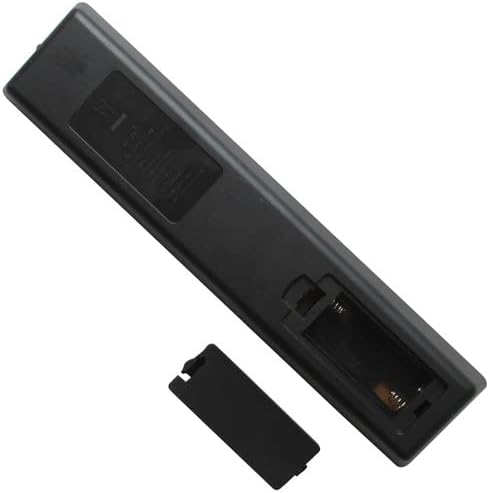
Image: Back of the remote control with the battery cover removed, illustrating where to insert the AAA batteries.

Image: Back of the remote control with the battery cover closed after installation.
3. Operating Instructions
This section outlines the primary functions of the remote control buttons.

Image: Front view of the remote control, displaying all functional buttons.
Basic Functions
- POWER (Red Button): Turns the television on or off.
- SOURCE: Selects the input source (e.g., HDMI 1, AV, Component).
- VOL +/-: Adjusts the volume level.
- CH +/-: Changes television channels.
- MUTE: Silences or restores the television audio.
- Number Pad (0-9): Directly enters channel numbers.
- PREV.CH: Returns to the previously viewed channel.
Navigation and Menu Functions
- MODE: Accesses different operational modes.
- INFO: Displays on-screen information about the current program or input.
- CC (Closed Caption): Toggles closed captions on or off.
- Directional Arrows (Up, Down, Left, Right): Navigates through on-screen menus.
- OK: Confirms selections in menus.
- BACK: Returns to the previous menu or screen.
- HOME (House Icon): Accesses the TV's main smart TV or home menu.
Media Playback Controls
- Play/Pause, Stop, Fast Forward, Rewind, Skip Forward, Skip Back: Controls media playback when applicable (e.g., USB media, streaming apps).
Specialized Buttons
- VUDU: Direct access button for the Vudu streaming service.
- Colored Buttons (Red, Green, Yellow, Blue): These buttons often correspond to specific functions within menus or applications, as indicated on the TV screen.
4. Troubleshooting
Remote Control Not Responding
- Check Batteries: Ensure batteries are inserted correctly with the correct polarity (+/-). Replace old batteries with new AAA batteries if necessary.
- Line of Sight: Ensure there is a clear line of sight between the remote control and the TV's infrared sensor. Remove any obstructions.
- TV Compatibility: Verify that your television model is listed as compatible with this remote control. This remote is specifically designed for Magnavox NH402UD, 39ME313, 39ME313/F7, 39ME313F7, 39ME313V, 39ME313V/F7, 39ME313VF7, and 39ME313V/F7A models. It is not a universal remote.
- Functionality Differences: Note that as a replacement remote, some advanced or specific functions of your original remote may not be fully supported. Basic TV operations should function as expected.
5. Specifications
| Feature | Detail |
|---|---|
| Model Number | Easytry4436 |
| Brand | Easytry123 |
| Compatible Devices | Magnavox LCD HDTVs (NH402UD, 39ME313, 39ME313/F7, 39ME313F7, 39ME313V, 39ME313V/F7, 39ME313VF7, 39ME313V/F7A) |
| Connectivity Technology | Infrared (IR) |
| Power Source | 2 x AAA Batteries (not included) |
| Special Feature | Replacement Remote, No Programming Required |
6. Important Notes
- This is a dedicated replacement remote control, not a universal remote.
- No setup or programming codes are required for operation with compatible models.
- While designed for specific models, some advanced functions present on the original remote may not be available on this replacement unit.
- Batteries are not included and must be purchased separately.