
Dorman 590-440
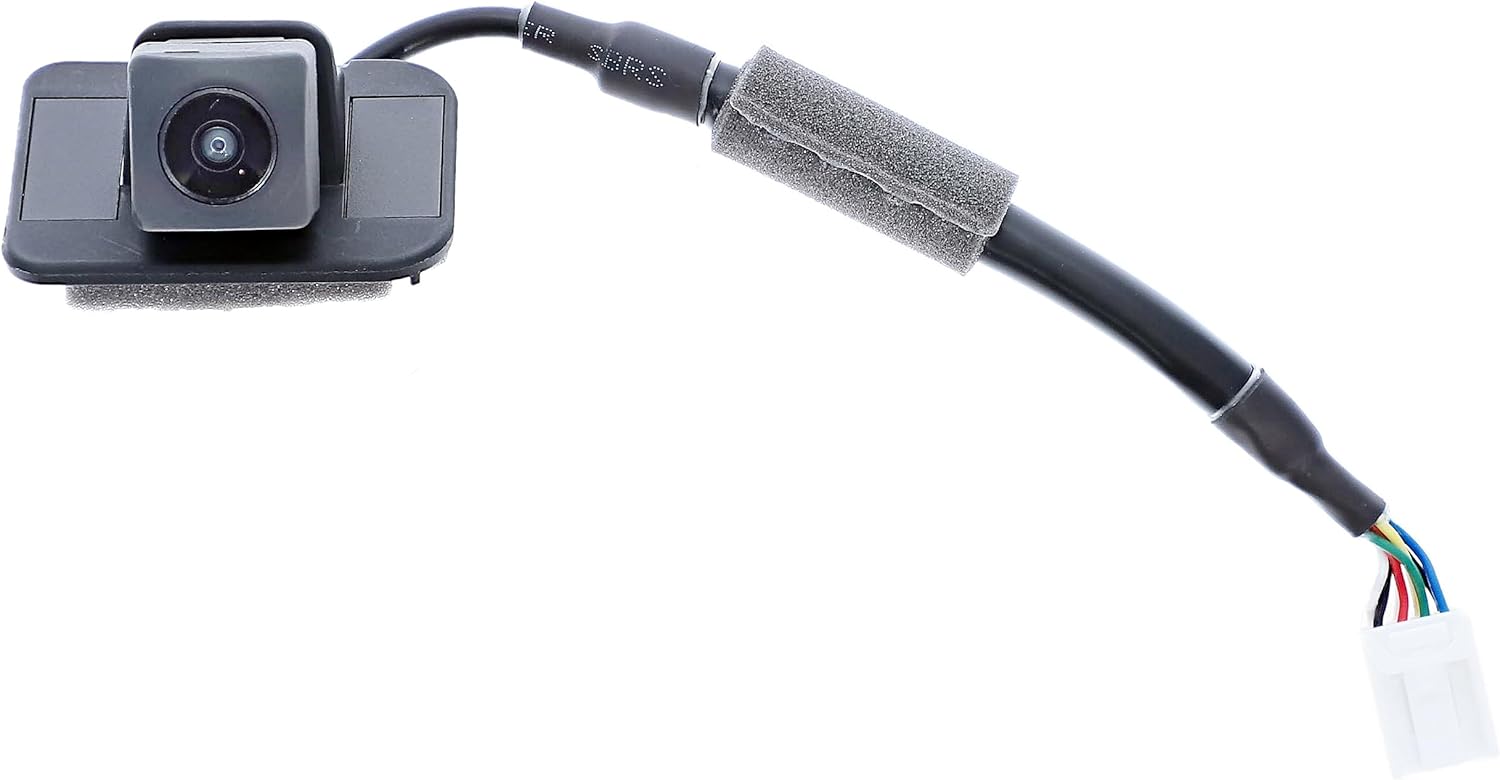
Dorman 590-440 Rear Park Assist Camera
User Instruction Manual
1. Introduction
This manual provides essential information for the installation, operation, and maintenance of your Dorman 590-440 Rear Park Assist Camera. This camera is designed as a direct replacement for original equipment cameras in compatible vehicles, offering reliable performance and enhanced visibility.
Key Features:
- Ideal Replacement: Directly replaces damaged or faulty original equipment cameras for a dependable repair.
- Durable Construction: Features a high-quality, wide-angle lens for clear resolution and additional electronics protection for reliability in harsh conditions.
- Direct Installation: Plugs into the vehicle's wiring using a factory-style connector.
- Quality Tested: Has undergone try-on, on-vehicle, and salt spray testing to ensure quality fit and durability.
2. Package Contents
Please verify that all items listed below are present in your package:
- 1 x Park Assist Camera
- 1 x Harness Connector
- 1 x Bracket
- 1 x Zip Tie
3. Technical Specifications
| Model Number | 590-440 |
| Manufacturer | Dorman Products |
| Item Weight | 3.34 ounces |
| Product Dimensions | 5 x 5.6 x 3.1 inches |
| Voltage | 12 Volts |
| Lens Type | Wide Angle |
| Real Angle of View | 170 Degrees |
| Video Capture Resolution | 1080p |
| Installation Type | Surface Mount |
| Compatible Devices | Monitor |
| OEM Part Numbers | 39530-T2A-A21; 39530-T2A-A31 |
4. Vehicle Compatibility
This Dorman 590-440 Rear Park Assist Camera is compatible with select Honda models. Please confirm fitment for your specific vehicle trim before installation.
Compatible Vehicles:
- Honda Accord: 2014, 2015, 2016, 2017
Note: Always verify compatibility using your vehicle's make, model, and trim level.
5. Setup and Installation
The Dorman 590-440 camera is designed for direct installation, plugging into your vehicle's existing wiring using a factory-style connector. While installation is generally straightforward for those with automotive repair experience, it is recommended to consult your vehicle's service manual or seek professional assistance for detailed, vehicle-specific instructions.
General Installation Steps (Consult vehicle-specific guides for precise details):
- Preparation: Ensure the vehicle is turned off and the battery is disconnected to prevent electrical issues.
- Access: Locate the original camera assembly, typically near the license plate or trunk lid. This may require removing interior trim panels.
- Removal: Carefully disconnect the wiring harness and unmount the old camera.
- Installation: Mount the new Dorman 590-440 camera in the same location. Connect the camera's harness to the vehicle's wiring.
- Secure: Ensure all connections are secure and reattach any removed trim panels.
- Test: Reconnect the battery and test the camera's functionality by engaging reverse gear.



6. Operating Instructions
Once properly installed, the Dorman 590-440 Rear Park Assist Camera operates automatically when the vehicle is shifted into reverse gear. The camera provides a clear, high-resolution, wide-angle view of the area behind your vehicle on the compatible display monitor.
Camera View Modes:
Depending on your vehicle's original system capabilities, the Dorman 590-440 camera supports multiple view modes (e.g., wide, normal, top-down). These modes allow you to select the most appropriate perspective for your parking or reversing needs. Refer to your vehicle's owner's manual for instructions on how to switch between these view modes on your display.
Important Safety Note: Always check your surroundings visually in addition to using the park assist camera. The camera is an aid and does not replace the driver's responsibility to operate the vehicle safely.
7. Maintenance
The Dorman 590-440 Rear Park Assist Camera is designed for durability and minimal maintenance. To ensure optimal performance and longevity:
- Cleaning the Lens: Periodically clean the camera lens with a soft, damp cloth to remove dirt, dust, or debris that may obstruct the view. Avoid abrasive cleaners or materials that could scratch the lens.
- Inspect Connections: Occasionally check the wiring and connections for any signs of wear, corrosion, or looseness.
- Environmental Protection: While the camera features additional electronics protection for harsh conditions, extreme temperatures or prolonged exposure to direct sunlight can affect electronic components over time.
8. Troubleshooting
If you experience issues with your Dorman 590-440 Rear Park Assist Camera, consider the following troubleshooting steps:
| Problem | Possible Cause / Solution |
|---|---|
| No image on display when in reverse. |
|
| Image is blurry, distorted, or fogged. |
|
| Delayed display or slow activation. |
|
If these steps do not resolve the issue, it is recommended to consult a qualified automotive technician or contact Dorman customer support for further assistance.
9. Warranty and Support
Dorman is committed to providing high-quality replacement products engineered to save time and money, and increase convenience and reliability. While specific warranty details are not provided within this manual, Dorman stands behind its products.
For detailed warranty information, technical support, or assistance with your Dorman 590-440 Rear Park Assist Camera, please visit the official Dorman website or contact Dorman customer service directly. Have your product model number (590-440) and vehicle information ready when contacting support.
Dorman Customer Support:
- Website: www.dormanproducts.com
- Contact Information: Refer to the website for current phone numbers and contact forms.
Related documents590-440

Ask a question about this manual
Ask about setup, troubleshooting, compatibility, parts, safety, or missing instructions. Manuals+ will review the question and use this page’s manual context to help answer it.