
Stanley FCCC4G4STF515_
Stanley FCCC4G4STF515 Air Compressor User Manual
Model: FCCC4G4STF515
Introduction
This manual provides essential information for the safe and efficient operation, maintenance, and troubleshooting of your Stanley FCCC4G4STF515 Air Compressor. Please read this manual thoroughly before operating the compressor to ensure proper use and to prevent injury or damage.
The Stanley FCCC4G4STF515 is a robust and portable air compressor designed for both hobbyists and professionals. It features a 2.5 HP electric motor, a maximum pressure of 10 bar, and a 24-liter tank, making it suitable for various tasks such as tire inflation, powering pneumatic tools, and general cleaning or painting applications. Its integrated wheels and carrying handle ensure comfortable and ergonomic transport.
Safety Instructions
Always observe basic safety precautions when using electrical appliances to reduce the risk of fire, electric shock, and personal injury.
- Read all instructions carefully before use.
- Ensure the power supply matches the voltage specified on the compressor's rating plate.
- Operate the compressor in a well-ventilated area.
- Wear appropriate personal protective equipment (PPE), such as safety glasses and hearing protection.
- Do not operate the compressor if it is damaged or malfunctioning.
- Keep children and bystanders away from the operating area.
- Always disconnect the power supply before performing any maintenance or adjustments.
- Regularly drain condensation from the air tank to prevent corrosion.
Setup
Before first use, some assembly and initial checks are required.
- Unpacking: Carefully remove the compressor and all accessories from the packaging. Inspect for any shipping damage.
- Wheel Assembly: Attach the wheels to the designated axles on the compressor base. Secure them firmly with the provided hardware.
- Handle Assembly: Secure the carrying handle to the compressor frame using the bolts and nuts provided. Ensure it is stable for transport.
- Air Filter Installation: Install the air filter into its port on the compressor pump. This protects the pump from dust and debris.
- Initial Oil Check (if applicable): Some compressors may require an initial oil fill or check. Refer to the specific instructions on the compressor itself or a separate oil manual if provided. (Note: This model is likely oil-lubricated given its power, but the spec doesn't explicitly state it. Assuming standard practice for such compressors.)
- Placement: Position the compressor on a stable, level surface in a well-ventilated area, away from walls or obstructions to allow for proper airflow.
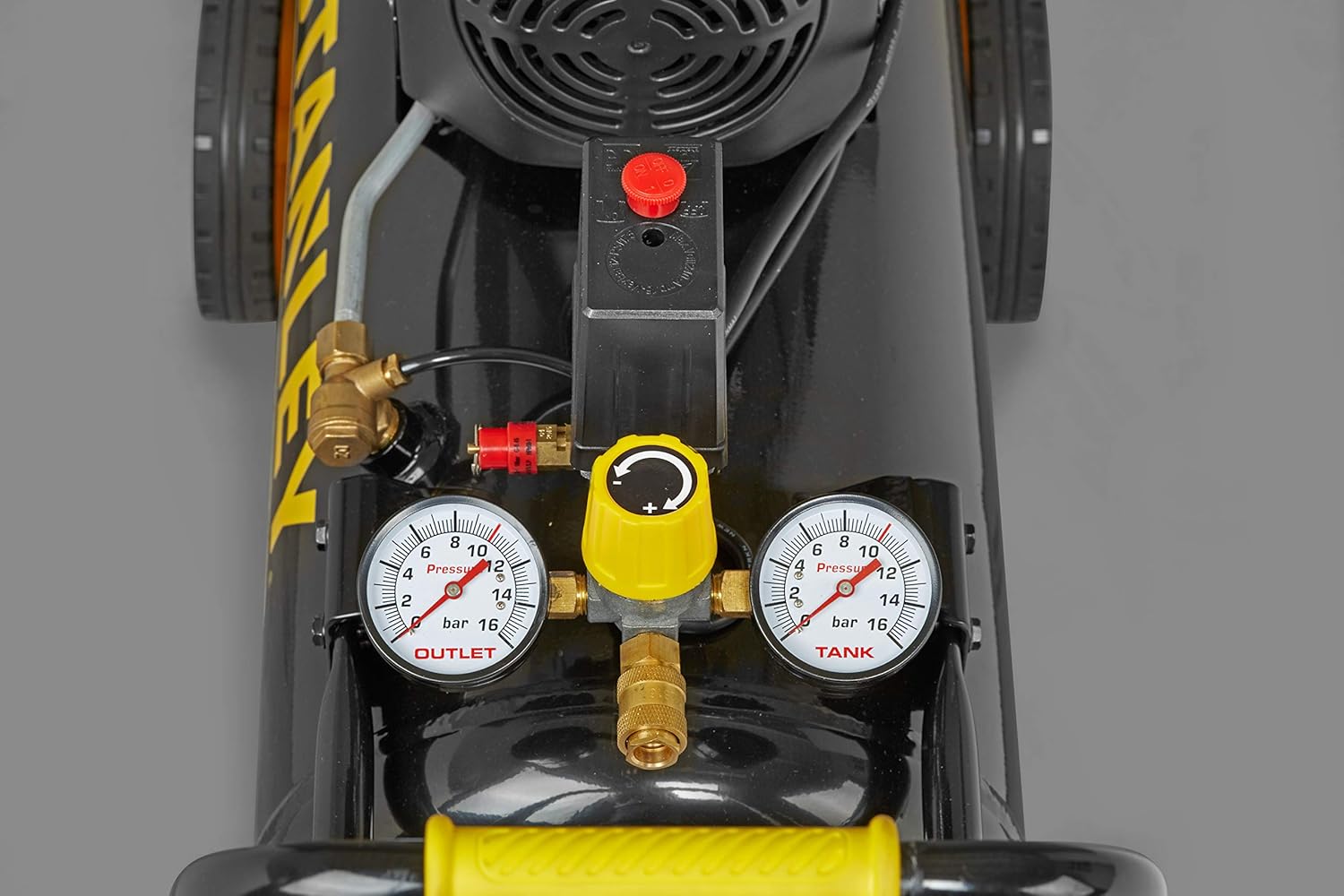
Figure 1: Front view of the Stanley FCCC4G4STF515 air compressor, highlighting the tank, wheels, and control panel. This view is helpful for identifying components during initial setup.
Operating Instructions
Follow these steps for safe and effective operation of your air compressor.
- Power Connection: Plug the compressor into a grounded electrical outlet with the correct voltage (230 Volts).
- Power On: Locate the power switch (usually a red button or lever) and turn the compressor ON. The motor will start, and the tank will begin to fill with air.
- Pressure Monitoring: Observe the two pressure gauges. One gauge indicates the tank pressure, and the other indicates the regulated outlet pressure.
- Adjusting Outlet Pressure: Use the pressure regulator knob (often yellow) to set the desired outlet pressure for your pneumatic tool or application. Turn clockwise to increase pressure, counter-clockwise to decrease.
- Connecting Air Tools: Attach your air hose to the quick-connect coupler on the compressor. Then connect your pneumatic tool to the other end of the hose.
- Operation: Once the tank reaches its maximum pressure (10 bar), the motor will automatically shut off. It will restart when the tank pressure drops below a certain threshold.
- Power Off: When finished, turn the power switch OFF.
- Depressurizing: Before disconnecting tools or storing, release any remaining air pressure from the tank by opening the drain valve or using an air tool until the gauges read zero.

Figure 2: Side view demonstrating the portability of the Stanley FCCC4G4STF515 air compressor with its wheels and handle. This image also provides a good view of the control panel and gauges.

Figure 3: A comprehensive view of the Stanley FCCC4G4STF515 air compressor, showcasing its design and key components.
Maintenance
Regular maintenance ensures the longevity and optimal performance of your air compressor.
- Drain Tank Daily: Condensation accumulates in the air tank. To prevent rust and maintain tank integrity, drain the tank daily after each use. Locate the drain valve at the bottom of the tank, place a container underneath, and open the valve until all moisture is expelled.
- Clean Air Filter: Periodically inspect and clean the air filter. A clogged filter reduces compressor efficiency. Remove the filter cover and clean the filter element with compressed air or replace it if heavily soiled.
- Check for Leaks: Regularly check all connections and hoses for air leaks. Leaks reduce efficiency and cause the compressor to run more frequently.
- General Cleaning: Keep the compressor clean and free of dust and debris. Wipe down the exterior with a damp cloth.

Figure 4: Top view of the compressor, highlighting the air filter housing (black circular component) and the motor area, crucial for routine maintenance checks.
Troubleshooting
This section addresses common issues you might encounter and their potential solutions.
| Problem | Possible Cause | Solution |
|---|---|---|
| Compressor does not start. | No power, tripped circuit breaker, faulty switch. | Check power cord, reset circuit breaker, inspect switch. |
| Compressor runs continuously. | Air leak, pressure switch malfunction. | Check for leaks and tighten connections. If problem persists, consult service. |
| Low air pressure at outlet. | Regulator set too low, clogged air filter, air leak. | Adjust regulator, clean/replace air filter, check for leaks. |
| Excessive noise or vibration. | Loose components, worn parts, insufficient lubrication. | Tighten all fasteners, inspect for worn parts, check oil level (if applicable). |
If you encounter issues not listed here or if solutions do not resolve the problem, please contact Stanley customer support.
Specifications
Detailed technical specifications for the Stanley FCCC4G4STF515 Air Compressor.
| Feature | Value |
|---|---|
| Brand | Stanley |
| Model Number | FCCC4G4STF515_ |
| Power Source | Electric (alimentazione elettrica) |
| Voltage | 230 Volts |
| Maximum Power | 1865 Watts (2.5 HP) |
| Tank Capacity | 24 Liters |
| Airflow Capacity | 240 LPM |
| Maximum Pressure | 10 Bar |
| Noise Level | 95 dB |
| Product Dimensions (L x W x H) | 57.99 x 26.01 x 57 cm |
| Item Weight | 27.3 Kilograms |
| Special Features | Lightweight, Portable (with wheels and handle) |
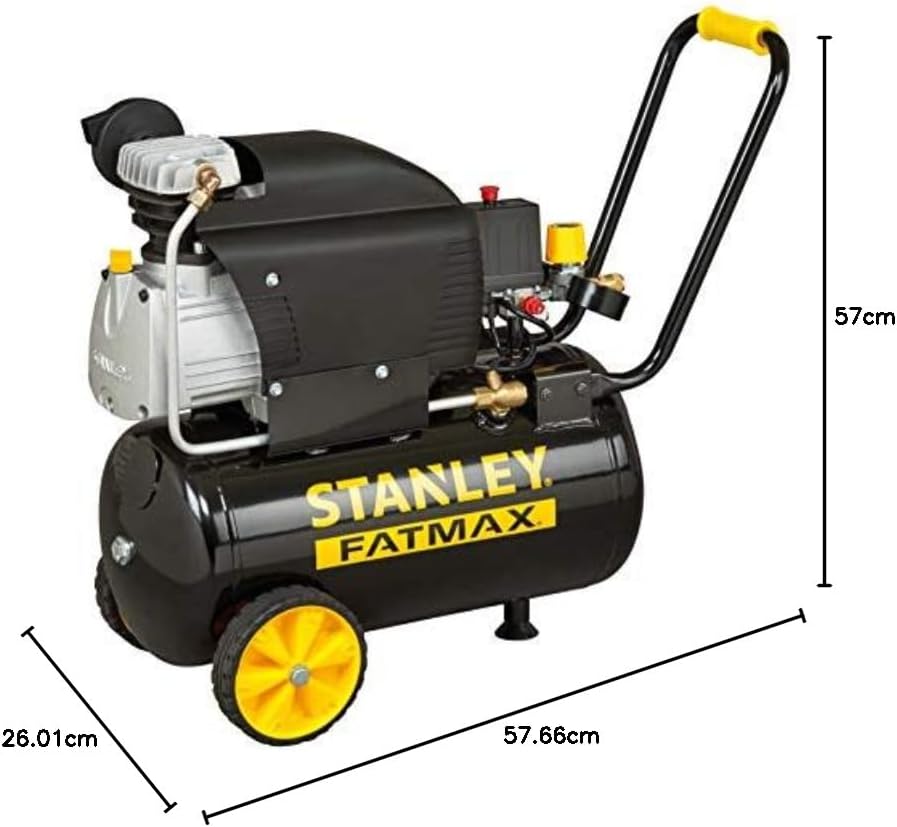
Figure 5: Dimensional overview of the Stanley FCCC4G4STF515 air compressor, indicating its physical measurements.
Warranty and Support
For warranty information, technical support, or service inquiries, please refer to the warranty card included with your product or visit the official Stanley website. Keep your purchase receipt as proof of purchase for warranty claims.
Online Resources: For additional resources, FAQs, and product registration, please visit www.stanleytools.com (or your regional Stanley website).
Related documentsFCCC4G4STF515_


Ask a question about this manual
Ask about setup, troubleshooting, compatibility, parts, safety, or missing instructions. Manuals+ will review the question and use this page’s manual context to help answer it.