
1. Introduction
1.1 Product Overview
The Necchi EX100 is a versatile sewing machine designed for various projects, including quilting, garment construction, and home decor. It features a user-friendly interface for direct stitch selection and enhanced visibility with wide-angle LED lighting. An included extension table provides ample workspace for larger projects.
Key Features:
- 100 Built-in Stitches, including 6 Buttonholes
- Top Loading Full Rotary Hook Bobbin
- Easy Convenience Buttons: Start/Stop, Reverse, Locking Stitch, Needle Up/Down, Automatic Thread Cutter
- Maximum Stitch Width: 7mm
- Included 16" x 11" Extension Table and Optic Magnifier

Figure 1.1: The Necchi EX100 Sewing Machine with its extension table attached, showcasing its design and primary components.
2. Setup
2.1 Unpacking
Carefully remove the sewing machine and all accessories from the packaging. Retain the original packaging for future storage or transport. Ensure all components listed in the packing list are present.
2.2 Power Connection
Connect the AC adapter to the machine's power input jack, then plug the adapter into a standard electrical outlet. Ensure the power switch is in the 'OFF' position before connecting.
2.3 Attaching the Extension Table
To attach the extension table, slide its mounting tabs into the corresponding slots on the free arm of the sewing machine until it clicks securely into place. This provides a larger, flat work surface.

Figure 2.1: The Necchi EX100 with the extension table properly installed, expanding the work area.
2.4 Winding the Bobbin
- Place a spool of thread on the spool pin.
- Guide the thread through the upper thread guide and around the bobbin winding tension disc.
- Place an empty bobbin onto the bobbin winder spindle.
- Wrap the thread clockwise around the bobbin a few times.
- Push the bobbin winder spindle to the right.
- Press the Start/Stop button to begin winding. The machine will stop automatically when the bobbin is full.
- Cut the thread and push the bobbin winder spindle back to the left.
2.5 Threading the Machine
- Raise the presser foot and the needle to its highest position.
- Place a spool of thread on the spool pin.
- Follow the numbered threading path indicated on the machine, ensuring the thread passes through all guides and the take-up lever.
- Use the automatic needle threader for easy needle threading, or thread manually from front to back.
- Insert the wound bobbin into the bobbin case under the needle plate, ensuring the thread feeds correctly.

Figure 2.2: A detailed view of the Necchi EX100's control panel and the upper threading path, highlighting key operational areas.
3. Operating Instructions
3.1 Basic Controls
- Start/Stop Button: Initiates and halts sewing without the foot controller.
- Reverse Button: Sews in reverse to secure stitches at the beginning and end of seams.
- Locking Stitch Button: Creates a neat, secure locking stitch at the end of a seam.
- Needle Up/Down Button: Positions the needle either fully up or fully down, useful for pivoting fabric.
- Automatic Thread Cutter: Trims both upper and bobbin threads with a single press.

Figure 3.1: Close-up of the Necchi EX100's convenience buttons, including Start/Stop, Reverse, Locking Stitch, Needle Up/Down, and Automatic Thread Cutter.
3.2 Stitch Selection
The EX100 offers 100 built-in stitches, including 6 types of buttonholes. Use the direct stitch selection interface on the machine's front panel to choose your desired stitch. Refer to the stitch chart for visual guidance.
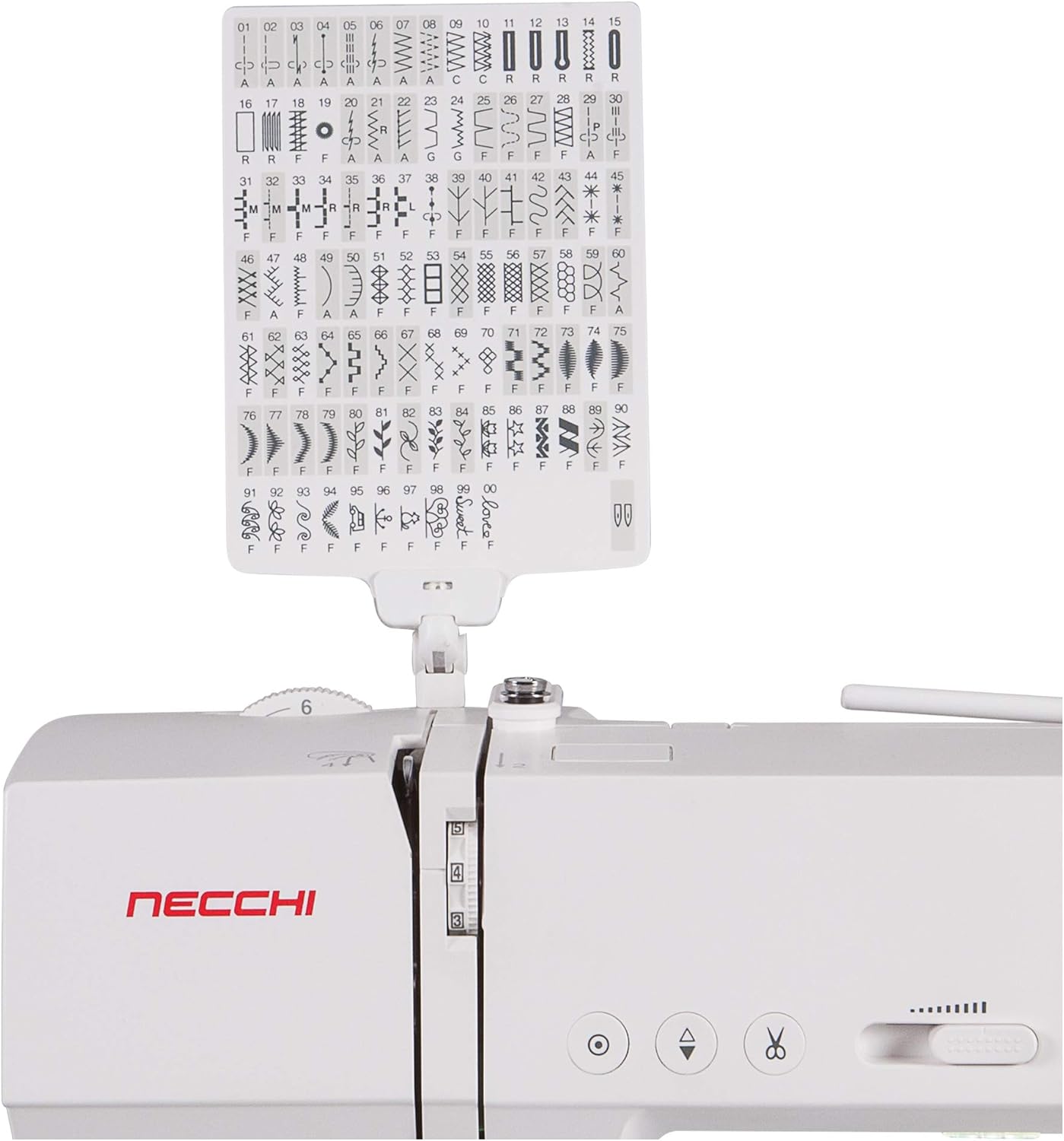
Figure 3.2: The comprehensive stitch chart for the Necchi EX100, displaying all 100 built-in stitch patterns and their corresponding numbers.
3.3 Adjusting Stitch Settings
The machine allows adjustment of stitch length and width. The maximum stitch width is 7mm. Consult the display panel and your manual for specific instructions on modifying these settings for different stitch types and fabric requirements.
3.4 Using the Optic Magnifier
The included optic magnifier can be attached to the machine to provide enhanced visibility for intricate sewing tasks or for users with vision challenges. Position it directly over the needle area for optimal viewing.
4. Maintenance
4.1 Cleaning
Regularly clean the bobbin area, feed dogs, and needle plate to remove lint and thread buildup. Use a small brush and avoid compressed air, which can push debris further into the machine. Ensure the machine is unplugged before cleaning.
4.2 Needle Replacement
Change the needle frequently, especially after 8-10 hours of sewing or if it becomes bent or dull. Use the correct needle type and size for your fabric. Loosen the needle clamp screw, remove the old needle, insert the new needle with the flat side facing the back, and tighten the screw securely.
5. Troubleshooting
This section addresses common issues you might encounter during operation. For more complex problems, refer to the full service manual or contact customer support.
| Problem | Possible Cause | Solution |
|---|---|---|
| Skipped Stitches | Incorrect needle, bent needle, improper threading. | Replace needle with correct type/size, re-thread machine, ensure needle is fully inserted. |
| Thread Breaking | Improper threading, incorrect tension, damaged needle, poor quality thread. | Re-thread machine, adjust tension, replace needle, use good quality thread. |
| Uneven Stitches | Incorrect tension, wrong needle for fabric, lint in bobbin case. | Adjust tension, change needle, clean bobbin case. |
| Machine Not Starting | Power cord not connected, power switch off, bobbin winder engaged. | Check power connections, turn power switch on, disengage bobbin winder. |
6. Specifications
| Feature | Detail |
|---|---|
| Brand | Necchi |
| Model Number | EX100 |
| Color | White |
| Material | Metal, Plastic |
| Item Weight | 23.79 Pounds |
| Power Source | AC Adapter |
| Built-in Stitches | 100 (including 6 buttonholes) |
| Maximum Stitch Width | 7mm |
| Extension Table | Included (16" x 11") |
| Special Features | Optic Magnifier, Automatic Thread Cutter, Needle Up/Down, Start/Stop Button |
7. Warranty and Support
7.1 Warranty Information
The Necchi EX100 Sewing Machine comes with the following warranty:
- 1 year labor
- 25 year housing/casting
- 5 year electronics
Please retain your proof of purchase for warranty claims.
7.2 Customer Support
For technical assistance, troubleshooting beyond this manual, or warranty service, please contact Necchi customer support. Refer to the contact information provided with your product packaging or visit the official Necchi website for current support details.


