Introduction
Thank you for purchasing the Tangkula Folding Wall Table. This manual provides essential information for the safe assembly, operation, and maintenance of your new wall-mounted desk. Please read all instructions carefully before use and retain this manual for future reference.
Safety Information
Always ensure the desk is securely mounted to the wall. Do not force the tabletop to fold down or up. Keep fingers away from the moving parts. Always use the drawer stoppers to prevent the drawer from falling out.
Package Contents
The package includes the following components:
- 1 x Wall-mounted Floating Desk
Setup and Assembly
The Tangkula Folding Wall Table requires assembly and secure wall mounting. Follow the steps below for proper installation.
- Prepare the Wall: Choose a suitable location on a sturdy wall. Ensure the mounting surface can support the weight of the desk and any items placed on it.
- Assemble Components: Follow the detailed instructions provided in the assembly video and included manual to connect all parts of the desk. This includes assembling the drawer and the main cabinet structure.
- Install Pneumatic Rods and Hinges: Attach the upgraded hydraulic rods and hinges to the tabletop panel and the main cabinet. These components ensure smooth and safe folding/unfolding.
- Mount to Wall: Use the sturdy wall hangers and complete accessories to securely mount the assembled cabinet onto the wall at your desired height. It is recommended to use a stud finder to locate wall studs for maximum stability.
- Attach Magnetic Catch and Knob: Install the magnetic door catch to keep the tabletop panel closed when not in use, and attach the convenient knob for easy opening.
For a visual guide, please refer to the assembly video below:
Video: Assembly instructions for the Tangkula Wall Mounted Desk.

Image: The Tangkula Folding Wall Table in its open position, showcasing the desktop and internal shelves. A laptop is placed on the desk surface, and decorative items are on the shelves.
Operating Instructions
The Tangkula Folding Wall Table is designed for versatile use and space-saving functionality.
- Folding Down the Tabletop: To open the desk, unlatch the magnetic catch and gently pull the tabletop panel downwards. The hydraulic rods will assist in a smooth descent, transforming the unit into a spacious worktop.
- Folding Up the Tabletop: To close the desk, lift the tabletop panel upwards until the magnetic catch engages, securing it in a compact, wall-mounted cabinet position.
- Using Storage: The desk features one drawer and six shelves. Utilize these compartments for organizing books, plants, ornaments, cosmetics, and other small items. The drawer includes stoppers to prevent accidental falling.
Video: Demonstration of the Tangkula Folding Wall Table in use, highlighting its functionality as a compact workspace.
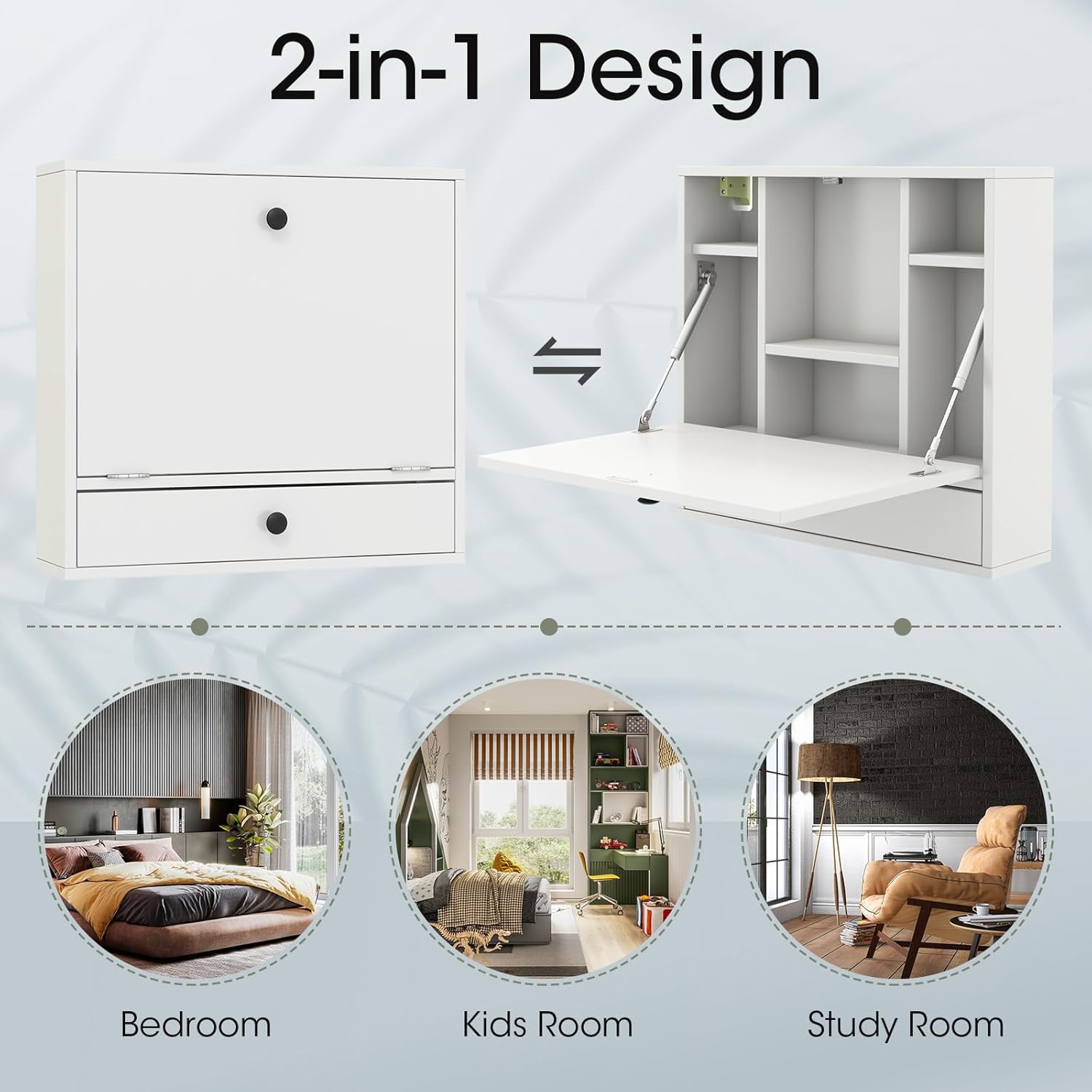
Image: A visual representation of the desk's 2-in-1 design, showing it as a closed cabinet and an open desk with internal shelving. Icons suggest its use in bedrooms, kids' rooms, and study rooms.

Image: The interior of the desk with the tabletop folded down, revealing six shelves and a drawer. Various items like books, plants, and a laptop are shown, illustrating its storage capacity.
Maintenance
To maintain the appearance and longevity of your Tangkula Folding Wall Table, wipe it with a dry cloth regularly. Avoid using harsh chemicals or abrasive cleaners that may damage the finish.
Troubleshooting
- Tabletop not folding smoothly: Check the hydraulic rods and hinges for any obstructions or loose screws. Ensure they are properly aligned and lubricated if necessary.
- Drawer falling out: Verify that the drawer stoppers are correctly installed and functioning. If the drawer is overloaded, remove some items to reduce weight.
- Desk feels unstable after mounting: Re-check all wall mounting hardware to ensure it is securely fastened, preferably into wall studs. If unsure, consult a professional for installation.
- Magnetic catch not holding: Ensure the magnetic catch components are aligned and free from debris. Adjust their position if needed to ensure a firm closure.
Specifications
| Feature | Detail |
|---|---|
| Brand | Tangkula |
| Shape | Rectangular |
| Desk Design | Computer Desk |
| Product Dimensions | 6"D x 24"W x 22.5"H |
| Color | White |
| Style | Modern |
| Base Material | Engineered Wood |
| Top Material Type | Engineered Wood |
| Finish Type | Wood |
| Special Feature | Adjustable |
| Room Type | Bedroom |
| Age Range Description | Adult |
| Included Components | 1 x Wall-mounted Floating Desk |
| Product Grade | new |
| Model Number | AM3814HM |
| Model Name | Wall Mounted Desk |
| Manufacturer | Tangkula |
| Item Height | 22.5 inches |
| Unit Count | 1 Count |
| Base | Engineered Wood |
| Product Care Instructions | Wipe with Dry Cloth |
| Additional Features | Adjustable |
| Mounting Type | Wall Mount |
| Drawer Type | Utility Drawer |
| Base Type | Metal |
| Storage Options | 1 Drawer, 6 Shelves |
| Cabinet Configuration | Built-In |
| Drawer Pedestal Count | 1 |
| Is Customizable? | No |
| Style Name | Modern |
| Furniture Finish | white |
| Top Color | White |
| Item Dimensions D x W x H | 6"D x 24"W x 22.5"H |
| Number of Drawers | 1 |
| Item Weight | 27.5 Pounds |
| Size | 24 inches x 6 inches x 22.5 inches |
| Number Of Shelves | 6 |
| Tabletop Thickness | 22.5 Inches |
| Storage Volume | 10 Inches |
| Maximum Height | 22.5 Inches |
| Minimum Height | 22.5 Inches |
| Working Surface Diagonal Length | 27 Inches |
| Number Of Enclosed Shelves | 6 |
| Required Assembly | Yes |
| Maximum Weight Recommendation | 11 Pounds |
| Includes All Assembly Tools | No |

Image: A detailed diagram illustrating the dimensions of the Tangkula Folding Wall Table, including measurements for the overall unit, individual shelves, and the desktop area. Weight capacities for different sections are also indicated.
Warranty & Support
For warranty information or technical support, please contact Tangkula customer service through the retailer where the product was purchased. Please have your model number (AM3814HM) and purchase date available.


