
1. Introduction
The LiNKFOR 3 Port Toslink Splitter is designed to distribute a single digital optical audio signal to three separate output devices simultaneously. This device is ideal for connecting multiple audio systems, such as soundbars, amplifiers, or wireless headphone transmitters, to a single optical audio source like a TV, Blu-ray player, or game console.
2. Features
- 1-Input, 3-Output Splitter: Splits one digital optical Toslink source to three optical Toslink SPDIF signals.
- Audio Format Support: Compatible with LPCM2.0, DTS, and Dolby-AC3 audio formats.
- Long Distance Transmission: Supports signal transmission up to 25 meters (82 feet) with minimal loss.
- Durable Construction: Aluminum alloy housing provides anti-interference and heat-resistance.
- LED Indicator: Clearly shows the device's working status.
- Over-voltage Protection: Safeguards the splitter from potential damage.
- Wide Compatibility: Works with devices such as PS3, STB, VHS, VCR, Blu-Ray DVD players, HDTVs, and power amplifiers.
- Power: Powered via a 5V 1A USB cable.
3. Package Contents

Image: Contents of the LiNKFOR 3 Port Toslink Splitter package.
- LiNKFOR 3 Port Digital Optical Audio Splitter (1 unit)
- Optical Cables (4 pieces, 1m each)
- USB Power Cable (1 piece)
- User Manual (1 piece)
4. Product Overview
The LiNKFOR Digital Audio Splitter features a compact design with clearly labeled ports for easy connection.
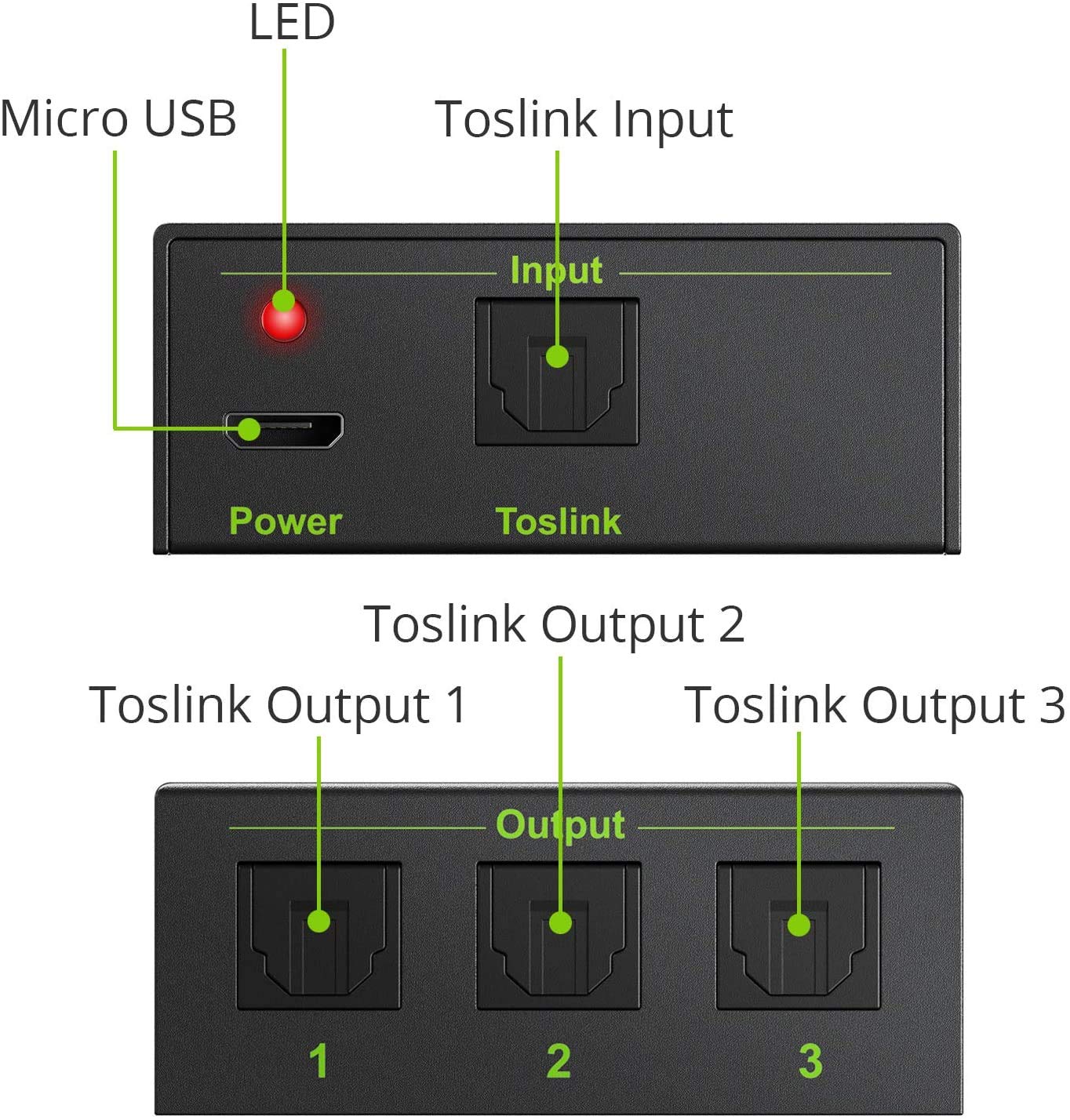
Image: Front and rear view of the splitter highlighting its ports and indicators.
- Micro USB Port: For connecting the 5V power supply.
- Power Indicator LED: Illuminates when the device is powered on.
- Toslink Input Port: Connects to your digital optical audio source (e.g., TV, game console).
- Toslink Output Ports (1, 2, 3): Connect to your audio receiving devices (e.g., soundbar, headphones).
5. Setup and Installation
Follow these steps to connect your LiNKFOR 3 Port Toslink Splitter:
- Connect the Source: Insert one end of an optical cable into the digital optical audio output port of your source device (e.g., TV, Blu-ray player).
- Connect to Splitter Input: Insert the other end of the optical cable into the "Input" port of the LiNKFOR Digital Audio Splitter.
- Connect Output Devices: Use optical cables to connect your audio receiving devices (e.g., soundbar, optical Bluetooth transmitter, DAC) to the "Output 1", "Output 2", and "Output 3" ports on the splitter.
- Power On: Connect the provided USB power cable to the Micro USB port on the splitter and plug the other end into a 5V USB power source (e.g., a USB wall adapter, TV USB port). The power indicator LED will light up.
- Select Audio Output: On your source device (e.g., TV), navigate to the audio settings and select "Optical" or "External Speaker" as the sound output.
Video: This video demonstrates the connection process for the LiNKFOR 3 Port Toslink Splitter, showing how to connect it to a TV, soundbar, and Bluetooth headphone adapter.

Image: Example setup with the splitter connecting a TV to a soundbar and wireless headphones.
6. Operating Instructions
Once all connections are made and the splitter is powered on, the digital optical audio signal from your source will be simultaneously transmitted to all connected output devices. Ensure that your receiving devices are also powered on and configured to receive audio from their optical input.
Important Note on Audio Formats:
This splitter supports LPCM2.0, DTS, and Dolby-AC3 audio formats. It does not support 7.1CH Dolby Digital Plus or Dolby TrueHD. These advanced audio formats typically require transmission via HDMI cable.

Image: Supported audio formats for the LiNKFOR Toslink Splitter.
7. Troubleshooting
- No Sound:
- Verify all optical cables are securely connected to both the source, splitter, and output devices.
- Ensure the splitter is powered on and the power indicator LED is lit.
- Check your source device's audio settings to confirm "Optical" or "External Speaker" is selected as the output.
- Confirm your receiving devices (soundbar, headphones) are powered on and set to their optical input.
- Test with different optical cables if possible.
- Some TVs may require specific audio output settings (e.g., PCM instead of Bitstream) for optical output compatibility. Adjust these settings on your TV.
- Poor Sound Quality/Intermittent Audio:
- Ensure optical cables are not bent sharply or damaged, as this can affect signal transmission.
- Check for dust or debris in the optical ports and cable ends. Clean gently if necessary.
- Verify that the audio format from your source is supported by the splitter (LPCM2.0, DTS, Dolby-AC3).
- Ensure the power supply is stable (5V 1A).
- Only One Output Working:
- Check the optical cable connections for the non-working outputs.
- Test the non-working output ports with a known good cable and device.
8. Specifications
| Product Dimensions | 9.06 x 6.3 x 0.98 inches |
| Item Weight | 10.6 ounces |
| Model Number | Optical Splitter |
| Manufacturer | LiNKFOR |
| Material | Aluminum Alloy |
| Input | 1 x Toslink |
| Output | 3 x Toslink |
| Supported Audio Formats | LPCM2.0, DTS, Dolby-AC3 |
| Max Transmission Distance | 25m (82ft) |
| Power Supply | 5V 1A via Micro USB |
9. Safety Information
- Do not expose the device to water, moisture, or extreme temperatures.
- Use only the specified power adapter (5V 1A USB).
- Do not attempt to open or repair the device yourself. Refer to qualified personnel.
- Keep out of reach of children.
- Avoid direct eye exposure to the optical fiber ends, as the laser light can be harmful.
10. Warranty and Support
For warranty information and technical support, please refer to the official LiNKFOR website or contact their customer service directly. Keep your purchase receipt for warranty claims.