
1. Introduction
The TP-Link AV1000 TL-WPA7510 KIT is a Powerline Wi-Fi Extender designed to expand your home network using your existing electrical wiring. This kit provides a stable and high-speed network connection to any room with a power outlet, eliminating Wi-Fi dead zones and providing reliable internet access for all your devices.
It leverages advanced HomePlug AV2 technology to deliver powerline speeds of up to 1000Mbps, ideal for bandwidth-intensive activities like 4K streaming and online gaming. The integrated dual-band Wi-Fi (300Mbps on 2.4GHz and 433Mbps on 5GHz) ensures fast and stable wireless connections. Additionally, a Gigabit Ethernet port allows for direct wired connections to devices such as smart TVs, gaming consoles, or PCs.

TP-Link AV1000 Powerline Wi-Fi Extender plugged into a wall outlet, demonstrating its compact design and integrated Wi-Fi signal.
2. Package Contents
Before you begin, please verify that your package contains the following items:
- TL-WPA7510 Powerline Wi-Fi Extender
- TL-PA7010 Powerline Adapter
- Ethernet Cable
- Quick Installation Guide

The retail packaging for the TP-Link AV1000 TL-WPA7510 KIT, displaying product features and branding.
3. Setup
Follow these steps to set up your TP-Link AV1000 Powerline Wi-Fi Extender Kit:
- Plug in the Powerline Adapter: Plug the TL-PA7010 Powerline Adapter into a wall outlet near your router.
- Connect to Router: Connect the TL-PA7010 to your router's LAN port using the provided Ethernet cable.
- Plug in the Wi-Fi Extender: Plug the TL-WPA7510 Powerline Wi-Fi Extender into a wall outlet in the room where you need Wi-Fi coverage. Ensure it's in the same electrical circuit as the adapter.
- Pair the Devices:
- Press the Pair button on the TL-PA7010 Powerline Adapter for 1 second. The Power LED will start blinking.
- Within 2 minutes, press the Pair button on the TL-WPA7510 Powerline Wi-Fi Extender for 1 second. The Power LED will start blinking.
- When the Power LEDs on both devices turn solid, the pairing is successful.
- Connect to Wi-Fi: The TL-WPA7510 will broadcast a Wi-Fi network. You can find the default Wi-Fi name (SSID) and password on the label attached to the extender. Connect your wireless devices to this network.
- Clone Wi-Fi (Optional): To unify your Wi-Fi network, you can use the Wi-Fi Clone button on the TL-WPA7510 to copy your router's Wi-Fi name and password. Press the Wi-Fi Clone button on the extender for 1 second, then press the WPS button on your router within 2 minutes.
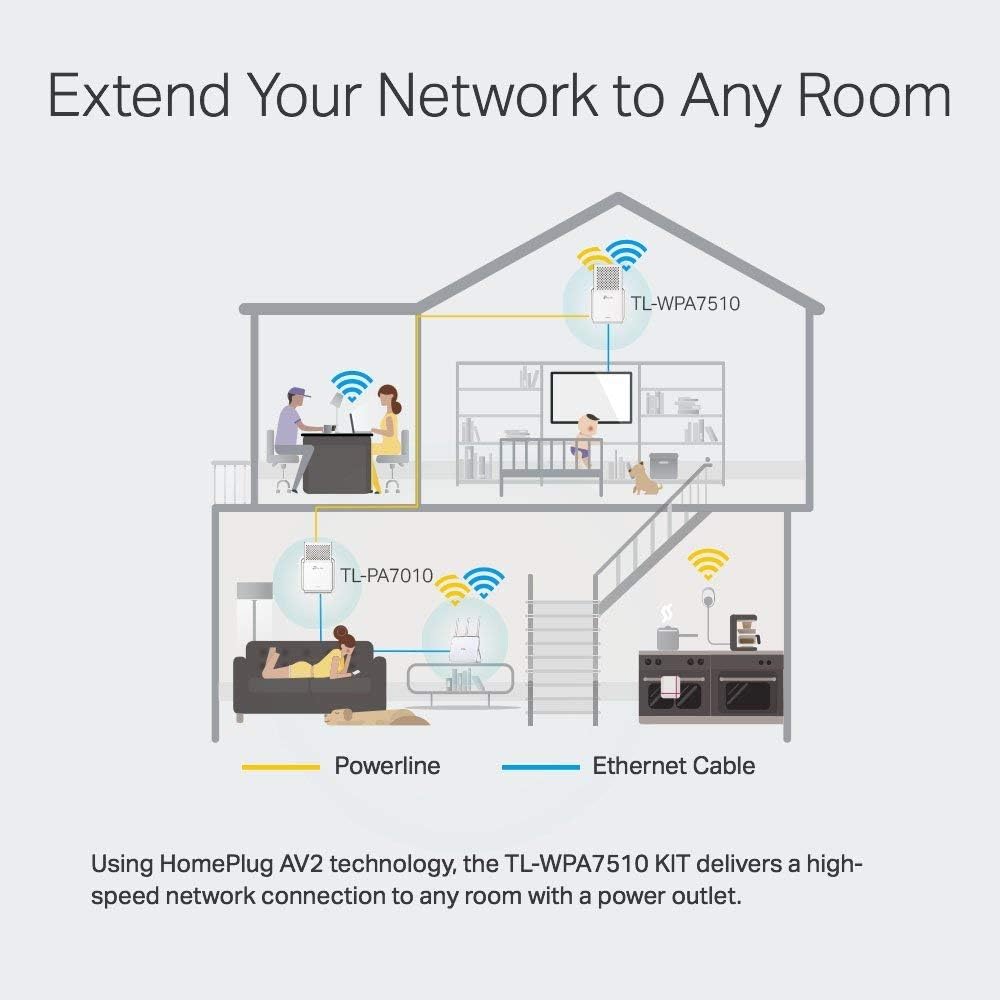
Diagram illustrating how the TP-Link Powerline system extends network connectivity throughout a home using existing electrical wiring, showing both powerline and Ethernet cable connections.
4. Operating
The TL-WPA7510 KIT operates by transforming your home's electrical wiring into a high-speed network. Once set up, it provides both wired and wireless connectivity.
Dual-Band Wi-Fi
The extender supports dual-band Wi-Fi, offering both 2.4GHz and 5GHz frequencies. The 2.4GHz band provides broader coverage, while the 5GHz band offers faster speeds and less interference, ideal for streaming and gaming. The total combined wireless transmission speed is up to 750Mbps (300Mbps on 2.4GHz and 433Mbps on 5GHz).

An interior room scene with a laptop and television, depicting the extended Wi-Fi coverage provided by the TP-Link AV1000 Powerline Wi-Fi Extender, highlighting dual-band AC Wi-Fi.
Gigabit Ethernet Port
The TL-WPA7510 features a Gigabit Ethernet port, allowing you to connect wired devices directly for maximum speed and stability. This is particularly beneficial for devices that require a consistent, high-bandwidth connection, such as desktop computers, smart TVs, or gaming consoles.

A couple watching television, with the TP-Link AV1000 Powerline Wi-Fi Extender visible near the TV, emphasizing the reliable Gigabit Ethernet connection for wired devices.
Power Saving Mode
The device is designed with power-saving features. It automatically reduces power consumption by up to 85% when not actively transmitting data, contributing to energy efficiency.
5. Maintenance
To ensure optimal performance and longevity of your TP-Link AV1000 TL-WPA7510 KIT, consider the following maintenance tips:
- Placement: Plug the powerline devices directly into wall outlets. Avoid power strips, surge protectors, or extension cords, as these can degrade performance.
- Cleaning: Keep the devices clean and free from dust. Use a soft, dry cloth for cleaning. Do not use liquid cleaners or aerosols.
- Ventilation: Ensure the devices have adequate ventilation. Do not block the ventilation holes.
- Environment: Operate the devices within their specified temperature and humidity ranges. Avoid extreme temperatures or high humidity.
6. Troubleshooting
If you encounter issues with your TP-Link AV1000 TL-WPA7510 KIT, refer to the following common problems and solutions:
- No Powerline Connection:
- Ensure both powerline devices are plugged directly into wall outlets and are powered on.
- Verify that both devices are on the same electrical circuit. Powerline performance can be affected by different electrical phases or circuit breakers.
- Try re-pairing the devices as described in the Setup section.
- Slow Powerline Speed:
- Avoid plugging devices into power strips or surge protectors.
- Relocate the powerline devices to different outlets to find the optimal connection.
- Large electrical appliances (e.g., refrigerators, washing machines) on the same circuit can cause interference. Try moving the powerline devices away from such appliances.
- No Wi-Fi Signal from Extender:
- Check if the Wi-Fi LED on the TL-WPA7510 is on. If not, press the Wi-Fi On/Off button.
- Ensure the powerline connection between the adapter and extender is stable (Power LED solid).
- Reset the extender to factory defaults and reconfigure.
- Cannot Access Web Management Page:
- Ensure your device is connected to the extender's Wi-Fi network or via Ethernet cable.
- Verify the correct IP address or domain name for the management page (refer to the Quick Installation Guide or TP-Link's website).
7. Specifications
| Feature | Detail |
|---|---|
| Model Number | TL-WPA7510 KIT-cr |
| Powerline Speed | Up to 1000 Mbps (HomePlug AV2) |
| Wireless Standard | IEEE 802.11ac/n/a 5GHz, IEEE 802.11b/g/n 2.4GHz |
| Wireless Transmission Speed | 750 Mbps (300 Mbps 2.4GHz + 433 Mbps 5GHz) |
| Ethernet Ports | 1 x Gigabit Ethernet Port (RJ45) |
| Distance Supported | Up to 984.25 ft (300 meters) over electrical circuit |
| Dimensions (Extender) | 5.35 x 2.8 x 1.93 inches |
| Item Weight | 1.23 pounds |
| Power Consumption | Power saving mode reduces consumption by up to 85% |
8. Warranty and Support
This TP-Link AV1000 TL-WPA7510 KIT is a Certified Refurbished product. It has been tested and certified to look and work like new. The refurbishing process includes functionality testing, basic cleaning, inspection, and repackaging. The product ships with all relevant accessories and a minimum 90-day warranty.
For technical support, warranty claims, or further assistance, please visit the official TP-Link website or contact their customer support channels. Keep your purchase receipt for warranty purposes.


