
MEKE MK-430
MEKE MK-430 TTL Flash Speedlite User Manual
For Nikon DSLR Cameras
1. Introduction
The MEKE MK-430 TTL Flash Speedlite is an external flash unit designed to provide enhanced lighting for your photography. It features a high guide number, multiple flash modes (TTL, Manual, Multi), and wireless triggering capabilities. This manual provides detailed instructions for its proper setup, operation, and maintenance to ensure optimal performance.
2. Safety Precautions
- Do not expose the flash unit to water or high humidity.
- Avoid direct eye exposure to the flash light, especially at close range, as it can cause temporary vision impairment.
- Keep the unit away from flammable gases or liquids.
- Do not attempt to disassemble or repair the flash unit yourself. Refer to qualified service personnel.
- Use only specified AA batteries. Do not mix old and new batteries or different types of batteries.
- Remove batteries if the flash will not be used for an extended period.
3. Package Contents
Please check that all the following items are included in your package:
- MEKE MK-430 Flash Speedlite
- Flash Stand
- Protective Bag
- User Manual (English)
4. Setup
4.1 Battery Installation
- Open the battery compartment cover located on the side or back of the flash unit.
- Insert four (4) AA-size batteries according to the polarity indicators (+/-) inside the compartment.
- Close the battery compartment cover securely.
Note: Ensure batteries are fully charged for optimal performance, especially during high-speed continuous shooting.
4.2 Mounting on Camera
- Slide the flash's hot shoe mount into your camera's hot shoe slot.
- Tighten the locking knob or lever on the flash unit to secure it firmly to the camera.

Image: Meike MK-430 Flash Speedlite mounted on a camera, showing its compact design and hot shoe connection.
5. Operating Instructions
5.1 Power On/Off
Press and hold the ON/OFF button to power the flash unit on or off. The LCD screen will illuminate upon power-on.
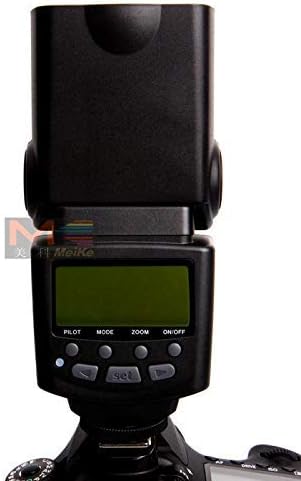
Image: Close-up of the flash's back panel, displaying the LCD screen and various control buttons for mode selection, zoom, and power.
5.2 Flash Modes
Press the MODE button to cycle through the available flash modes:
- TTL (Through-The-Lens) Mode: The flash output is automatically controlled by the camera's metering system to achieve correct exposure.
- M (Manual) Mode: You manually set the flash output level from 1/128 to 1/1, with 22 levels of fine adjustment.
- Multi (Stroboscopic) Mode: The flash fires multiple times during a single exposure, creating a stroboscopic effect.
5.3 Wireless Triggering (S1/S2 Modes)
The MK-430 features enhanced wireless trigger sensor sensitivity, making S1/S2 modes available for outdoor use. The wireless triggering distance is approximately 20-25m indoors and 10-15m outdoors.
- S1 Mode: The flash fires in response to the first flash from a master flash unit. This mode is suitable for manual flash or TTL flash without pre-flash.
- S2 Mode: The flash fires in response to the second flash from a master flash unit, ignoring the pre-flash. This mode is suitable for TTL flash with pre-flash.
Outdoor Usage Tips:
- Ensure the wireless trigger window on the MK-430 faces the main flash.
- Avoid direct sunlight on the trigger window.
- If light irradiation direction conflicts with trigger window orientation, rotate the flash head to meet shooting requirements while maintaining line of sight for the trigger.
- Do not place obstacles between the host flash and the slave flash, as they can block radio signal transmission.
Power Saving: In S1/S2 wireless flash mode, if the flash is idle for 30 minutes, it will automatically power off to conserve energy.
5.4 High-Speed Continuous Shooting
The flash supports high-speed continuous shooting. Set your camera to continuous shooting mode. The number of continuous shots depends on the flash output level. Use fully charged batteries for best results.
5.5 Zoom Function
The flash supports both manual and auto zoom functions (FEC, FEB). Use the ZOOM button to adjust the flash coverage to match your lens's focal length.
5.6 Flash Head Rotation
The flash head can be rotated for bounce flash photography:
- Vertical Rotation: 0 to 90 degrees.
- Horizontal Rotation: 0 to 270 degrees.

Image: The Meike MK-430 flash head tilted upwards, demonstrating its vertical rotation capability, with the built-in wide-angle diffuser pulled out.
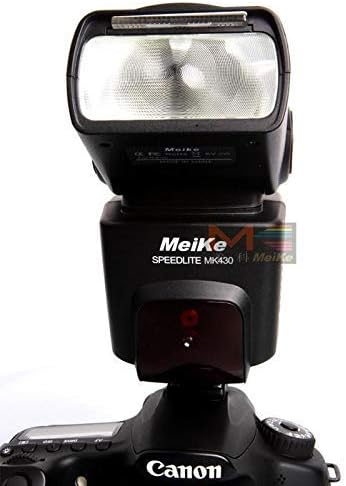
Image: Front view of the Meike MK-430 Flash Speedlite with its head in the forward-facing position, showing the flash tube and sensor.
6. Maintenance
6.1 Cleaning
- Use a soft, dry cloth to clean the flash unit.
- For stubborn dirt, lightly dampen the cloth with water or a mild cleaning solution, then wipe dry.
- Do not use strong solvents or abrasive cleaners.
- Keep the flash tube and sensor clean for optimal performance.
6.2 Storage
- Store the flash unit in a cool, dry place, away from direct sunlight and extreme temperatures.
- Remove batteries if storing for an extended period to prevent leakage.
- Use the provided protective bag to prevent dust and scratches.
7. Troubleshooting
| Problem | Possible Cause | Solution |
|---|---|---|
| Flash does not fire. | Low or dead batteries. Flash not securely mounted. Flash in sleep mode. | Replace batteries. Ensure flash is properly mounted and locked. Press any button to wake up the flash. |
| Wireless triggering (S1/S2) not working. | Obstruction between flashes. Incorrect mode selected. Trigger window not facing master flash. | Ensure clear line of sight. Verify S1 or S2 mode is active. Adjust flash position. |
| Slow recycling time. | Low battery power. High flash output setting. | Replace or recharge batteries. Reduce flash output if possible. |
| Flash output is inconsistent. | Low battery power. Dirty hot shoe contacts. | Replace or recharge batteries. Clean hot shoe contacts on both flash and camera. |
8. Specifications
| Circuit Design | Insulated Gate Bipolar Transistor (IGBT) |
| Guide Number | 36 (ISO 100, 105mm) |
| Flash Mode | TTL, M, Multi |
| Wireless Triggering Distance | 20-25m (Indoor), 10-15m (Outdoor) |
| Vertical Rotation Angle | 0-90 degrees |
| Horizontal Rotation Angle | 0-270 degrees |
| Power Supply | 4 x AA batteries |
| Lighting Times | 100-1500 times (with new AA alkaline batteries) |
| Recycle Time | Approx. 4 seconds |
| Color Temperature | 5600K |
| Flash Duration | 1/200s - 1/20000s |
| Flash Control | 1/128 - 1/1 output, 22 levels of fine adjustment |
| External Interface | Hot shoe, PC port, External charging port |
| Additional Features | FEC, FEB, Manual Zoom, Auto Zoom |
| Dimensions (Extended) | 165 x 74.6 x 59.2 mm |
| Net Weight | 275 g |
| Compatible Mounts | Nikon SB 700 (and other Nikon DSLR hot shoes) |
| ISO Range | 100-25600 |
| Water Resistance Level | Not waterproof |
9. Warranty and Support
For warranty information or technical support, please refer to the documentation provided with your purchase or contact the manufacturer directly. Keep your proof of purchase for any warranty claims.
Ask a question about this manual
Ask about setup, troubleshooting, compatibility, parts, safety, or missing instructions. Manuals+ will review the question and use this page’s manual context to help answer it.