
Introduction
Thank you for purchasing the Globo TYRELL White Plastic Table Lamp. This lamp combines modern design with practical features, including touch on/off control, a sensitive dimmer, an integrated LED light source, and an alarm function with a display showing time, date, and temperature. Please read this manual carefully before use to ensure proper operation and maintenance.
Safety Instructions
- Ensure the lamp is placed on a stable, flat surface to prevent tipping.
- Do not expose the lamp to excessive moisture or direct water. This product is for indoor use only.
- Use only the provided power adapter. Using an incompatible adapter may damage the lamp or pose a safety risk.
- Do not attempt to disassemble or repair the lamp yourself. Refer all servicing to qualified personnel.
- Keep the lamp away from heat sources and direct sunlight to prevent damage to plastic components.
- The LED light source is not replaceable. Do not attempt to remove or replace it.
Package Contents
Please check the package for the following items:
- Globo TYRELL Table Lamp (Model: 58329W)
- Power Adapter
- User Manual (this document)
Setup
- Unpack the Lamp: Carefully remove the lamp and all components from the packaging. Retain packaging for future storage or transport.

Image: The Globo TYRELL table lamp in its upright position, showcasing its sleek white design and integrated display.
- Position the Lamp: Place the lamp on a stable, flat surface where you intend to use it. Ensure there is adequate space around the lamp for ventilation and adjustment.
- Connect the Power Adapter: Insert the small end of the power adapter cable into the power input port located at the back or base of the lamp. Plug the other end of the adapter into a standard electrical outlet.

Image: A close-up view of the lamp's base, highlighting the touch-sensitive power and brightness controls.
- Initial Power On: Once connected, the lamp's display should illuminate. The lamp is now ready for operation.
Operating Instructions
Power On/Off and Dimmer Control
- Power On/Off: Lightly touch the On/Off symbol (power icon) on the lamp's base to turn the light on or off.
- Adjusting Brightness (Dimmer): With the lamp on, touch and hold the Brightness symbol (sun icon) on the base. The light intensity will gradually increase or decrease. Release your finger when the desired brightness is reached.

Image: The lamp with its LED light panel illuminated, angled for reading or task lighting.
Display Functions (Time, Date, Temperature, Alarm)
The lamp features an integrated LCD display on its arm, showing current time, date, day of the week, and ambient temperature.

Image: A detailed view of the lamp's LCD display, showing the time, month, date, day of the week, and temperature readings.
- Setting Time and Date:
Specific instructions for setting time and date are typically found on the device itself or in a dedicated section of the manual. Look for small buttons or touch areas near the display for "SET", "MODE", or arrow icons. Press "SET" or "MODE" to cycle through settings (hour, minute, year, month, day) and use arrow buttons to adjust values. Press "SET" again to confirm each setting.
- Alarm Function:
To set the alarm, locate the alarm setting button (often indicated by a bell icon). Press it to enter alarm setting mode. Use the adjustment buttons to set the desired alarm time. Confirm the setting. Ensure the alarm is activated (usually indicated by a small alarm icon on the display).
- Temperature Display: The lamp automatically displays the ambient temperature. No user input is required for this function.
Adjusting Lamp Position
The lamp features an adjustable arm and head, allowing you to direct the light as needed. Gently pivot the lamp arm and head to achieve the desired angle. Do not force the joints beyond their natural range of motion.
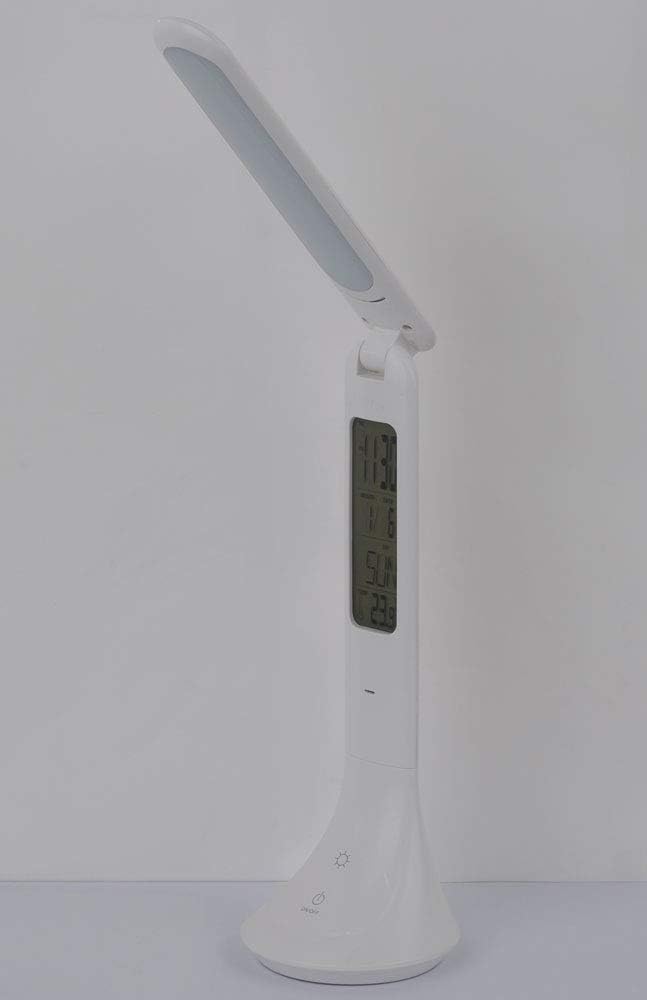
Image: The lamp shown in a compact, folded position, demonstrating its adjustable design for storage or portability.
Maintenance
- Cleaning: Before cleaning, always unplug the lamp from the power outlet. Use a soft, dry, or slightly damp cloth to wipe the lamp's surface. Do not use abrasive cleaners, solvents, or harsh chemicals, as these can damage the plastic finish and display.
- Storage: If storing the lamp for an extended period, unplug it and store it in a cool, dry place, preferably in its original packaging to protect it from dust and damage.
- LED Light Source: The LED light source in this lamp is designed for long-term use and is not user-replaceable.
Troubleshooting
| Problem | Possible Cause | Solution |
|---|---|---|
| Lamp does not turn on. |
|
|
| Dimmer function not responding. |
|
|
| Display is blank or flickering. |
|
|
| Alarm does not sound. |
|
|
Specifications
| Brand | Globo |
| Model Number | 58329W |
| Dimensions (L x W x H) | 20 x 9 x 42.5 cm (7.87 x 3.54 x 16.73 inches) |
| Weight | 350 grams (0.77 lbs) |
| Material | Plastic |
| Color | White |
| Light Source Type | Integrated LED |
| Power Consumption | 4 Watts |
| Luminous Flux (Output) | 200 lumens |
| Color Temperature | 4000K (Neutral White) |
| Voltage | 230V |
| Switch Type | Touch Control |
| Special Features | Dimmable, Alarm Function, Time/Date/Temperature Display |
| Components Included | Adapter |
Warranty and Support
For warranty information, please refer to the terms and conditions provided by your retailer at the time of purchase. This product is designed for durability and long-term performance.
Please note that information regarding the availability of spare parts for this product is currently unavailable. For any technical support or service inquiries, please contact your point of purchase or the manufacturer, Globo Lighting.


