
1. Introduction
This manual provides essential information for the safe and efficient operation of your PowerDrive 1000W Bluetooth Pure Sine Wave Power Inverter. This device converts 12V DC power from your vehicle's battery into 110V AC power, suitable for sensitive electronics. Please read this manual thoroughly before installation and use.
2. Safety Information
WARNING: Improper installation or use can result in electric shock, fire, or damage to the inverter and connected devices. Always follow these safety guidelines.
- Ventilation: Ensure the inverter is installed in a well-ventilated area. Do not block ventilation openings.
- Moisture: Do not expose the inverter to rain, moisture, or water.
- Flammable Materials: Do not operate the inverter near flammable materials, gases, or vapors.
- Connection: Connect the inverter only to a 12V DC power source. Ensure correct polarity (+ to + and - to -). Incorrect connection will damage the inverter.
- Grounding: The inverter must be properly grounded.
- Load Capacity: Do not exceed the inverter's continuous power rating of 1000 watts. Overloading can cause damage or fire.
- Children: Keep the inverter out of reach of children.
- Servicing: Do not attempt to service the inverter yourself. Refer all servicing to qualified personnel.
- Proposition 65 Warning: This product may contain chemicals known to the State of California to cause cancer and birth defects or other reproductive harm.
3. Product Features
- 1000W Continuous Power: Powers AC devices up to 1000 watts.
- Pure Sine Wave Output: Provides clean, stable power for sensitive electronics.
- Bluetooth Connectivity: Monitor and control the inverter via a smartphone app.
- Dual AC Outlets: Two 3-prong 110V AC outlets.
- USB Charging Ports: One Standard USB 2.4A port and one USB-C 3.0A port for charging smartphones, tablets, and other devices.
- Detachable Front Panel: Allows for remote placement of controls.
- Integrated Protection: Features LED indicator lights for various protection modes.
4. Package Contents
Verify that all items are present in the package:
- PowerDrive PDIPS1000B 1000 Watt Bluetooth Pure Sine Wave Power Inverter
- 5 replaceable 30 amp fuses
- Battery connection cables (red and black)
- Detachable front panel cable

Image: The PowerDrive 1000W Bluetooth Pure Sine Wave Power Inverter shown within its retail packaging.
5. Setup and Installation
5.1 Inverter Overview

Image: Angled view of the PowerDrive 1000W Inverter, showing the front panel with display and outlets, and the main casing.
5.2 Connecting to a 12V DC Power Source
- Preparation: Ensure the vehicle engine is off and the inverter's power switch is in the OFF position.
- Battery Connections: Connect the red (positive) battery cable to the positive (+) terminal of the inverter and then to the positive (+) terminal of the 12V battery. Connect the black (negative) battery cable to the negative (-) terminal of the inverter and then to the negative (-) terminal of the 12V battery. Ensure connections are tight and secure.
- Grounding: Connect the inverter's grounding terminal to a good chassis ground in your vehicle.

Image: Side view of the PowerDrive 1000W Inverter showing the red and black battery connection terminals with cables attached.
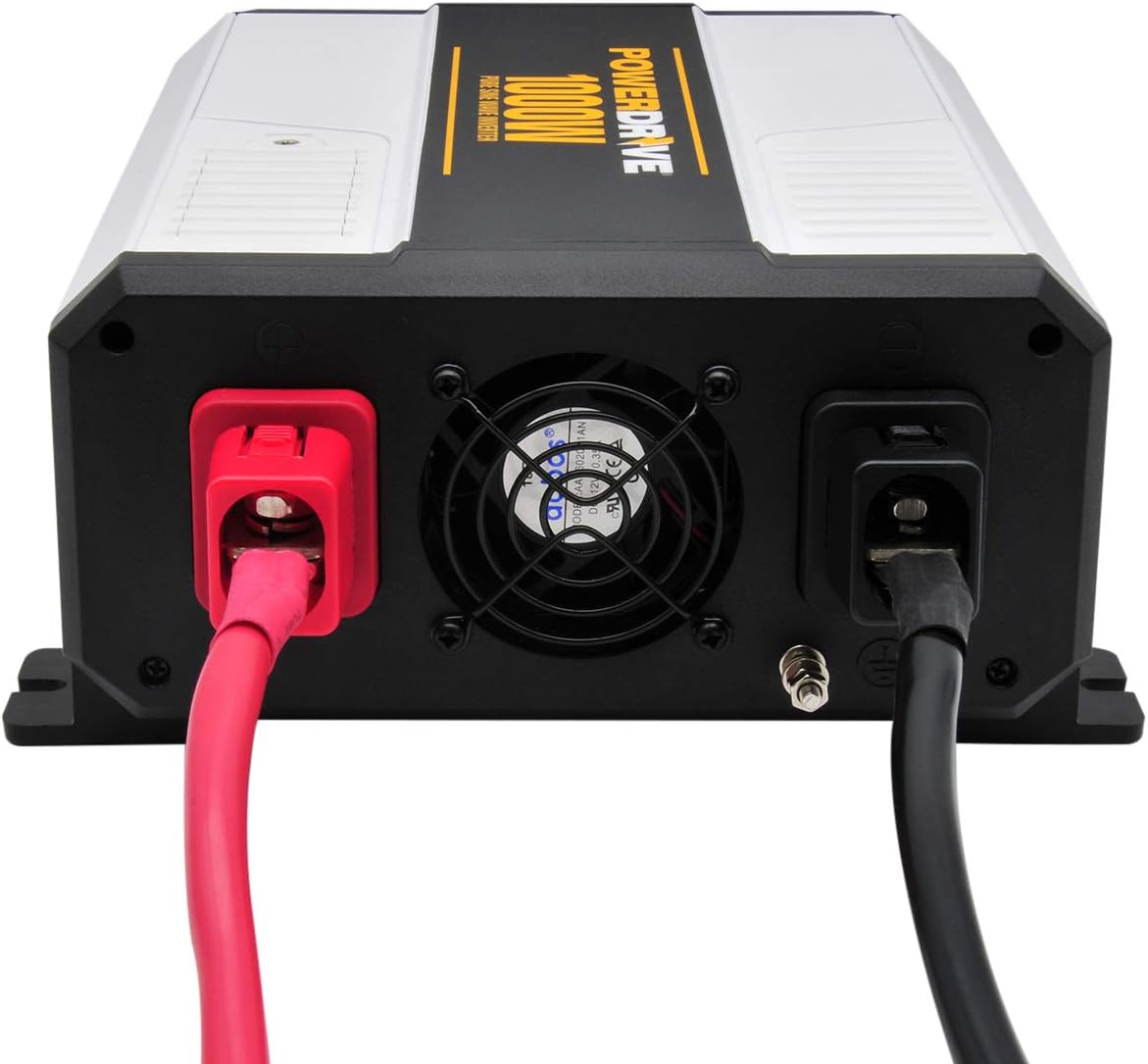
Image: Rear view of the PowerDrive 1000W Inverter, highlighting the cooling fan and the main power input connection.
5.3 Detachable Front Panel
The inverter features a detachable front panel for remote control and monitoring. To use it:
- Gently pull the front panel away from the main unit.
- Connect the provided cable to the port on the back of the detachable panel and the corresponding port on the inverter.
- Mount the detachable panel in a convenient location.
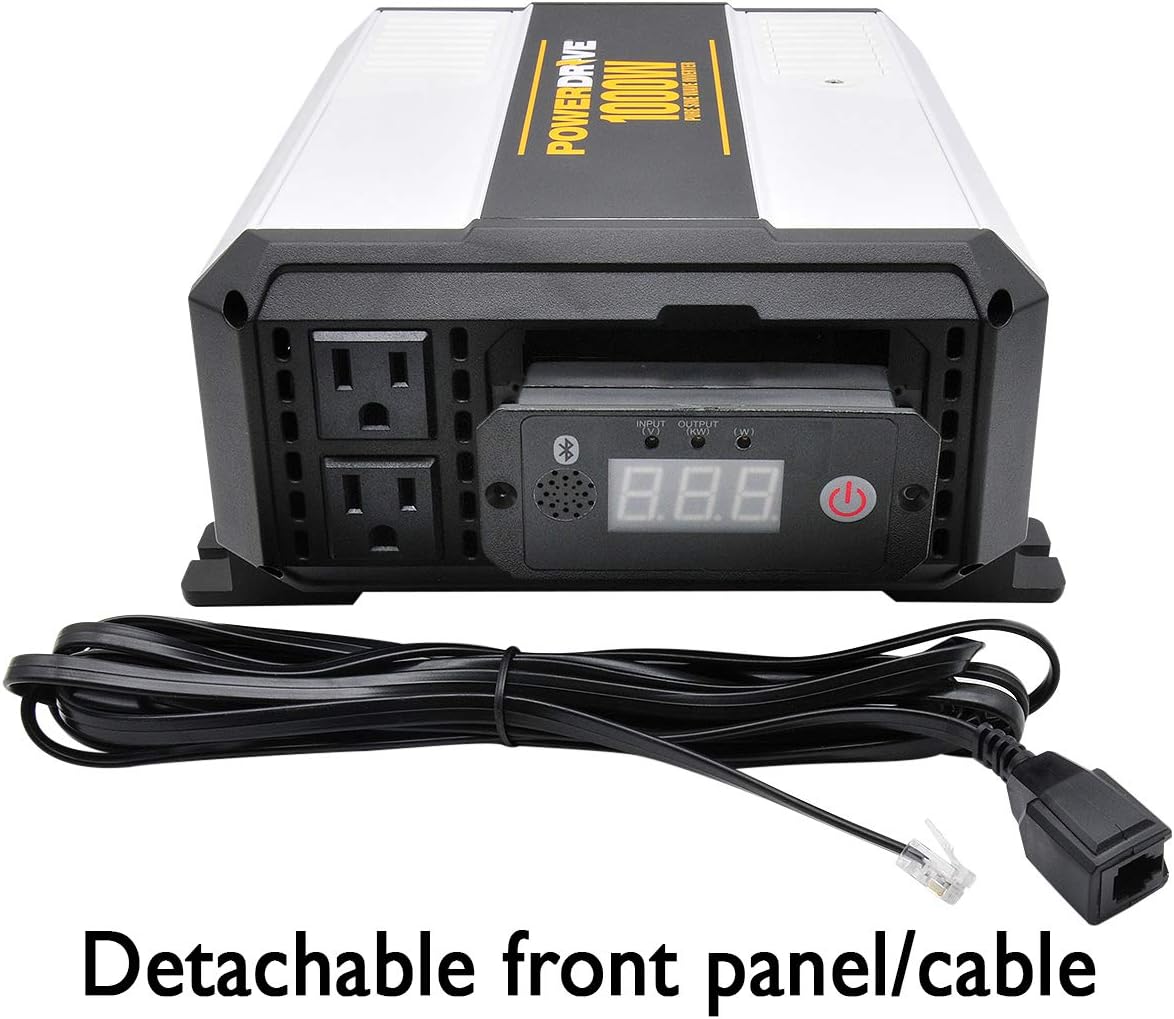
Image: The PowerDrive 1000W Inverter with its front control panel detached and connected via a cable, illustrating the remote control feature.
6. Operation
6.1 Powering On/Off
- After securing all connections, press the power button on the front panel to turn the inverter ON. The display will illuminate.
- To turn OFF, press the power button again.

Image: Close-up view of the PowerDrive 1000W Inverter's front panel, showing the digital display, power button, AC outlets, and USB ports.
6.2 Using AC Outlets and USB Ports
- Plug your 110V AC devices into the two 3-prong AC outlets.
- Connect your USB-powered devices to the Standard USB (2.4A) or USB-C (3.0A) ports for charging.
- Ensure the total wattage of all connected devices does not exceed 1000 watts.
6.3 Bluetooth App Connectivity
The PowerDrive inverter can be monitored and controlled via a Bluetooth-enabled smartphone app.
- Download the official PowerDrive app from your device's app store.
- Ensure Bluetooth is enabled on your smartphone.
- Turn on the inverter.
- Open the PowerDrive app and follow the on-screen instructions to pair with your inverter.
- Once connected, you can monitor input/output voltage, wattage, and potentially control the inverter remotely.
7. Maintenance
7.1 Fuse Replacement
The inverter includes replaceable 30 amp fuses. If the inverter stops functioning due to an overload or short circuit, a fuse may need replacement.
- Turn off the inverter and disconnect it from the 12V power source.
- Locate the fuse access door (refer to the product diagram if available).
- Open the fuse access door and carefully remove the blown fuse.
- Insert a new 30 amp fuse. Use only fuses of the specified rating.
- Close the fuse access door and reconnect the inverter.
7.2 General Care
- Keep the inverter clean and free from dust and debris. Use a dry cloth for cleaning.
- Ensure ventilation openings are clear at all times.
- Regularly check battery cable connections for tightness.
8. Troubleshooting
If you encounter issues with your PowerDrive inverter, refer to the following common problems and solutions:
| Problem | Possible Cause | Solution |
|---|---|---|
| No power output / Inverter not turning on | Loose battery connections Blown fuse Low battery voltage Inverter protection mode activated | Check and tighten battery cable connections. Replace blown fuses (see Section 7.1). Recharge or replace the 12V battery. Turn off the inverter, disconnect load, and restart. |
| Overload warning / Inverter shuts down | Connected device(s) exceed 1000W High surge current from device | Reduce the total wattage of connected devices. Try connecting devices one at a time. Some devices have high startup (surge) power requirements. |
| Bluetooth connection issues | Bluetooth not enabled on phone App not installed or updated Interference | Ensure Bluetooth is active on your smartphone. Download or update the PowerDrive app. Move closer to the inverter; minimize other wireless devices. |
| Fan running constantly or loudly | High internal temperature Dust buildup in fan | Ensure adequate ventilation around the inverter. Clean fan vents carefully with compressed air (inverter off and disconnected). |
If the problem persists after attempting these solutions, contact PowerDrive customer support.
9. Specifications
| Feature | Specification |
|---|---|
| Model Number | PDIPS1000B |
| Continuous Power | 1000 Watts |
| Input Voltage | 12V DC |
| Output Voltage | 110V AC |
| Output Waveform | Pure Sine Wave |
| AC Outlets | Two 3-prong |
| USB Ports | 1x Standard USB 2.4A, 1x USB-C 3.0A |
| Connectivity | Bluetooth |
| Dimensions (L x W x H) | 11.53 x 9.05 x 4.20 inches |
| Item Weight | 5.2 pounds |
| Included Fuses | 5 replaceable 30 amp fuses |
10. Warranty and Support
For warranty information and customer support, please refer to the documentation provided with your purchase or visit the official PowerDrive website. Keep your proof of purchase for warranty claims.
Brand: PowerDrive

