
Introduction
This manual provides essential information for the safe and efficient operation of your Milwaukee USB Rechargeable Pivoting LED Light, model 2113-21. Please read these instructions thoroughly before using the product and retain them for future reference.
Safety Information
Always observe basic safety precautions when using electrical devices to reduce the risk of fire, electric shock, and personal injury.
- Eye Safety: Do not stare directly into the LED light. The intense light can cause temporary vision impairment or eye damage.
- Charging: Use only the provided USB cable or a certified equivalent. Do not attempt to charge the device with damaged cables or in wet conditions.
- Battery Care: Do not expose the battery to extreme temperatures, direct sunlight, or fire. Do not puncture or disassemble the battery.
- Water Exposure: This product is not waterproof. Avoid exposure to water or other liquids.
- Children: Keep the device out of reach of children.
- Disassembly: Do not attempt to disassemble or modify the light. This will void the warranty and may result in injury.
Package Contents
Verify that all items are present upon unpacking:
- Milwaukee USB Rechargeable Pivoting LED Light (Model 2113-21)
- USB Charging Cable
- User Manual (this document)
Product Overview
Familiarize yourself with the components of your LED light:
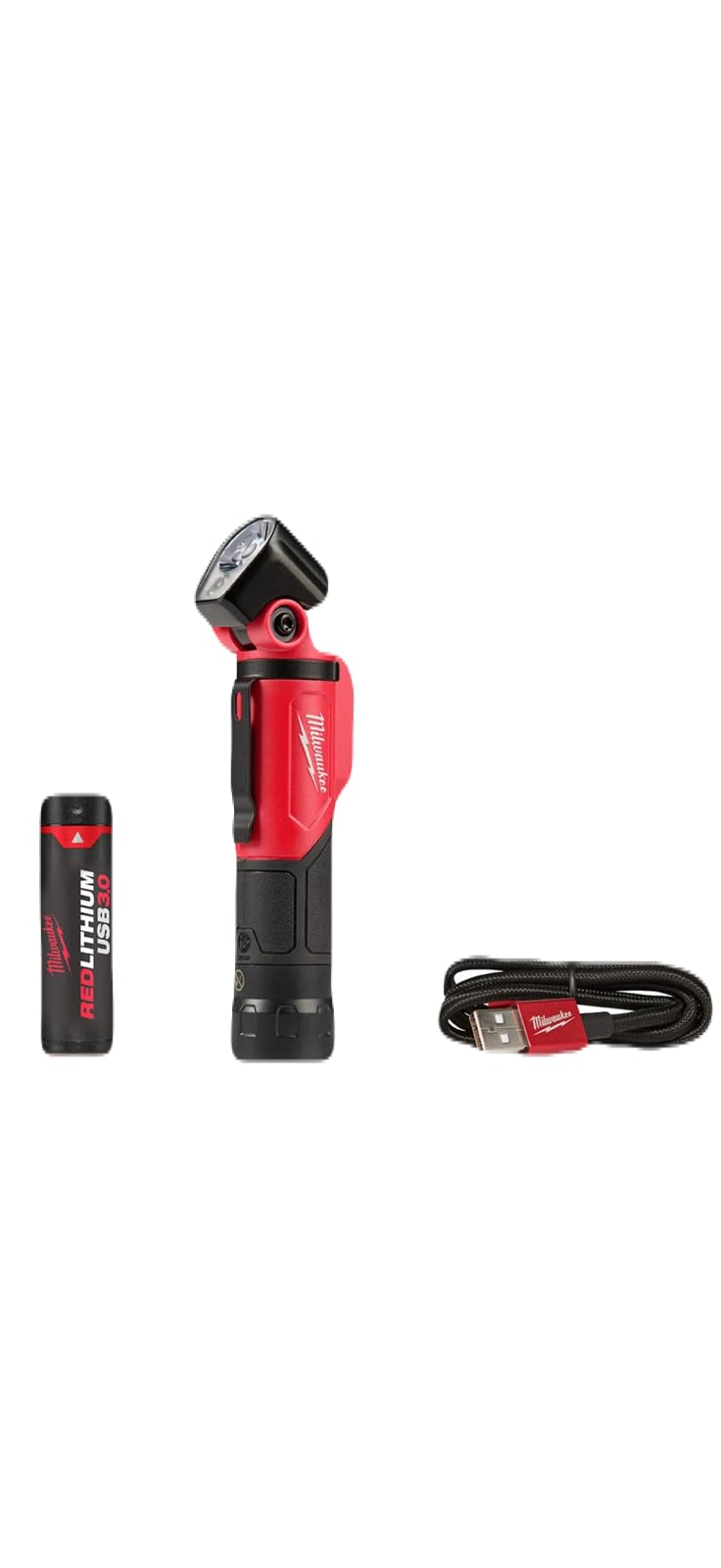
This image displays the Milwaukee USB Rechargeable Pivoting LED Light, highlighting its compact form factor and the adjustable pivoting head, which allows for versatile illumination angles.
- Pivoting Head: Allows for multi-directional light adjustment.
- LED Array: Provides bright, efficient illumination.
- Power Button: Controls power on/off and cycles through light modes.
- USB Charging Port: For recharging the internal battery.
- Magnetic Base: Enables hands-free attachment to metal surfaces.
- Battery Indicator: (Typically small LED lights) Shows battery charge status.
Setup
Charging the Battery
- Locate the USB charging port on the light.
- Connect the smaller end of the provided USB charging cable to the light's USB port.
- Connect the larger end of the USB cable to a standard USB power source (e.g., wall adapter, computer USB port, power bank).
- The battery indicator light will typically illuminate red while charging and turn green when fully charged.
- A full charge may take several hours. Disconnect the light once charging is complete.
Operating Instructions
Power On/Off and Light Modes
- To Power On: Press the Power Button once. The light will typically turn on in its highest brightness mode.
- To Change Light Modes: While the light is on, press the Power Button repeatedly to cycle through available brightness settings (e.g., High > Medium > Low > Off). Some models may include a strobe or floodlight mode.
- To Power Off: Continue pressing the Power Button until the light turns off, or press and hold the Power Button for approximately 2 seconds.
Adjusting the Pivoting Head
The light features a pivoting head for directional illumination. Gently adjust the head to the desired angle to direct the light beam where needed. Avoid forcing the head beyond its designed range of motion.
Using the Magnetic Base
The integrated magnetic base allows for hands-free operation. Simply attach the base to any ferrous metal surface. Ensure the surface is clean and stable enough to support the light securely.
Maintenance
Cleaning
To clean the light, wipe the exterior with a soft, damp cloth. Do not use abrasive cleaners, solvents, or harsh chemicals, as these can damage the finish or internal components. Ensure the charging port cover is closed before cleaning.
Storage
When not in use, store the light in a cool, dry place away from direct sunlight and extreme temperatures. For long-term storage, it is recommended to charge the battery periodically (e.g., every 3-6 months) to maintain battery health and extend its lifespan.
Battery Care
To maximize battery life, avoid fully discharging the battery frequently. Recharge the light when the battery indicator shows low power.
Troubleshooting
| Problem | Possible Cause | Solution |
|---|---|---|
| Light does not turn on | Battery is discharged | Recharge the battery using the USB cable. |
| Light is dim or flickers | Low battery charge | Recharge the battery. |
| Light does not charge | Faulty USB cable or power source | Try a different USB cable or power adapter. Ensure connections are secure. |
| Pivoting head is stiff | Dust or debris in the joint | Gently clean around the pivot point. Do not apply lubricants or force. |
Specifications
- Manufacturer: Milwaukee
- Model Number: 2113-21
- Product Dimensions: 2.54 x 2.54 x 15.24 cm (1 x 1 x 6 inches)
- Weight: 281.23 g (0.62 lbs)
- ASIN: B07KFMRCQ9
- Features: Rechargeable, Pivoting Head, Magnetic Base
- Power Source: Battery Powered (USB Rechargeable)
- Light Source Type: LED
- Material: Aluminum
- Lumen Output: 500 Lumens (as per product description)
Warranty and Support
For warranty information, technical support, or service inquiries, please refer to the official Milwaukee website or contact their customer service department directly. Keep your purchase receipt as proof of purchase for warranty claims.


