1. Introduction
This manual provides essential information for the safe and efficient operation, maintenance, and troubleshooting of your Fimer X206 Inverter Welding Machine. Please read this manual thoroughly before using the machine to ensure proper handling and to prevent injury or damage. Keep this manual in a safe place for future reference.
3. Setup
Proper setup is crucial for safe and effective welding. Follow these steps carefully.
3.1 Unpacking and Inspection
- Carefully remove the welding machine and all accessories from the packaging.
- Inspect the machine for any signs of damage that may have occurred during shipping. If damage is found, do not operate the machine and contact your supplier immediately.
- Verify that all components listed in the packing list are present.
3.2 Connecting the Welding Cables
The Fimer X206 uses standard quick-connect terminals for welding cables.
- Ground Clamp Connection: Connect the ground clamp cable to the negative (-) terminal on the front panel of the welding machine. Ensure a secure connection by twisting the connector clockwise. Attach the ground clamp to the workpiece, ensuring good electrical contact.
- Electrode Holder Connection: Connect the electrode holder cable to the positive (+) terminal on the front panel. Twist clockwise to secure. Insert the welding electrode into the holder.
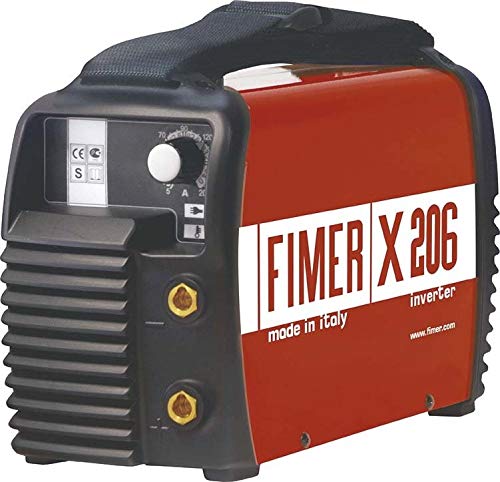
Image 1: Front panel of the Fimer X206 Inverter Welding Machine showing cable connection points. The negative terminal is for the ground clamp, and the positive terminal is for the electrode holder.
3.3 Power Connection
- Ensure the welding machine's power switch is in the "OFF" position.
- Connect the power cord to a suitable power outlet. The Fimer X206 requires a 220-240V AC, 50/60Hz power supply. Ensure the circuit can handle the machine's maximum current draw (180 Amperes).
- Do not use extension cords unless absolutely necessary, and if used, ensure they are rated for the appropriate current and voltage.
4. Operating Instructions
This section details the steps for operating your Fimer X206 Inverter Welding Machine.
4.1 Powering On and Initial Settings
- Ensure all safety precautions are observed and the work area is prepared.
- Turn the power switch to the "ON" position. The power indicator light should illuminate.
- Adjust the welding current using the control knob on the front panel. Refer to the electrode manufacturer's recommendations for appropriate current settings based on electrode type and material thickness.
4.2 Welding Process (MMA/Stick Welding)
- Secure the workpiece and ensure the ground clamp has good contact.
- Insert the appropriate electrode into the electrode holder.
- Position the electrode tip near the workpiece. Strike an arc by lightly touching the electrode to the workpiece and quickly lifting it slightly to establish the arc.
- Maintain a consistent arc length and travel speed to produce a stable weld bead.
- When finished, break the arc by quickly pulling the electrode away from the workpiece.
- Allow the weld to cool before handling.
4.3 Overload Protection
The Fimer X206 is equipped with thermal overload protection. If the machine overheats, the overload indicator light will illuminate, and the welding output will cease. Allow the machine to cool down for several minutes before resuming operation. Ensure adequate ventilation around the machine to prevent frequent overheating.
5. Maintenance
Regular maintenance ensures the longevity and optimal performance of your welding machine.
5.1 Daily Maintenance
- Inspect welding cables and connections for damage or wear. Replace any damaged cables immediately.
- Clean the electrode holder and ground clamp to ensure good electrical contact.
- Wipe down the exterior of the machine to remove dust and debris.
5.2 Periodic Maintenance (Monthly/Quarterly)
- Disconnect the machine from the power supply.
- Use compressed air to blow out dust and metal particles from inside the machine's ventilation openings. Do this in a well-ventilated area.
- Check all electrical connections for tightness.
- Inspect the power cord for any signs of damage.
Caution: Do not open the machine casing unless you are a qualified service technician. High voltages are present even when the machine is unplugged.
8. Warranty and Support
For warranty information and technical support, please contact your authorized Fimer dealer or visit the official Fimer website. Keep your purchase receipt as proof of purchase for warranty claims.
Note: Unauthorized repairs or modifications will void the product warranty.
