
1. Introduction
This manual provides detailed instructions for the proper setup, operation, and maintenance of your SIRUI AM-223+SL-100 Lightweight Carbon Fiber Mini Travel Tripod. Designed for portability and stability, this tripod system is ideal for various photographic applications, offering flexible height adjustments and robust support for your camera equipment.
The SIRUI AM-223+SL-100 combines a durable carbon fiber tripod with a two-section center column, providing a maximum height of 26 inches and supporting up to 22 lbs (10 kg). Its compact and lightweight design makes it suitable for both indoor and outdoor use.
2. Package Contents
Before proceeding, please verify that all components are present in your package:
- SIRUI AM-223 Tripod
- SIRUI SL-100 Two-Section Center Column
- Carrying Bag
- Hex Key (x3)
- Steel Spikes (x3)
- Instruction Manual (this document)
- Warranty Card

Image: Overview of the SIRUI AM-223+SL-100 tripod and its included accessories, such as the carrying bag, hex keys, and steel spikes.
3. Setup and Assembly
3.1 Attaching the Center Column (Optional)
The SL-100 two-section carbon center column can be attached to the AM-223 tripod to increase the working height. To attach:
- Ensure the tripod legs are folded or extended as desired.
- Locate the mounting screw on the top plate of the AM-223 tripod.
- Align the base of the SL-100 center column with the mounting screw and rotate clockwise until securely fastened.
- To extend the center column, twist the locking collars on the SL-100 counter-clockwise to loosen, pull out the sections to the desired height, and twist clockwise to lock.
The center column can be detached for a lighter setup or for extremely low-angle shots.
3.2 Extending and Adjusting Tripod Legs
The AM-223 tripod features three leg sections with twist-lock mechanisms for quick adjustment.
- Extend Legs: Twist the leg locking collars counter-clockwise to loosen. Pull out the leg sections to the desired length. Twist the collars clockwise to securely lock each section.
- Adjust Leg Angle: Each leg has a semi-automatic adjustment system. Press the blue button near the top of each leg to release the leg angle lock. You can select from three preset angles: 22°, 55°, and 85°. Push the leg into the desired position until it clicks into place.

Image: Close-up view of the blue semi-automatic button for adjusting leg angles on the SIRUI AM-223 tripod, showing the three available positions.
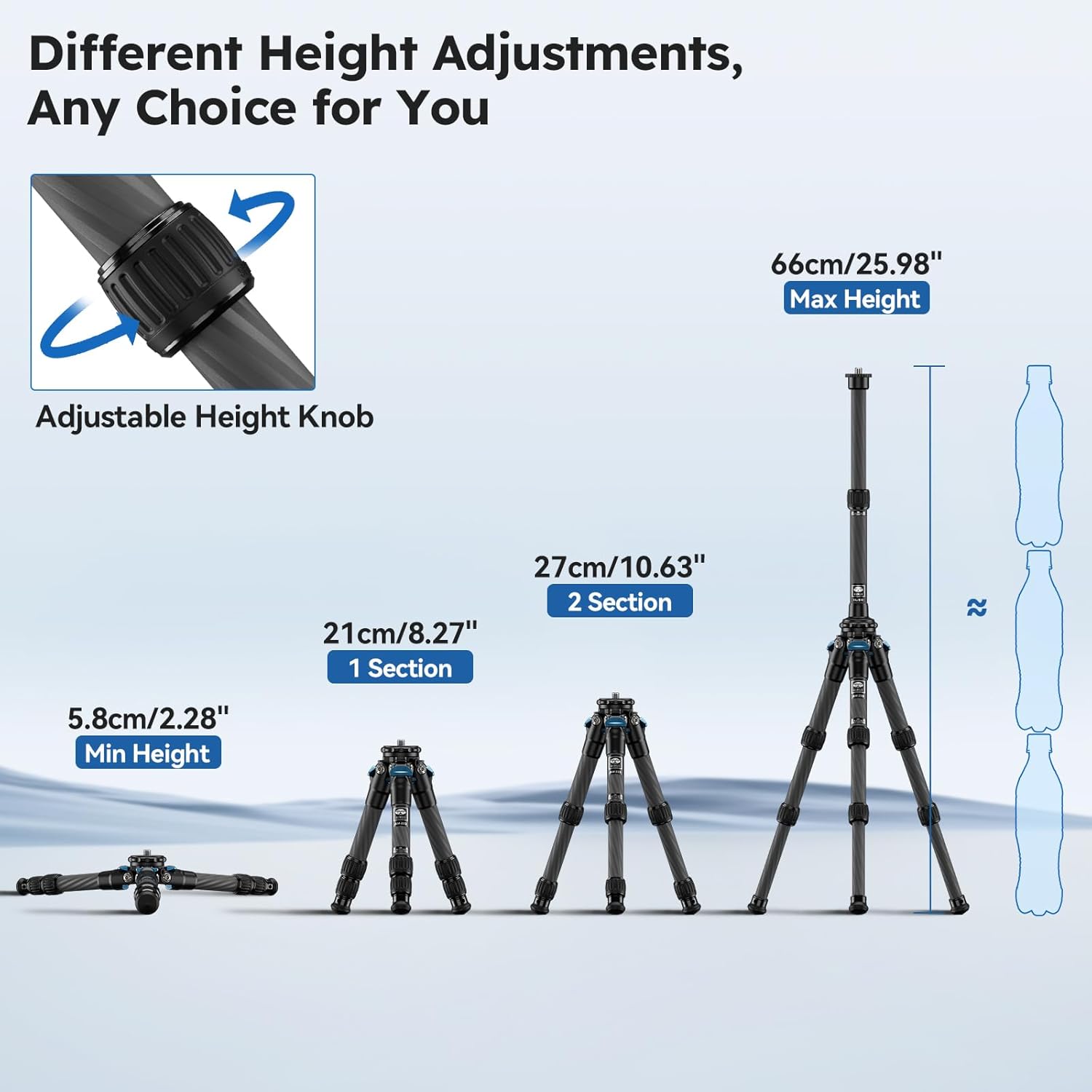
Image: Diagram illustrating the various height adjustments possible with the SIRUI AM-223+SL-100 tripod, from minimum height to maximum height with the extended center column.
3.3 Attaching Your Camera
The tripod head features a convertible 1/4" and 3/8" screw for wide compatibility.
- Ensure the camera's mounting thread matches the tripod screw. If necessary, use the included adapter.
- Carefully screw your camera onto the tripod's mounting plate until it is secure. Do not overtighten.
- If using a ball head (not included with this specific model but compatible), ensure the quick release plate is securely attached to your camera before mounting it to the ball head.

Image: The SIRUI AM-223+SL-100 tripod supporting a camera and a smartphone, demonstrating its versatility with different devices.
4. Operating the Tripod
4.1 General Use
Once your camera is mounted and the legs are adjusted, ensure all locking mechanisms are tightened before use. The tripod provides a stable platform for still photography and video recording.
4.2 Low-Angle Shooting
For extremely low-angle shots, the center column can be removed. Adjust the leg angles to the widest setting (85°) by pressing the blue leg angle lock buttons. This allows the tripod to sit very close to the ground, with a minimum height of 2.3 inches (5.8 cm).
Video: Demonstrates the flexibility of the SIRUI mini tripod, including how to adjust leg angles and extend the center column for various shooting heights and low-angle setups. This video highlights the tripod's adaptability for tight spaces and diverse photographic needs.
4.3 Using Replaceable Foot Spikes
The tripod comes with replaceable rubber feet and steel spikes. For increased stability on soft or uneven terrain (e.g., dirt, grass), replace the rubber feet with the included steel spikes. To replace:
- Unscrew the rubber feet from the bottom of each leg.
- Screw the steel spikes into the leg ends until secure.

Image: Illustration showing the replaceable foot spikes and the telescopic adjustment knob on the tripod legs, designed for stability on various surfaces.
5. Maintenance
- Cleaning: Wipe down the carbon fiber legs and metal components with a soft, damp cloth. Avoid harsh chemicals or abrasive materials.
- Lubrication: Periodically check leg locks and moving parts. If they become stiff, apply a small amount of silicone-based lubricant.
- Storage: Store the tripod in its carrying bag in a dry, cool place to prevent dust accumulation and environmental damage.
- Tightness: Use the provided Allen key to periodically check and adjust the tightness of leg tubes and other adjustable components as needed.
6. Troubleshooting
- Legs not extending/retracting smoothly: Ensure the twist-lock collars are fully loosened. Clean any dirt or debris from the leg sections. If still stiff, apply a small amount of silicone lubricant.
- Tripod instability: Verify that all leg sections are fully extended and locked, and that the leg angle locks are engaged. Ensure the camera is securely mounted. On uneven terrain, use the steel spikes for better grip.
- Camera wobbles on tripod head: Check that the camera is tightly screwed onto the mounting plate. If using a ball head, ensure the quick release plate is firmly attached to the camera and the ball head's locking knob is tightened.
7. Specifications
| Feature | Detail |
|---|---|
| Model | AM-223+SL-100 |
| Material | Carbon Fiber |
| Sections | 3 (legs) + 2 (center column) |
| Max Tube Diameter | Φ22mm |
| Min Height (without column) | 2.3" / 5.8 cm |
| Max Height (with column) | 26" / 66 cm |
| Folded Height (without column) | 8.5" / 21.5 cm |
| Folded Height (with column) | 15.94" / 40.5 cm |
| Weight (Total) | 1.46 lbs / 0.66 kg |
| Max Load Capacity | 22 lbs / 10 kg |
| Leg Angle Options | 22°, 55°, 85° |
| Accessory Port | 1/4" |
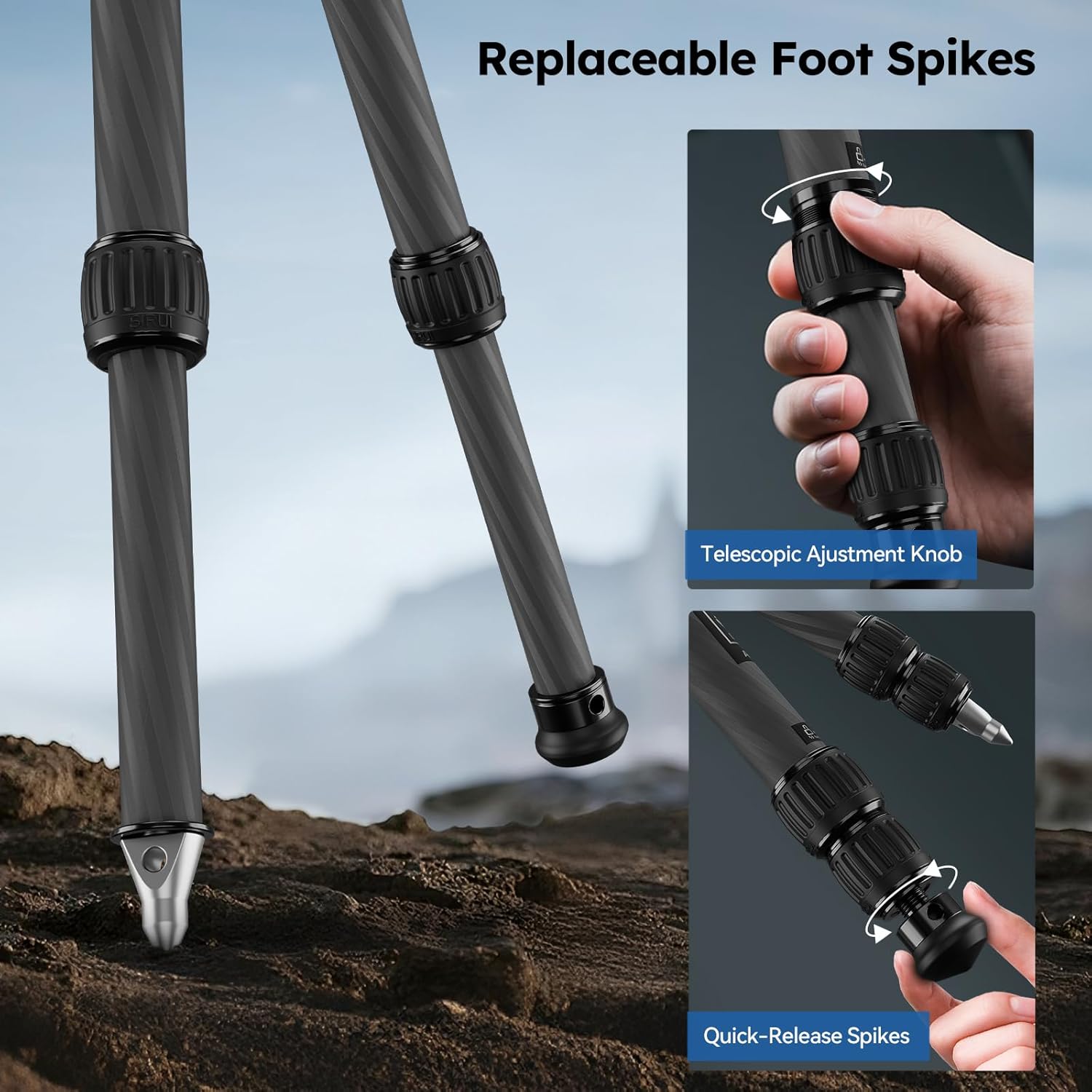
Image: Visual summary of the SIRUI AM-223+SL-100 tripod's key specifications, including weight, maximum height, and load capacity.
8. Warranty and Support
SIRUI products are designed for durability and performance. For warranty information, please refer to the included Warranty Card in your package. For technical support, product inquiries, or service, please visit the official SIRUI website or contact their customer service department.
You can also find additional information and support on the Sirui Store on Amazon.