
1. Introduction
This manual provides detailed instructions for the proper setup, operation, and maintenance of your Sirui ET-2204 4-Section Carbon Fiber Travel Tripod, equipped with the VA-5 Ultra-Compact Video Head. The ET-2204 tripod is engineered from strong, lightweight carbon fiber, offering maximum performance, stability, and durability. The VA-5 Video Head features a fluid system for smooth camera movements and is designed for use with DSLRs and compact video cameras.
2. Product Overview and Components
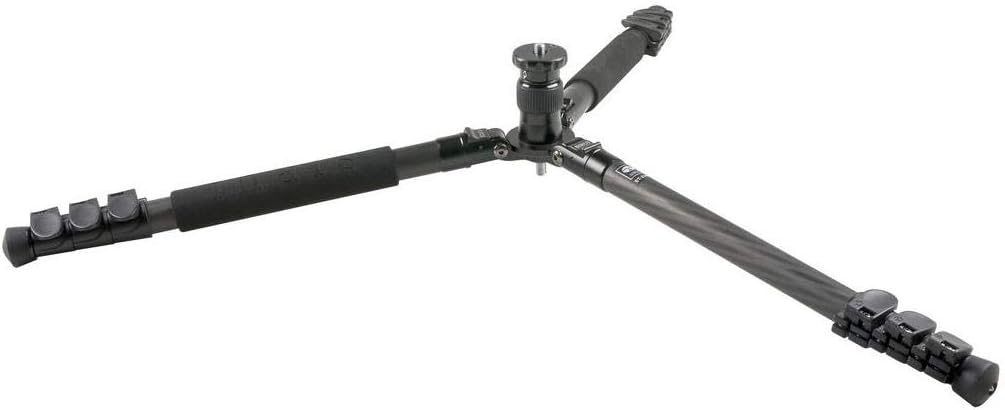
The Sirui ET-2204 tripod system includes a 4-section carbon fiber leg set and a VA-5 fluid video head. Key features include quick flip leg locks for rapid deployment, an automatic leg angle lock mechanism, and a short center column for low-angle or macro photography.
2.1 Main Components
- ET-2204 Tripod Legs: 4-section carbon fiber construction with flip locks.
- VA-5 Video Head: Ultra-compact fluid head with independent pan and tilt locks.
- Quick Release Plate: For attaching cameras to the video head.
- Standard Center Column: Provides extended height.
- Short Center Column: For low-angle shooting.
2.2 Product Images



3. Setup
Follow these steps to set up your Sirui ET-2204 tripod and VA-5 video head:
- Unfold the Legs: Release the leg locks and extend the tripod legs. The automatic leg angle lock mechanism will engage, allowing you to set the legs at various angles for stability on uneven terrain.
- Adjust Leg Height: Use the quick flip locks on each leg section to extend them to the desired height. Ensure all locks are securely fastened before mounting equipment.
- Center Column Adjustment: The standard rapid center column can be extended for additional height, reaching a maximum of 57.1 inches. For low-angle shots, replace the standard column with the included short center column.
- Attach Camera to VA-5 Head: Secure your camera to the quick release plate. The VA-5 head is equipped with reversible 1/4" and 3/8" screws for wide compatibility. Slide the quick release plate into the head and lock it in place. The sliding base plate allows for fast balance adjustment of your camera.
3.1 Setup Demonstration Video
3.2 Leg Quick Release Mechanism
3.3 Compact Folding Demonstration
4. Operating Instructions
The VA-5 Ultra-Compact Video Head is designed for smooth and precise camera control.
- Pan Movement: Loosen the pan lock knob located at the base of the video head to allow for 360° panoramic rotation. Tighten the knob to secure the head in position.
- Tilt Movement: Loosen the tilt lock knob on the side of the head to adjust the camera's vertical angle. The fluid system and internal spring-assisted counterbalance mechanism ensure smooth tilting movements. Tighten the knob to lock the tilt.
- Counterbalance: The VA-5 head features a spring-assisted counterbalance mechanism, which helps to balance heavier cameras and prevent accidental drops when tilting.
5. Maintenance
Regular maintenance ensures the longevity and optimal performance of your tripod and video head.
- Cleaning: After each use, especially in dusty or sandy environments, wipe down the tripod legs and head with a soft, dry cloth. For stubborn dirt, use a slightly damp cloth and mild soap, then dry thoroughly.
- Lubrication: Do not apply lubricants to the leg locks or fluid head mechanisms unless specifically instructed by Sirui. Improper lubrication can attract dirt and impair function.
- Inspection: Periodically check all screws, knobs, and locks for tightness. Ensure the quick release plate mechanism operates smoothly.
- Storage: Store the tripod in a dry, cool place, preferably in its carrying case, to protect it from dust and moisture.
6. Troubleshooting
If you encounter any issues with your Sirui ET-2204 tripod and VA-5 video head, refer to the following common solutions:
- Legs Not Extending/Retracting Smoothly: Check for dirt or debris in the leg sections or around the flip locks. Clean as per maintenance instructions. Ensure the flip locks are fully disengaged.
- Video Head Movement Is Stiff or Loose: Verify that the pan and tilt lock knobs are correctly adjusted. If movement is still not smooth, ensure no foreign objects are obstructing the mechanism.
- Camera Not Secure on Head: Ensure the quick release plate is properly attached to your camera and fully seated and locked into the VA-5 video head. Check that the quick release plate's screw is tight.
- Tripod Instability: Ensure all leg sections are fully extended and locked, and leg angles are set appropriately for the terrain. Avoid overloading the tripod beyond its maximum load capacity.
For persistent issues, please contact Sirui customer support.
7. Specifications
| Feature | Specification |
|---|---|
| Tripod Material | Carbon Fiber |
| Maximum Load Capacity | 12 kg / 26.5 lb |
| Maximum Height | 1450 mm / 57.1 inches |
| Item Weight (Tripod + Head) | 1.3 kg / 2.9 lb |
| Product Dimensions (Folded) | 23.2 x 6.4 x 5.6 inches |
| Model Name | ET-2204 + VA-5 |
| Tripod Head Type | Fluid Head, Video Head |
| Compatible Devices | Camera |
8. Warranty and Support
For warranty information, product registration, and technical support, please visit the official Sirui website or contact their customer service department. Keep your purchase receipt as proof of purchase for warranty claims.


