
1. Introduction
The Sirui TSH-01WX is a versatile portable tripod designed for smartphones. It functions as a mini tripod, a monopod, and a selfie stick, offering flexibility for various photography and videography needs. Constructed from durable aluminum and plastic, it is lightweight and compact for easy transport.
2. Product Components

Figure 1: Exploded view of the Sirui TSH-01WX components.
Familiarize yourself with the following components:
- Fill Light Mount Adapter: For attaching external lighting accessories.
- Mobile Phone Clamp: Securely holds your smartphone.
- Retractable Tube: Extends the tripod for monopod or selfie stick use.
- Bluetooth Remote Control: For wireless shutter activation.
- Clamp Base Locking Knob: Secures the phone clamp to the universal head.
- 1/4" Screw: Standard mounting screw for the phone clamp or other accessories.
- Universal Head: Allows for angle adjustments.
- Support Feet: Provides stability when used as a tripod.
3. Setup Instructions
3.1 Attaching the Mobile Phone Clamp

Figure 2: Steps for attaching the mobile phone clamp.
- Locate the 1/4" screw on the universal head of the tripod.
- Align the mobile phone clamp with the 1/4" screw.
- Rotate the clamp clockwise onto the screw until it is securely fastened.
- Ensure the clamp is tight to prevent your phone from detaching.
3.2 Extending the Tripod/Monopod
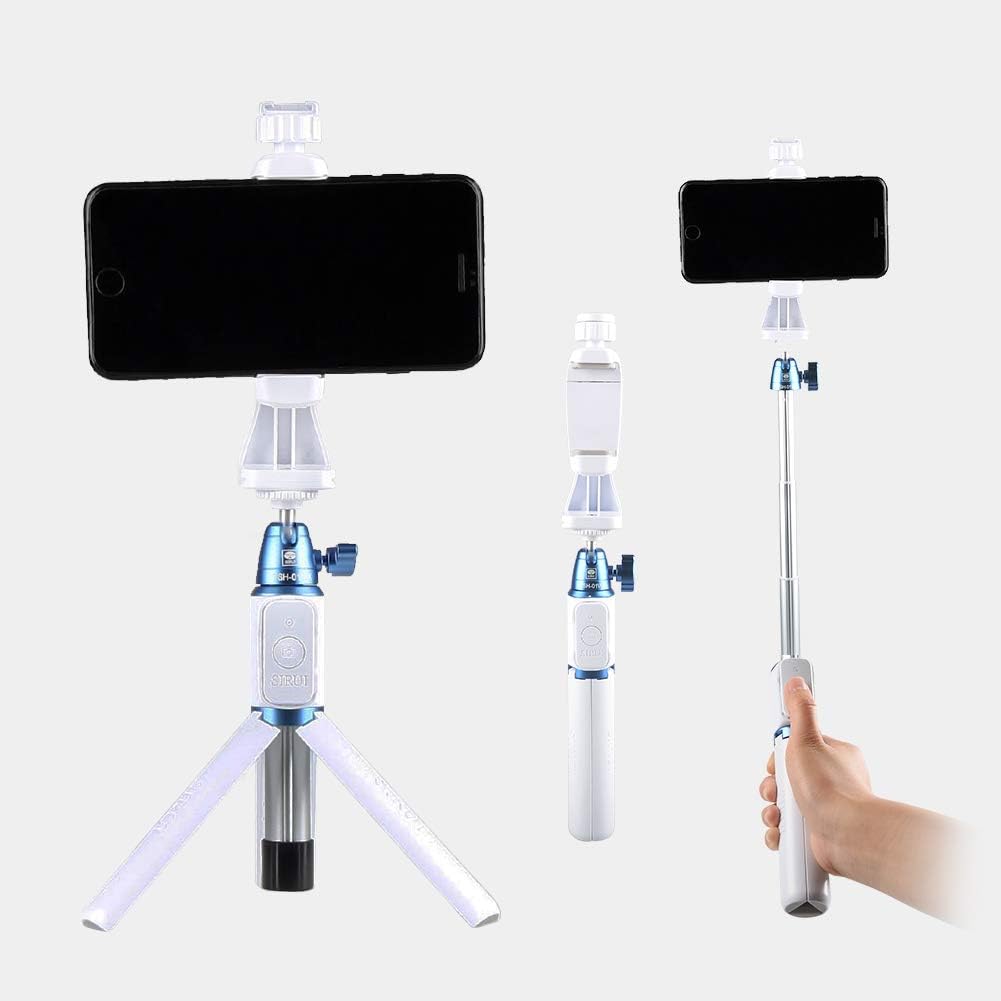
Figure 3: The Sirui TSH-01WX in various configurations.
- To use as a tripod, unfold the support feet until they lock into position.
- To extend the height, pull the retractable tube upwards. The tube can be extended to a maximum height of approximately 208 cm (82 inches).
- To retract, push the tube back down until it is fully collapsed.
3.3 Adjusting the Universal Head Angle

Figure 4: Universal head tilt adjustment.
- Loosen the locking knob on the universal head.
- Adjust the angle of your phone clamp up to 180 degrees.
- Tighten the locking knob to secure the desired angle.
3.4 Bluetooth Remote Control Pairing

Figure 5: Using the Bluetooth remote control.
- Ensure the remote control has a working battery (1 Lithium metal battery included).
- Turn on the Bluetooth remote control (usually by pressing and holding the button). An indicator light will typically flash.
- On your smartphone, go to Bluetooth settings and search for available devices.
- Select the device named 'SIRUI' or similar from the list to pair.
- Once paired, the indicator light on the remote will stop flashing or show a steady light.
- Open your phone's camera app. The remote can now be used to trigger the shutter.
4. Operating Instructions
4.1 Using as a Tripod
Unfold the support feet and place the tripod on a stable, flat surface. Adjust the height and angle as needed. This mode is ideal for stable shots, time-lapses, or video calls.
4.2 Using as a Monopod/Selfie Stick
Collapse the support feet and extend the retractable tube to your desired length. Hold the handle firmly. This mode is suitable for capturing wider angles, group photos, or vlogging.
4.3 Using the Bluetooth Remote
Once paired, open your phone's camera application. Press the button on the Bluetooth remote control to take photos or start/stop video recording. Ensure the remote is within effective Bluetooth range of your phone.
5. Maintenance
- Keep the tripod clean by wiping it with a soft, dry cloth.
- Avoid exposing the tripod to extreme temperatures or moisture.
- Do not apply excessive force when extending or retracting the tube.
- Store the tripod in a dry, cool place when not in use.
- Replace the remote control battery when its performance diminishes.
6. Troubleshooting
6.1 Remote Control Not Pairing
- Ensure the remote control is turned on and its battery is not depleted.
- Check your phone's Bluetooth settings to ensure Bluetooth is enabled.
- Try unpairing and re-pairing the remote control from your phone's Bluetooth device list.
- Ensure no other Bluetooth devices are interfering with the connection.
6.2 Tripod Instability
- Ensure the support feet are fully extended and locked into position.
- Place the tripod on a flat, level surface.
- Do not overload the tripod with accessories heavier than a standard smartphone.
7. Specifications
| Feature | Detail |
|---|---|
| Model Number | TSH-01WX |
| Material | Aluminum, Plastic |
| Weight | 230 Grams |
| Dimensions (L x W x H, folded) | 9.7 x 5.51 x 29.69 cm |
| Minimum Height | 300 Millimeters (30 cm) |
| Maximum Height | 82 Inches (approx. 208 cm) |
| Mounting Screw | 1/4 inch |
| Battery (Remote) | 1 Lithium metal (included) |
8. Warranty and Support
For warranty information and customer support, please refer to the official Sirui website or contact your local distributor. Keep your purchase receipt as proof of purchase.