
Introduction
This manual provides essential instructions for the safe and effective use of your Surker HC-7098 Waterproof Rechargeable Hair Clipper. Please read this manual thoroughly before first use and retain it for future reference.
Important Safety Instructions
- Do not immerse the appliance in water while it is connected to the charging adapter.
- Keep the appliance out of reach of children.
- Use only the charging adapter supplied with this product.
- Unplug the appliance from the power outlet before cleaning or performing any maintenance.
- Do not use the appliance if the blades are damaged or broken, as this may cause injury.
- Avoid using the appliance in extremely hot or cold environments.
- If the charging cable is damaged, it must be replaced by the manufacturer, its service agent, or similarly qualified persons to avoid a hazard.
Product Overview and Components
The Surker HC-7098 is a waterproof, rechargeable hair clipper designed for efficient hair and beard trimming. Its adjustable length settings and stainless steel blade ensure precise results.
Package Contents:
- 1 x Surker HC-7098 Hair Clipper
- 1 x Charging Adapter Cable
- 2 x Limit Combs (for various length settings)
- 1 x Cleaning Brush
- 1 x Comb
- 1 x English User Manual (this document)
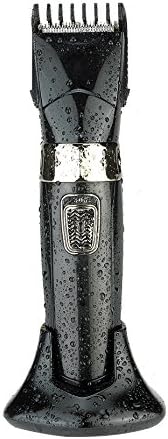
Image: Surker HC-7098 hair clipper on its charging stand, covered in water droplets, highlighting its waterproof design.
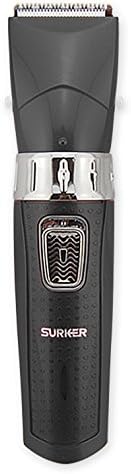
Image: Front view of the Surker HC-7098 hair clipper, showing the power button and 'SURKER' branding.
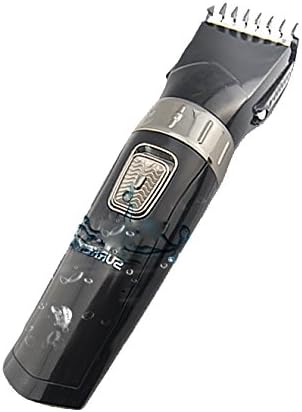
Image: Side view of the Surker HC-7098 hair clipper with an adjustable limit comb attached, demonstrating the length setting mechanism.
Setup
Initial Charging:
- Before first use, fully charge the hair clipper.
- Connect the charging adapter cable to the clipper and plug it into a suitable power outlet (220V).
- The charging indicator light will illuminate. Allow sufficient time for a full charge as indicated by the device (refer to charging section for details).
Attaching Limit Combs:
- Ensure the clipper is turned off before attaching or detaching any accessories.
- Align the desired limit comb with the clipper head and gently push it until it clicks into place.
- To remove, gently pull the comb away from the clipper head.
Operating Instructions
Charging the Clipper:
Connect the charging adapter to the clipper and a power source. The charging indicator will show the charging status. A full charge typically takes several hours. Do not operate the clipper while it is charging.
Turning On/Off:
Press the power button located on the front of the clipper to turn it on. Press the button again to turn it off.
Adjusting Hair Length:
The Surker HC-7098 offers 10 adjustable length settings using the two included limit combs. These settings allow for precise trimming from 4mm to 30mm.
| Limit Comb | Adjustable Lengths (mm) |
|---|---|
| Comb 1 | 4mm, 7mm, 10mm, 13mm, 16mm |
| Comb 2 | 18mm, 21mm, 24mm, 27mm, 30mm |
To select a length, attach the appropriate limit comb and adjust the setting on the comb or clipper body (depending on the comb design) to your desired length. Always start with a longer setting if you are unsure.
Trimming Hair/Beard:
- Ensure hair is clean and dry for best results.
- Select the desired cutting length using the limit comb.
- Turn on the clipper.
- Hold the clipper with the blades pointing upwards and move it against the direction of hair growth.
- Use smooth, even strokes.
- For detailing or outlining, remove the limit comb and use the bare blade carefully.
Maintenance
Cleaning:
The Surker HC-7098 is waterproof, allowing for easy cleaning.
- Turn off the clipper and disconnect it from the charging adapter.
- Remove the limit comb.
- Use the provided cleaning brush to remove loose hairs from the blades and clipper body.
- Rinse the clipper head and blades under running water. Ensure the charging port is covered or dry before charging again.
- Allow the clipper to air dry completely before storing or recharging.
Storage:
Store the clipper in a cool, dry place, away from direct sunlight and extreme temperatures. Ensure it is fully charged before long-term storage to maintain battery health.
Troubleshooting
- Clipper does not turn on: Ensure the clipper is charged. Connect it to the charger and check if the charging indicator lights up.
- Poor cutting performance: Clean the blades thoroughly. Ensure no hair is stuck. The blades may need oiling (if applicable, though not specified for this model, it's a common clipper maintenance step). Ensure the battery is sufficiently charged.
- Clipper not charging: Check the charging adapter and cable for damage. Ensure the power outlet is functional.
If problems persist, please contact customer support.
Specifications
| Feature | Detail |
|---|---|
| Brand | Surker |
| Model | HC-7098 |
| Color | Black |
| Size | 20 x 4 cm |
| Weight | 700g |
| Power Source | Rechargeable |
| Rated Power | 3W |
| Voltage | 220V |
| Blade Material | Stainless Steel |
Warranty and Support
For warranty information and customer support, please refer to the documentation included with your purchase or visit the official Surker website. Keep your proof of purchase for warranty claims.
