
Introduction
This manual provides essential instructions for the proper setup, operation, and maintenance of your PURSUIT/AUDIOVOX 1-Button Keyfob Remote, model A1BTXPR. This keyfob is designed as a replacement transmitter for compatible Pursuit and Prestige vehicle security systems, primarily for remote start functionality.
Product Overview
The A1BTXPR is a one-button remote control designed for specific vehicle security systems. It features a single button for activating functions such as remote start.
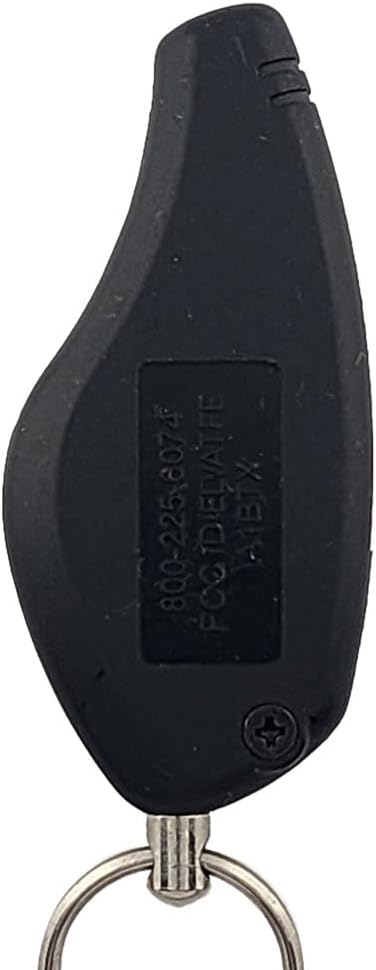
Figure 1: Front view of the A1BTXPR keyfob, showing the 'PRESTIGE' branding and the single blue remote start button.

Figure 2: Back view of the A1BTXPR keyfob, displaying the FCC ID ELVATFE and part number A1BTX.
Key Identifiers:
- FCC ID: ELVATFE (found on the back of the case)
- OE Part Numbers: A1BTX, A1BTXP, A1BTXPR
- Button Configuration: One button, typically for Remote Start.
- Compatible Systems: PRO9056, PRO9056N, PRO9256, APS921, APS901N, APS901.
Setup: Programming the Keyfob
This keyfob is user-programmable. The vehicle's control module must be programmed to recognize and accept this replacement part. Please follow these instructions carefully.
- Prerequisites:
- Your vehicle's alarm system must have a working valet button or switch. This is essential for programming.
- A working siren on your alarm system is helpful for audible confirmation during programming, though not strictly essential.
- Programming Steps:
Specific programming steps are typically provided with the replacement part. Generally, the process involves entering a programming mode on your vehicle's security system using the valet button, and then pressing the button on the new keyfob to link it.
- Important Note:
Not all users may be able to complete the programming process independently. If you encounter difficulties or are unsure about any step, it is recommended to seek professional assistance.
Operating the Keyfob
The A1BTXPR keyfob features a single button. Its primary function is to activate the remote start feature of your compatible vehicle security system. Refer to your vehicle's security system manual for specific button press sequences (e.g., single press, press and hold, multiple presses) required to activate remote start or other functions.
Maintenance
Battery Replacement
The keyfob is powered by two Lithium Metal batteries (CR2032/CR2025). When the remote's range decreases or it stops responding, the batteries may need replacement.
To replace batteries:
- Locate the small screw on the back of the keyfob (visible in Figure 2).
- Carefully remove the screw.
- Gently pry open the keyfob casing to access the battery compartment.
- Remove the old batteries and insert two new CR2032 or CR2025 Lithium Metal batteries, ensuring correct polarity.
- Close the casing and secure it with the screw.
Care and Handling
- Avoid exposing the keyfob to extreme temperatures, direct sunlight, or moisture.
- Do not drop the keyfob or subject it to strong impacts.
- Clean the exterior with a soft, dry cloth if necessary.
Troubleshooting
If your keyfob is not functioning correctly, consider the following:
- Keyfob not responding: Check the battery. Replace if necessary.
- Programming difficulties: Ensure your vehicle's valet button is working. Confirm you are following the programming steps precisely.
- Limited range: This often indicates a low battery. Replace the batteries.
- Keyfob still not working after programming and battery replacement: The keyfob may not be compatible with your specific system, or there might be an issue with the vehicle's control module.
Professional Assistance: If you are unable to successfully program the keyfob or resolve operational issues, diagnostic programming and assistance are available from a qualified automotive locksmith or car audio installation shop.
Specifications
| Brand | PURSUIT / AUDIOVOX |
| Model Number | A1BTXPR (also compatible with A1BTX, A1BTXP) |
| FCC ID | ELVATFE |
| Button Quantity | 1 |
| Connectivity Technology | Infrared |
| Battery Type | 2 x Lithium Metal (CR2032/CR2025) |
| Color | Black |
Support
For advanced diagnostics, programming assistance, or if you are experiencing persistent issues with your keyfob remote, it is recommended to consult with a professional automotive locksmith or a certified car audio installation technician. These professionals have the specialized tools and knowledge required to properly diagnose and resolve complex issues related to vehicle security systems and remote programming.


