
1. Introduction
The Stelpro ASMC402 Maestro Smart Home Wi-Fi Controller Thermostat is designed to integrate with your Maestro-enabled electric heating devices, including baseboards, convectors, and fan heaters. This controller serves as the central hub for your heating ecosystem, offering advanced features through its mobile application to enhance comfort, optimize energy usage, and provide peace of mind. This manual provides essential information for the safe and effective use of your thermostat.
2. Safety Information
WARNING: Installation must be performed by a qualified electrician in accordance with local and national electrical codes. Incorrect installation can lead to electrical shock, fire, or damage to the product and property.
- Always disconnect power at the main circuit breaker before installing or servicing the thermostat.
- This thermostat is designed for line voltage electric heating systems (208V/240V). Do not use with low voltage systems.
- Ensure all wiring connections are secure and properly insulated.
- Do not expose the thermostat to water or excessive moisture.
- Do not attempt to repair or modify the thermostat. Contact qualified service personnel for assistance.
3. Package Contents
Verify that all components are present before beginning installation:
- Stelpro ASMC402 Maestro Smart Home Wi-Fi Controller Thermostat
- Mounting screws and wall anchors (typically included)
- User Manual (this document)
4. Product Overview
The ASMC402 thermostat features a modern design with an intuitive display and touch controls. It acts as a central controller for up to 19 other Maestro ASMT402 thermostats or Maestro-enabled heaters within your home, creating a comprehensive smart heating solution.
4.1 Key Features
- Maestro Connectivity: Central control for multiple Maestro-enabled electric heating devices.
- Wi-Fi Enabled: Remote control and monitoring via a dedicated mobile application.
- Smart Home Integration: Compatible with Amazon Alexa and Google Assistant through IFTTT.
- Geofencing: Automatic adjustment of heating based on your proximity to home for energy efficiency.
- Personalized Activities: Create custom heating schedules and scenarios.
- Energy Monitoring: Track energy usage to optimize savings.
4.2 Thermostat Display and Controls
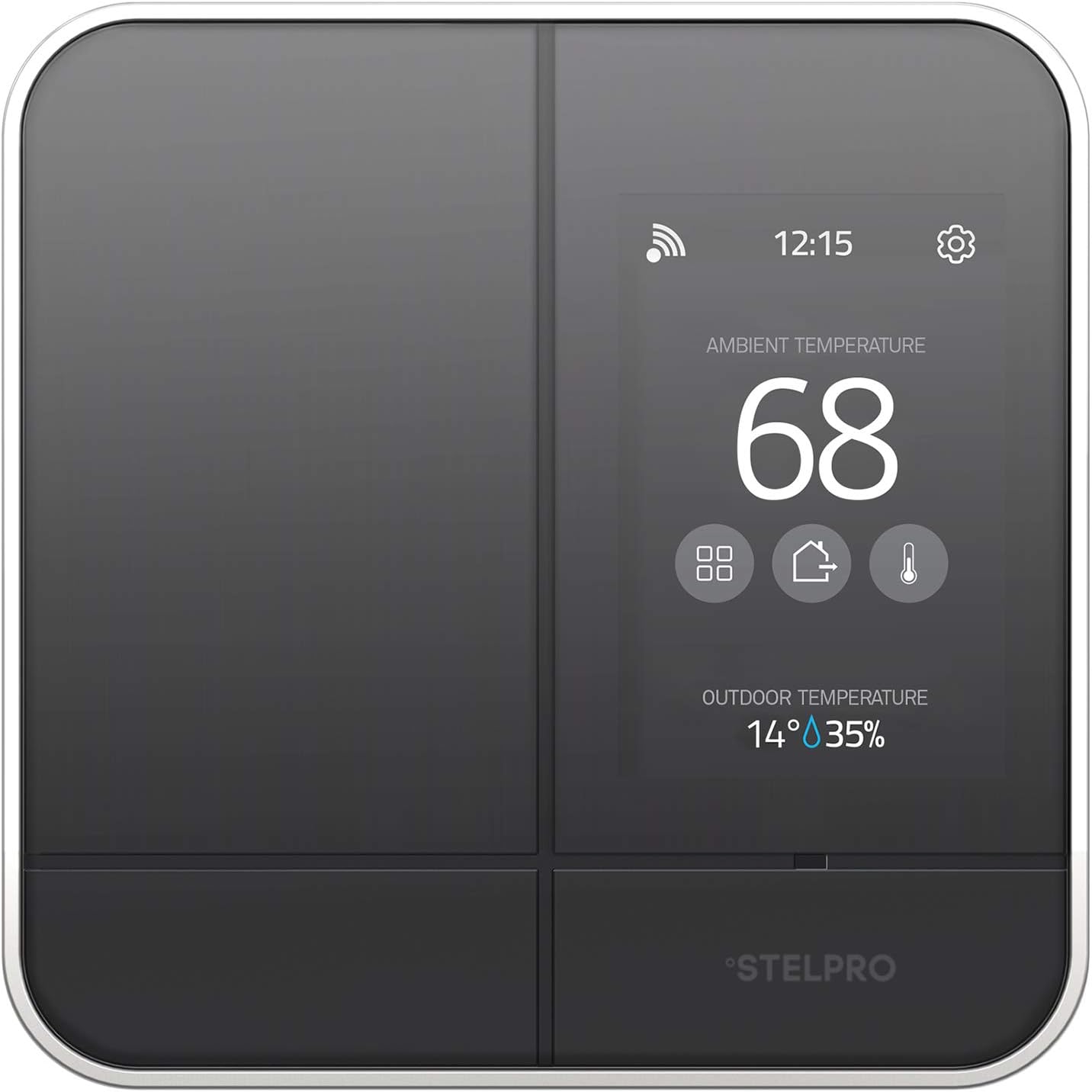
Image 1: Front view of the Stelpro ASMC402 thermostat display, showing ambient temperature (68 degrees), outdoor temperature (14 degrees), humidity (35%), Wi-Fi status, time (12:15), and settings icon.
The thermostat features a digital display showing ambient temperature, outdoor temperature, and humidity. Touch-sensitive icons allow for navigation and settings adjustments. The Wi-Fi icon indicates network connectivity.

Image 2: Stelpro ASMC402 thermostat mounted on a wall in a modern living space, demonstrating its aesthetic integration.
5. Installation
IMPORTANT: Ensure power is OFF at the circuit breaker before proceeding.
5.1 Mounting Location
- Install the thermostat on an interior wall, approximately 5 feet (1.5 meters) from the floor.
- Avoid locations near windows, doors, or air vents that could affect temperature readings.
- Ensure the location allows for clear Wi-Fi signal reception.
5.2 Wiring Instructions
This thermostat is designed for 208V/240V line voltage systems. Refer to the wiring diagram provided with your specific unit for detailed connections. Generally, you will connect the incoming power lines and the load lines to your heating unit. All connections must be made using appropriate wire connectors and comply with local electrical codes.
5.3 Initial Power-Up and Wi-Fi Connection
- After wiring and mounting, restore power at the circuit breaker.
- The thermostat will power on and guide you through the initial setup.
- Download the Stelpro Maestro mobile application from your device's app store.
- Follow the in-app instructions to connect your thermostat to your home Wi-Fi network and register it to your account. This process typically involves putting the thermostat into pairing mode and selecting your Wi-Fi network.
6. Operation
The Stelpro ASMC402 can be operated directly from the unit or through the Maestro mobile application.
6.1 Manual Control
- Temperature Adjustment: Use the up/down arrows or touch controls on the thermostat display to set the desired temperature.
- Mode Selection: Access the settings menu to switch between heating modes (e.g., Manual, Program, Away).
- Display Information: The screen shows current ambient temperature, setpoint, outdoor temperature, and humidity.
6.2 Mobile Application Control
The Maestro app provides comprehensive control and advanced features:
- Remote Temperature Control: Adjust settings from anywhere.
- Scheduling: Create detailed heating schedules for different times of the day and week.
- Geofencing: Enable location-based heating adjustments. The system can automatically lower the temperature when you leave and raise it as you approach home.
- Activities: Define custom scenarios (e.g., "Morning Warm-up," "Night Sleep") that adjust multiple thermostats simultaneously.
- Energy Reports: View historical energy consumption data.
- Zone Management: Control up to 19 connected Maestro thermostats or heaters in different zones.
6.3 Smart Home Integration (IFTTT)
The ASMC402 supports integration with Amazon Alexa and Google Assistant via IFTTT (If This Then That). This allows for voice control and custom automation routines. Refer to the Stelpro website or IFTTT platform for specific applets and setup instructions.
7. Maintenance
The Stelpro ASMC402 thermostat requires minimal maintenance.
- Cleaning: Gently wipe the display and exterior with a soft, damp cloth. Do not use abrasive cleaners or solvents.
- Software Updates: Ensure your mobile application is up-to-date to receive the latest features and performance improvements. Firmware updates for the thermostat may be pushed automatically or require manual initiation through the app.
8. Troubleshooting
If you encounter issues with your Stelpro ASMC402 thermostat, refer to the following common problems and solutions:
- Thermostat Screen is Blank or Unresponsive: This may indicate a thermal protection activation or a power interruption. Try resetting the circuit breaker supplying power to the thermostat. If the issue persists, ensure proper wiring and contact support.
- Cannot Connect to Wi-Fi: Ensure your home Wi-Fi network is active and the password is correct. Verify the thermostat is within range of your Wi-Fi router. Restarting your router and the thermostat may resolve connectivity issues.
- Geofencing Not Working Accurately: Check your mobile device's location services settings to ensure the Maestro app has permission to access your location. Ensure the geofencing feature is enabled and configured correctly within the app.
- Incorrect Time Display: The thermostat typically synchronizes time via Wi-Fi. If the time is incorrect, verify your Wi-Fi connection. Manual time adjustment options may be available in the settings menu or through the app.
- Temperature Reading Appears Inaccurate: The thermostat may use an internal algorithm to approximate room temperature. Ensure the thermostat is not exposed to direct sunlight, drafts, or heat sources that could skew readings.
- Difficulty with Alexa/Google Assistant Integration: Ensure your IFTTT account is properly linked to both your Maestro account and your smart assistant. Verify that the correct applets are enabled and configured. Consult IFTTT documentation for detailed setup.
For persistent issues not covered here, please contact Stelpro customer support.
9. Specifications
| Feature | Detail |
|---|---|
| Brand | Stelpro |
| Model Name | ASMC402 |
| Voltage | 208V / 240V |
| Amperage | 16.7 A |
| Min. Watts | 260W (208V) / 300W (240V) |
| Max. Watts | 3400W (208V) / 4000W (240V) |
| Connectivity Protocol | Wi-Fi |
| Controller Type | Amazon Alexa, Google Assistant (via IFTTT), IFTTT, Vera |
| Control Method | Voice, Button Control, Mobile App |
| Mounting Type | Wall Mount |
| Product Dimensions | 5.38 x 5.38 x 1.25 inches |
| Item Weight | 1.04 pounds |
| Display Type | Digital with Backlight |
| Special Features | Programmable, Geofencing, Energy Monitoring |
10. Warranty and Support
10.1 Warranty Information
The Stelpro ASMC402 thermostat comes with a 5-year limited warranty. This warranty covers defects in materials and workmanship under normal use. For specific terms and conditions, please refer to the warranty documentation included with your product or visit the Stelpro website.
10.2 Customer Support
For technical assistance, service, parts, or installation questions, please contact Stelpro customer support:
- Phone: 1-844-STELPRO (1-844-783-5776)
- Website: www.stelpro.com (for product information and online support resources)


