
POC 10721
POC Omne Air SPIN Helmet User Manual
Model: 10721
Introduction
The POC Omne Air SPIN helmet is engineered for optimal comfort, fit, and performance, integrating advanced safety features for everyday use. This manual provides essential information for the proper setup, use, and maintenance of your helmet.
It features POC's innovative SPIN (Shearing Pad INside) technology, designed to reduce the effects of an oblique impact by allowing the helmet to move relative to the head.
Safety Information
Your POC Omne Air SPIN helmet is designed to provide protection during cycling activities. Always wear your helmet correctly adjusted and fastened.
- SPIN Technology: This helmet incorporates POC's patent-pending silicone pad technology, SPIN, which complements the helmet's protective capabilities by addressing rotational impacts.
- EPS Liner: The helmet features an EPS liner with optimized density for superior impact absorption.
- Proper Fit: A helmet can only protect if it fits correctly and is securely fastened. Refer to the 'Setup' section for fitting instructions.
- Impact Damage: A helmet that has sustained an impact, even if no visible damage is present, should be replaced immediately. The protective capabilities may be compromised.
- Chemicals: Do not expose the helmet to chemical substances such as solvents, cleaning fluids, paints, or adhesives, as these can damage the helmet's materials and compromise its protective properties.
Setup: Achieving the Perfect Fit
A correctly fitted helmet is crucial for safety and comfort. Follow these steps to ensure your Omne Air SPIN helmet fits properly:
- Positioning: Place the helmet on your head so that it sits level and covers your forehead. The front edge should be approximately two finger-widths above your eyebrows.
- Size Adjustment System: Use the 360-degree size adjustment system located at the back of the helmet to tighten or loosen the fit around your head. Turn the dial clockwise to tighten and counter-clockwise to loosen until the helmet feels snug but comfortable, without excessive pressure points.
- Strap Adjustment: Adjust the side straps so that they form a 'V' shape just below your ears. The strap dividers should sit flat against your skin.
- Chin Strap: Fasten the chin strap buckle securely. Tighten the strap until it is snug under your chin, allowing only one or two fingers to fit between the strap and your chin.
- Final Check: With the straps fastened, try to move the helmet from side to side and front to back. It should not shift significantly. If it does, readjust the size and straps.

Figure 1: Side view of the helmet, illustrating the strap system and rear adjustment dial.
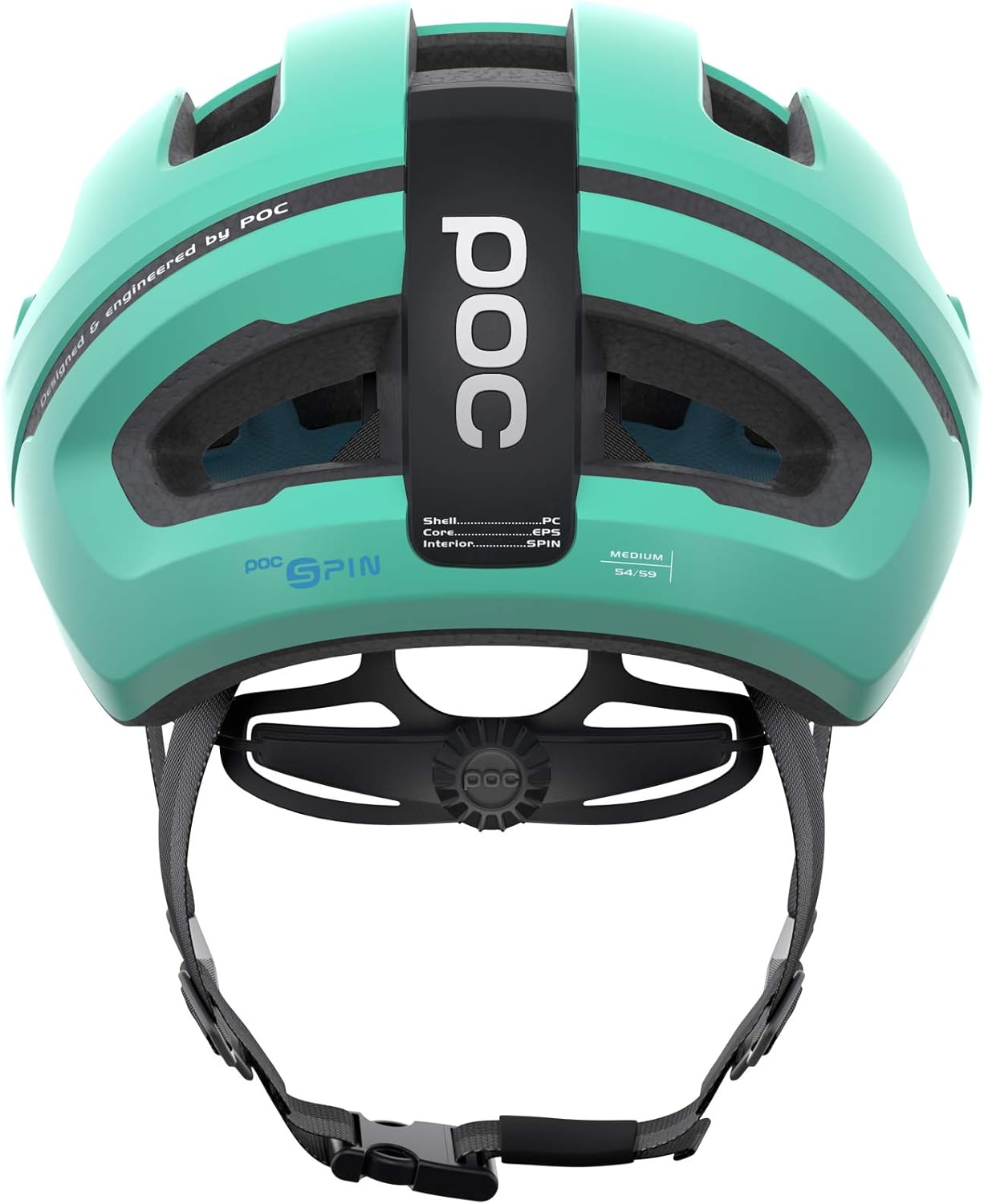
Figure 2: Rear view showing the 360-degree size adjustment system and the POC SPIN logo.

Figure 3: Interior view detailing the high-performance EPS liner and the blue SPIN silicone pads.
Operating (Usage Guidelines)
The POC Omne Air SPIN helmet is intended for cycling use. Adhere to the following guidelines for optimal performance and safety:
- Intended Use: This helmet is designed for cycling. Do not use it for motor sports or other activities for which it is not certified.
- Visibility: For enhanced safety, especially in low-light conditions, consider wearing reflective clothing and using bicycle lights.
- Ventilation: The helmet features ventilation channels for optimal airflow, providing comfort during longer rides.
- Storage: When not in use, store the helmet in a cool, dry place away from direct sunlight and extreme temperatures.
Maintenance
Proper maintenance extends the life of your helmet and ensures its continued protective capabilities:
- Cleaning: Clean the helmet using only mild soap and water. Avoid harsh chemicals, abrasive cleaners, or solvents, as these can damage the helmet's shell and internal components.
- Drying: Allow the helmet to air dry completely after cleaning. Do not expose it to direct heat sources.
- Pad Care: The internal pads can be removed and hand-washed with mild soap and water. Ensure they are completely dry before reinserting them.
- Inspection: Regularly inspect your helmet for any signs of damage, such as cracks in the shell or liner, frayed straps, or damaged buckles. If any damage is found, replace the helmet immediately.
Troubleshooting
If you encounter issues with your POC Omne Air SPIN helmet, consider the following:
| Problem | Possible Cause | Solution |
|---|---|---|
| Helmet feels too loose or too tight. | Incorrect size adjustment. | Adjust the 360-degree size adjustment system at the back of the helmet. Ensure you have the correct helmet size for your head circumference. |
| Straps are uncomfortable or rub. | Improper strap adjustment. | Ensure the side strap dividers are positioned just below your ears and lie flat. Adjust the chin strap for a snug but comfortable fit. |
| Helmet makes creaking noises. | Minor friction between components or pads. | This is generally normal and does not affect safety. Ensure all pads are correctly seated. |
| Visible damage after an impact. | Helmet has absorbed an impact. | Immediately replace the helmet. Even if damage is not obvious, the helmet's protective integrity may be compromised. |
Specifications
| Feature | Detail |
|---|---|
| Brand | POC |
| Model Name | Omne Air SPIN |
| Model Number | 10721 |
| Color | Green |
| Size | Small |
| Age Range | Adult |
| Outer Material | Polycarbonate (PC) |
| Inner Material | Expanded Polystyrene (EPS) |
| Special Features | Adjustable, Lightweight, SPIN Technology |
| Item Weight | 0.29 Kilograms |
| Dimensions (L x W x H) | 9.45 x 8.66 x 7.09 inches |
Warranty and Support
For specific warranty information regarding your POC Omne Air SPIN helmet, please refer to the documentation included with your purchase or visit the official POC website. Warranty terms typically cover manufacturing defects.
For technical support, spare parts, or further assistance, please contact POC customer service through their official channels. You can often find contact information on the brand's website or through the retailer where the product was purchased.
Important: Always purchase genuine POC replacement parts and accessories to ensure compatibility and maintain the helmet's safety standards.
Ask a question about this manual
Ask about setup, troubleshooting, compatibility, parts, safety, or missing instructions. Manuals+ will review the question and use this page’s manual context to help answer it.