
SERVO 225
SERVO 225 Mobile Phone User Manual
Model: SERVO 225
1. Introduction
This user manual provides comprehensive instructions for the operation and maintenance of your new SERVO 225 mobile phone. Please read this manual carefully before using the device to ensure proper functionality and to maximize its lifespan. The SERVO 225 is a compact and reliable mobile phone featuring dual SIM capability, a 2.4-inch display, and essential functions for daily communication.

Figure 1.1: Front and back view of the SERVO 225 mobile phone, showcasing its compact design and keypad.
2. Safety Information
- Do not disassemble or modify the device.
- Keep the device away from water and moisture.
- Use only original or approved accessories.
- Avoid extreme temperatures.
- Do not use the phone while driving.
- Dispose of batteries and the device responsibly according to local regulations.
- Before first use, ensure to remove any insulating tape from the battery terminals.
3. Package Contents
Please check the contents of your package. If any items are missing or damaged, contact your retailer.
- 1 x SERVO 225 Mobile Phone
- 1 x Battery (1400 mAh Li-ion)
- 1 x Charger
- 1 x Protective Case
- 1 x User Manual (this document)

Figure 3.1: The SERVO 225 package contents, including the phone, battery, charger, and protective case.
4. Product Overview
The SERVO 225 features a classic candy bar design with a physical keypad and a 2.4-inch display. It supports dual SIM cards for flexible network usage.
4.1. Physical Features
- Display: 2.4-inch VGA screen.
- Keypad: Standard alphanumeric keypad with navigation keys.
- Camera: 0.3 Megapixel CMOS camera with flash on the rear.
- Back Cover: Features a mechanical back cover, available in various colors like Black, Brown, and Gold.
- Dimensions: Approximately 122 x 52 x 11 mm (4.80 x 2.05 x 0.43 inches).
- Weight: Approximately 80 grams.

Figure 4.1: Close-up of the SERVO 225's rear, highlighting the camera and dual LED flash for improved low-light photography.

Figure 4.2: Various color options for the SERVO 225, demonstrating the 2.4-inch screen size.
5. Setup
5.1. Battery Installation and Charging
- Remove the back cover of the phone by gently prying it open from the notch.
- If present, remove the insulating tape from the battery terminals.
- Insert the 1400 mAh Li-ion battery into the battery compartment, ensuring the gold contacts align with the phone's terminals.
- Replace the back cover, pressing firmly until it clicks into place.
- Connect the charger to the phone's charging port and plug it into a power outlet. Charge the battery fully before first use.

Figure 5.1: The 1400 mAh battery and the phone's zinc alloy paint shell design.
5.2. Inserting SIM Cards and Memory Card
The SERVO 225 supports dual SIM cards (Dual GSM) and a T-Flash memory card (up to 32GB, not included).
- With the back cover and battery removed, locate the SIM card slots. The phone supports two SIM cards.
- Carefully insert your SIM cards into the designated slots with the gold contacts facing down.
- Locate the T-Flash (microSD) card slot. Insert the memory card until it clicks into place.
- Reinstall the battery and back cover.
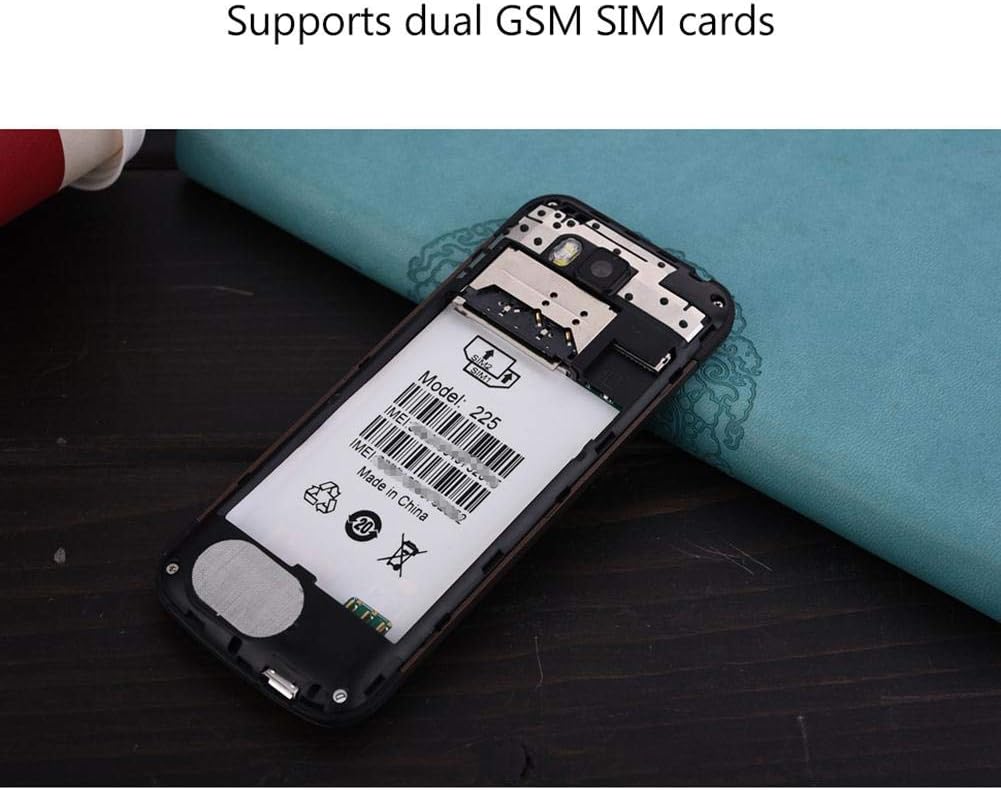
Figure 5.2: Internal view of the SERVO 225, illustrating the dual SIM card slots and the memory card slot.
6. Operating Instructions
6.1. Power On/Off
- To Power On: Press and hold the Power/End Call key until the screen lights up.
- To Power Off: Press and hold the Power/End Call key until the power off options appear, then select "Power off".
6.2. Basic Functions
- Making Calls: Enter the phone number using the keypad and press the Call key.
- Answering Calls: Press the Call key when the phone rings.
- Sending Messages: Navigate to the "Messages" menu, select "Write message", enter your text, and send to the desired recipient.
- Menu Navigation: Use the navigation keys (up, down, left, right) to browse through menus and the center key to select.
6.3. Key Features
- Bluetooth: Connect to other Bluetooth-enabled devices for file transfer or hands-free communication.
- FM Radio: Listen to your favorite radio stations. Requires headphones to be plugged in as an antenna.
- MP3/MP4 Player: Play audio and video files stored on your memory card.
- GPRS/WAP: Access basic internet services and WAP sites.
- Camera: Capture photos with the 0.3MP rear camera.
- Additional Tools: Calendar, Sound Recorder, Calculator, World Clock, Alarm.
7. Maintenance
- Cleaning: Use a soft, dry cloth to clean the phone's surface. Do not use liquid cleaners or aerosols.
- Storage: Store the phone in a cool, dry place when not in use for extended periods.
- Battery Care: Avoid overcharging or completely draining the battery frequently to prolong its life.
8. Troubleshooting
| Problem | Possible Cause | Solution |
|---|---|---|
| Phone does not power on. | Battery is low or not installed correctly. | Charge the battery. Ensure battery is properly inserted and insulating tape is removed. |
| No network signal. | SIM card not inserted correctly or out of network coverage. | Reinsert SIM card. Move to an area with better network coverage. |
| Cannot make or receive calls. | No network, SIM card issue, or call barring enabled. | Check network signal. Verify SIM card. Disable call barring if active. |
| Memory card not detected. | Memory card not inserted correctly or corrupted. | Reinsert memory card. Try a different memory card. |
9. Specifications
| Feature | Specification |
|---|---|
| Brand | SERVO |
| Model | 225 |
| Display | 2.4-inch VGA |
| Platform | Spreadtrum6531CA |
| SIM Type | Dual SIM, Dual Standby (Dual GSM) |
| Network Frequency | GSM850/900/1800/1900 MHz (2G) |
| Internal Memory | 32MB RAM, 32MB ROM |
| Expandable Memory | Up to 32GB (T-Flash / microSD card, not included) |
| Camera | 0.3 Megapixel CMOS (Rear) with Flash |
| Battery | 1400 mAh Li-ion |
| Talk Time | Approx. 6 hours |
| Dimensions | 122 x 52 x 11 mm (4.80 x 2.05 x 0.43 inches) |
| Weight | Approx. 80 g |
| Connectivity | Bluetooth |
| Other Features | FM Radio, MP3/MP4 Player, GPRS, WAP, Calendar, Recorder, Calculator, World Clock, Alarm |
10. Warranty and Support
Your SERVO 225 mobile phone comes with a standard manufacturer's warranty. Please refer to the warranty card included in your package for specific terms and conditions. For technical support, troubleshooting assistance, or warranty claims, please contact your point of purchase or the official SERVO customer service channels.
Keep your purchase receipt as proof of purchase for warranty purposes.
Related documents225


Ask a question about this manual
Ask about setup, troubleshooting, compatibility, parts, safety, or missing instructions. Manuals+ will review the question and use this page’s manual context to help answer it.