
Brennenstuhl 1153240006
Brennenstuhl Ecolor 4-Outlet Power Strip with 2 USB Charging Ports
Model: 1153240006
1. Introduction
This manual provides essential information for the safe and efficient use of your Brennenstuhl Ecolor 4-Outlet Power Strip with 2 USB Charging Ports. Please read these instructions carefully before use and retain them for future reference.
The Brennenstuhl Ecolor power strip is designed to provide convenient power distribution for up to four electrical devices and charging capabilities for two USB-powered devices. It features a durable construction and an integrated safety switch for enhanced user protection.
2. Safety Instructions
WARNING: Failure to follow these safety instructions may result in fire, electric shock, or injury.
- Do not exceed the maximum load capacity of the power strip (refer to Specifications).
- This product is designed for indoor use only. Do not expose to moisture, rain, or extreme temperatures.
- Do not connect multiple power strips in series.
- Ensure the power strip is fully unwound before use to prevent overheating.
- Do not open or modify the power strip. There are no user-serviceable parts inside.
- Keep out of reach of children.
- Always insert plugs completely into the sockets.
- If the power strip or its cable is damaged, discontinue use immediately and contact qualified personnel for repair or replacement.
- The integrated 2-pole illuminated safety switch allows for complete disconnection of all connected devices from the mains power. Always switch off when not in use or during maintenance.
3. Setup
- Unpack the Power Strip: Carefully remove the power strip from its packaging. Inspect for any visible damage.
- Choose a Location: Place the power strip on a stable, dry surface, away from heat sources, water, and direct sunlight. Ensure the cable can reach the wall outlet without being stretched or pinched.
- Connect to Power: Plug the power strip's main plug into a properly grounded wall outlet.
- Power On: Press the illuminated on/off switch to the "ON" position. The switch will light up, indicating power is supplied to the outlets and USB ports.
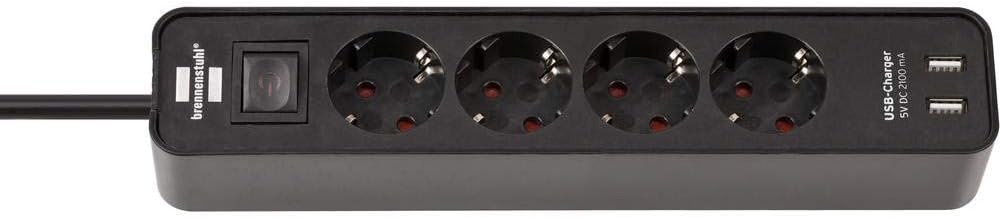
Figure 1: Brennenstuhl Ecolor 4-Outlet Power Strip. This image shows the overall design of the power strip, highlighting its four power outlets and two USB charging ports, along with the integrated on/off switch.
4. Operating Instructions
4.1 Using the Power Outlets
- Ensure the power strip is switched "ON" (illuminated switch).
- Plug your electrical devices into the available 45-degree angled outlets. The angled design allows for easier connection of multiple large or angled plugs without blocking adjacent sockets.
- Always ensure plugs are fully inserted.
- Do not overload the power strip. The total power consumption of all connected devices must not exceed the maximum rating specified in the Specifications section.
4.2 Using the USB Charging Ports
- The power strip features two USB charging ports (5V DC, 2.1A total output).
- Connect your USB-powered devices (e.g., smartphones, tablets, small electronics) using their respective USB charging cables to the USB ports on the power strip.
- Charging will begin automatically if the power strip is switched "ON".
- The 2.1A total output is shared between the two ports. If two devices are connected, the current will be distributed.

Figure 2: Close-up of the Brennenstuhl Ecolor power strip's outlets and USB ports. This image details the 45-degree angled arrangement of the power sockets and the two integrated USB charging ports.
4.3 On/Off Safety Switch
The integrated 2-pole illuminated switch controls the power supply to all outlets and USB ports. Press the switch to turn the power strip ON (lighted) or OFF (unlighted). Switching off the power strip completely disconnects all connected devices from the mains, enhancing safety and saving energy.
5. Maintenance
- Cleaning: Before cleaning, always unplug the power strip from the wall outlet and ensure all connected devices are removed. Wipe the surface with a soft, dry cloth. Do not use liquid cleaners or abrasive materials.
- Storage: When not in use for extended periods, store the power strip in a dry, dust-free environment.
- Inspection: Periodically inspect the power strip and its cable for any signs of wear or damage. If damage is found, do not use the product.
6. Troubleshooting
| Problem | Possible Cause | Solution |
|---|---|---|
| No power to outlets/USB ports. |
|
|
| USB devices not charging. |
|
|
7. Specifications
- Model Number: 1153240006
- Brand: Brennenstuhl
- Color: Black
- Number of Outlets: 4
- USB Ports: 2 (5V DC, 2.1A total output)
- Cable Length: 1.5 meters
- Voltage: 230 Volts
- Current: 13.5 Amperes
- Product Dimensions (L x W): 5.8 cm x 8 cm
- Item Weight: 440 Grams
- Plug Type: Type E and F (European standard)
- Special Features: USB Charger, Illuminated On/Off Switch, 45-degree Angled Sockets
- Internal Material: Plastic
- Country of Origin: China
8. Warranty and Support
Brennenstuhl products are manufactured to high-quality standards. For information regarding warranty terms and conditions, please refer to the documentation provided with your purchase or visit the official Brennenstuhl website. If you encounter any issues or require technical assistance, please contact Brennenstuhl customer support or your retailer.
For further assistance, please visit: www.brennenstuhl.com
Related documents1153240006


Ask a question about this manual
Ask about setup, troubleshooting, compatibility, parts, safety, or missing instructions. Manuals+ will review the question and use this page’s manual context to help answer it.