
Introduction
This manual provides detailed instructions for the setup, operation, maintenance, and troubleshooting of your Audio Pro A10 MKII Wireless Multiroom Speaker. Please read this manual thoroughly before using your speaker to ensure optimal performance and longevity.
Product Overview
The Audio Pro A10 MKII is a compact, high-fidelity wireless multiroom speaker designed to deliver exceptional sound quality with deep bass and detailed highs. It supports various connectivity options including Bluetooth, WiFi, AirPlay 2, and a 3.5 mm audio cable input.

Figure 1: Audio Pro A10 MKII Wireless Multiroom Speaker.
Video 1: A brief overview of the Audio Pro A10 MKII HiFi Portable Wifi Bluetooth Wireless Speaker.
Controls and Indicators
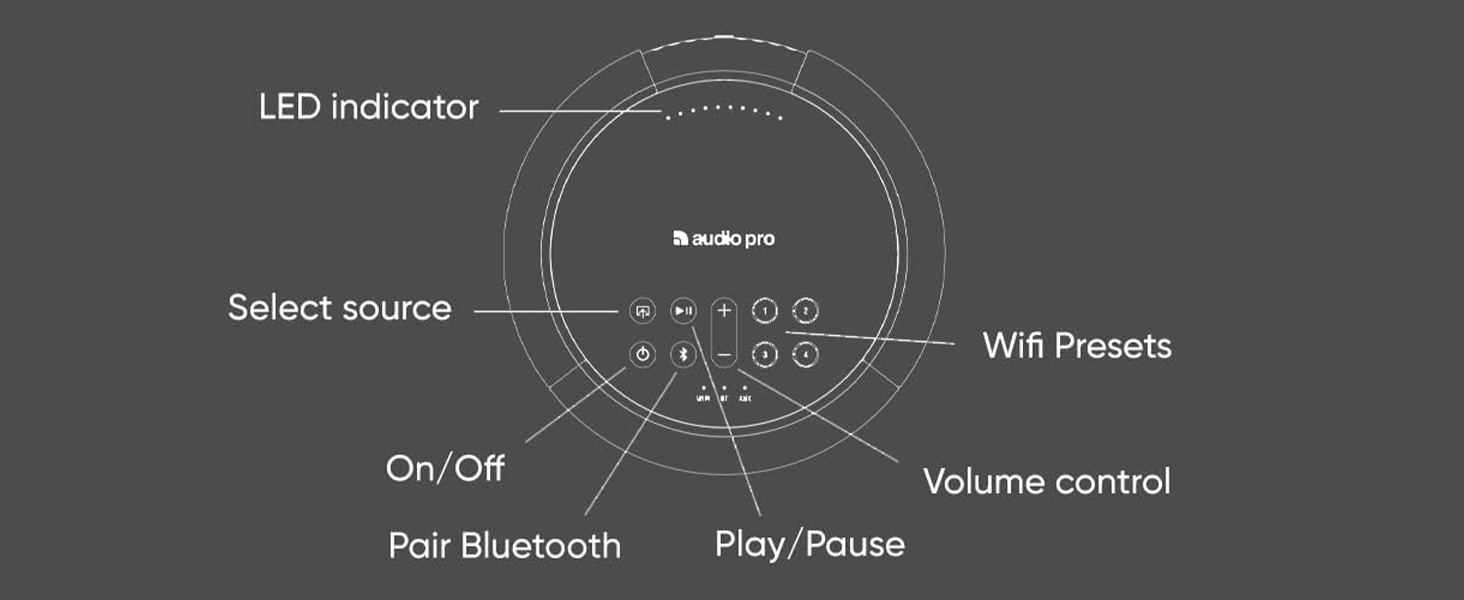
Figure 2: Top panel controls including LED indicator, source selection, volume, play/pause, Bluetooth pairing, and WiFi presets.
- LED Indicator: Displays status and connectivity.
- Select Source: Cycles through available input sources (WiFi, Bluetooth, AUX).
- Volume Control: Adjusts the speaker's output volume.
- Play/Pause: Controls media playback.
- Pair Bluetooth: Initiates Bluetooth pairing mode.
- WiFi Presets (1-4): Customizable buttons for quick access to favorite music or radio stations.
Setup
To begin using your Audio Pro A10 MKII speaker, follow these steps for initial setup.
1. Download the Audio Pro Control App
The Audio Pro Control app is essential for setting up and managing your speaker, especially for WiFi and multiroom functionalities. It is available for both iOS and Android devices.

Figure 3: Control your Audio Pro units with the Audio Pro Control app for iOS and Android.
Download the app here: iOS App Store | Google Play Store
2. Initial Power On and Network Connection
- Connect the speaker to a power outlet using the provided power cable.
- Open the Audio Pro Control app on your smartphone or tablet.
- Follow the on-screen instructions within the app to connect your A10 MKII to your home WiFi network. The speaker supports both 2.4GHz and 5GHz bands.
- Once connected, the speaker's LED indicator will confirm the network status.
Operating Instructions
Connectivity Options
- WiFi: For multiroom audio, AirPlay 2, Google Cast, and Spotify Connect. Offers higher fidelity and range than Bluetooth.
- Bluetooth: For direct connection from any Bluetooth-enabled device.
- AUX (3.5 mm Audio Cable Input): For wired connection to external audio sources.
Using AirPlay for Audio
AirPlay allows you to stream audio from your Apple devices to the A10 MKII speaker.
Video 2: Instructions on how to use AirPlay to stream audio from Apple devices to your Audio Pro speaker.
Using Google Cast for Audio
Google Cast enables streaming audio from Android devices, Chromebooks, and Google Chrome on PC/Mac to your A10 MKII speaker.
Video 3: Guide on how to use Google Cast to stream audio to your Audio Pro speaker.
Using Spotify Connect
Spotify Connect allows you to control music playback on your A10 MKII directly from the Spotify app on your device.
Video 4: Instructions on how to use Spotify Connect with your Audio Pro speaker.
Additional features with Spotify Connect:
Video 5: Explore three additional functionalities when using Spotify Connect with your Audio Pro speaker.
WiFi vs. Bluetooth
Understand the differences and advantages of WiFi and Bluetooth connectivity for your speaker.
Video 6: A comparison between WiFi and Bluetooth connectivity for Audio Pro speakers, highlighting features and benefits.
Saving and Playing Presets
Presets allow you to quickly access your favorite music or radio stations. You can save presets directly on the speaker or through the Audio Pro app.
Video 7: Learn how to save your favorite audio content as presets directly on your Audio Pro speaker.
Multiroom Functionality
The A10 MKII supports multiroom audio, allowing you to play music across multiple Audio Pro speakers simultaneously or individually. This feature is managed through the Audio Pro Control app.

Figure 4: Audio Pro A10 MKII speakers can be wall-mounted for multiroom audio setups.
Connecting a Turntable
You can connect a turntable to your Audio Pro speaker for vinyl playback. Ensure your turntable has a built-in or external RIAA amplifier if connecting via cables.
Video 8: Instructions on how to connect a turntable to your Audio Pro speaker, either wired or wirelessly via Bluetooth.
Maintenance
To keep your Audio Pro A10 MKII speaker in optimal condition, follow these maintenance guidelines:
- Cleaning: Use a soft, dry cloth to clean the speaker's surfaces. Avoid abrasive cleaners or solvents.
- Placement: Place the speaker on a stable surface, away from direct sunlight, heat sources, and moisture.
- Ventilation: Ensure adequate airflow around the speaker to prevent overheating.
- Power: Disconnect the power cable during electrical storms or when unused for extended periods.
Troubleshooting
If you encounter issues with your Audio Pro A10 MKII, refer to the following common troubleshooting steps:
| Problem | Possible Cause | Solution |
|---|---|---|
| No power | Power cable disconnected; power outlet not working. | Check power cable connection; try a different outlet. |
| No sound | Incorrect source selected; volume too low; device not connected. | Select correct input source; increase volume; re-establish connection (Bluetooth/WiFi). |
| Cannot connect to WiFi | Incorrect WiFi password; speaker too far from router; network interference. | Verify WiFi password; move speaker closer to router; restart router and speaker. |
| Bluetooth pairing fails | Speaker not in pairing mode; device already paired; interference. | Press and hold Bluetooth button to enter pairing mode; forget device on your phone and re-pair; ensure no other devices are connected. |
| Multiroom audio issues | Network congestion; app synchronization issues. | Ensure all speakers are on the same network; restart the Audio Pro app; check network stability. |
For further assistance, please contact Audio Pro customer support.
Specifications
| Feature | Detail |
|---|---|
| Model Name | Audio Pro A10 MKII Wireless Multiroom Speaker |
| Speaker Type | Multi Room |
| Special Feature | Bluetooth, WiFi, AirPlay2, Spotify Compatible |
| Recommended Uses | Indoor |
| Color | MKII Black |
| Product Dimensions | 7.5"D x 5.5"W x 5.5"H |
| Item Weight | 5.32 pounds (2.42 Kilograms) |
| Manufacturer | Audio Pro |
| Speaker Maximum Output Power | 52 Watts |
| Connectivity Technology | Auxiliary, Bluetooth, WiFi |
| Mounting Type | Tabletop Mount (Wall mountable with separate bracket) |
| Material | Fabric, Plastic |
Warranty and Support
Your Audio Pro A10 MKII speaker comes with a standard manufacturer's warranty. For specific details regarding warranty coverage, duration, and terms, please refer to the warranty card included with your product or visit the official Audio Pro website.
For technical support, troubleshooting assistance beyond this manual, or service inquiries, please contact Audio Pro customer support through their official channels. Contact information can typically be found on the Audio Pro website or within the product packaging.


