
Esperanza EKH011
Esperanza EKH011 Black Induction Cooker User Manual
Model: EKH011
1. Introduction
Thank you for purchasing the Esperanza EKH011 Black Induction Cooker. This manual provides important information regarding the safe operation, maintenance, and troubleshooting of your new appliance. Please read this manual thoroughly before use and keep it for future reference.
The Esperanza EKH011 is a portable and efficient induction cooker designed for modern kitchens, offering precise temperature control and energy savings.
2. Important Safety Instructions
When using electrical appliances, basic safety precautions should always be followed, including the following:
- Read all instructions before using the appliance.
- Do not touch hot surfaces. Use handles or knobs.
- To protect against electrical shock, do not immerse cord, plugs, or the appliance in water or other liquid.
- Close supervision is necessary when any appliance is used by or near children.
- Unplug from outlet when not in use and before cleaning. Allow to cool before putting on or taking off parts.
- Do not operate any appliance with a damaged cord or plug or after the appliance malfunctions or has been damaged in any manner.
- The use of accessory attachments not recommended by the appliance manufacturer may cause injuries.
- Do not use outdoors.
- Do not let cord hang over edge of table or counter, or touch hot surfaces.
- Do not place on or near a hot gas or electric burner, or in a heated oven.
- Extreme caution must be used when moving an appliance containing hot oil or other hot liquids.
- Always attach plug to appliance first, then plug cord into the wall outlet. To disconnect, turn any control to "off", then remove plug from wall outlet.
- Do not use appliance for other than intended use.
- This appliance generates heat during use. Proper precautions must be taken to prevent the risk of burns, fires, or other damage to persons or property.
- Ensure the appliance is placed on a stable, heat-resistant surface.
- Only use induction-compatible cookware.
3. Product Components and Features
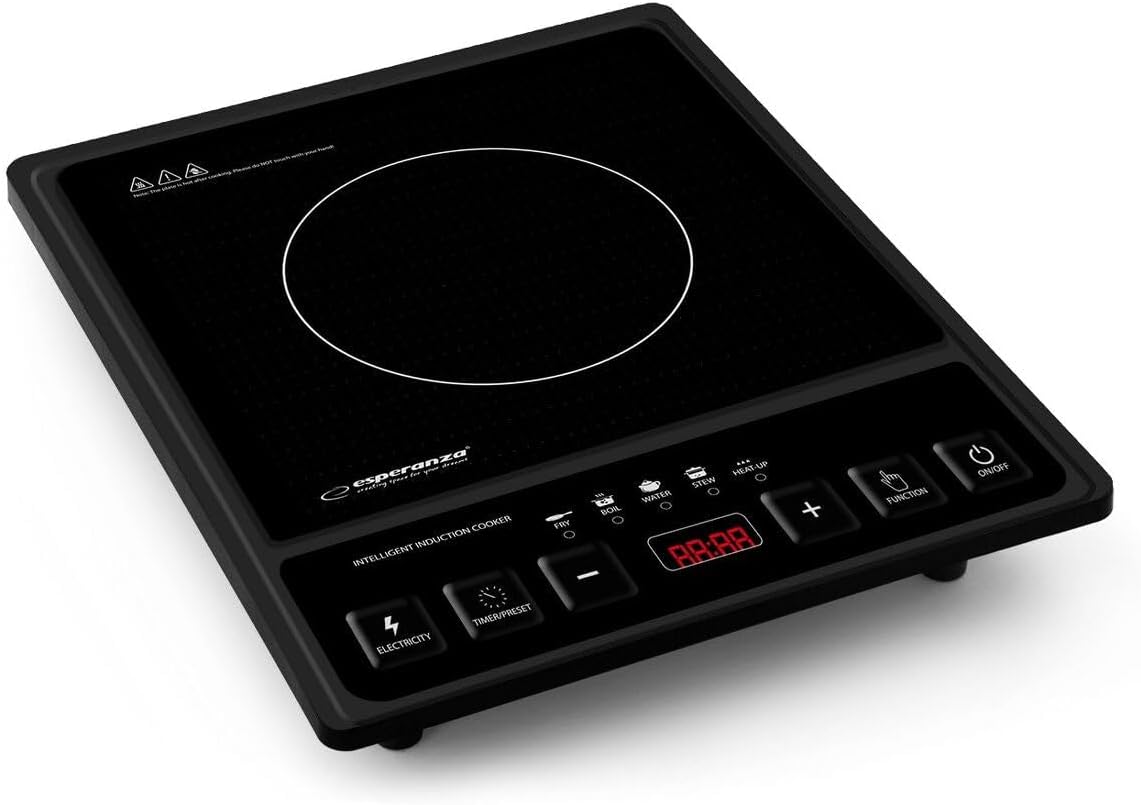
Figure 3.1: Top view of the Esperanza EKH011 Induction Cooker, showing the ceramic cooking surface, control panel with LED display, and various function buttons.

Figure 3.2: Packaging of the Esperanza EKH011 Induction Cooker, highlighting key features and design.
Key Features:
- Model: EKH011
- Power: 2000 watts
- Voltage: 120 Volts
- Material: Ceramic cooking surface
- Special Features: Portable, automatic pot detection
- Control Panel: Intuitive control panel with LED display for power, temperature, and timer.
- Temperature Settings: 8 levels of cooking temperature (80°C - 270°C).
- Power Settings: 8 levels of cooking power/strength (200W - 2000W).
- Timer Function: Up to 3 hours timer and 24 hours preset function.
- Energy Efficiency: Designed for up to 50% cooking time savings compared to traditional electric hot plates.
- Cooking Surface: Unpolished black crystal glass (250x250mm).
- Pre-set Functions: 5 special designed cooking functions: Fry, Boil, Water, Stew, Heat-Up.
4. Setup
- Unpacking: Carefully remove the induction cooker from its packaging. Retain packaging for future storage or transport.
- Placement: Place the induction cooker on a flat, stable, and heat-resistant surface. Ensure there is adequate ventilation around the unit (at least 10-15 cm clearance from walls or other appliances).
- Power Connection: Ensure the power outlet matches the voltage requirements of the cooker (120 Volts). Plug the power cord into a grounded electrical outlet.
- Cookware Check: Before first use, ensure you have induction-compatible cookware. Induction cookers require pots and pans made of ferromagnetic materials (e.g., cast iron, magnetic stainless steel). A simple test is to see if a magnet sticks to the bottom of your cookware.
5. Operating Instructions
Basic Operation:
- Place induction-compatible cookware with food on the center of the ceramic cooking surface.
- Press the ON/OFF button to turn on the cooker. The LED display will illuminate.
- The cooker will automatically detect if suitable cookware is present. If not, an error code may appear (refer to Troubleshooting).
- Select your desired cooking function using the FUNCTION button or adjust power/temperature using the + and - buttons.
- The display will show the selected power level (W) or temperature (°C).
- To turn off, press the ON/OFF button again. The fan may continue to run for a short period to cool down the unit.
Specific Functions:
- Power/Temperature Adjustment: Use the + and - buttons to cycle through 8 power levels (200W-2000W) or 8 temperature levels (80°C-270°C).
- Timer/Preset: Press the TIMER/PRESET button to set a cooking duration (up to 3 hours) or to pre-set a delayed start (up to 24 hours). Use + and - to adjust the time.
- Pre-set Cooking Modes: The FUNCTION button allows selection of specific cooking modes like Fry, Boil, Water, Stew, and Heat-Up. Each mode has optimized settings for common cooking tasks.
- Electricity Display: The ELECTRICITY button may display the current power consumption.
6. Care and Maintenance
- Cleaning:
- Always unplug the cooker and allow it to cool completely before cleaning.
- Wipe the ceramic glass surface with a soft, damp cloth and mild detergent. For stubborn stains, a non-abrasive ceramic hob cleaner can be used.
- Do not use abrasive cleaners, scouring pads, or harsh chemicals, as these can scratch or damage the surface.
- Wipe the control panel and exterior with a soft, damp cloth. Do not allow water to enter the internal components.
- Never immerse the cooker in water or any other liquid.
- Storage:
- Ensure the cooker is clean and dry before storing.
- Store in a cool, dry place, away from direct sunlight and moisture.
- Do not place heavy objects on top of the cooker during storage.
7. Troubleshooting Guide
Before contacting customer support, please refer to the following common issues and their solutions:
| Problem | Possible Cause | Solution |
|---|---|---|
| Cooker does not turn on. | Not plugged in; power outage; faulty outlet. | Check power cord connection; check household circuit breaker; try a different outlet. |
| Cooker turns on but does not heat. | Cookware not induction-compatible; cookware not centered; pot too small/large; internal overheating. | Use induction-compatible cookware; center the pot; ensure pot diameter is within recommended range; allow unit to cool down. |
| Display shows an error code (e.g., E0, E1, E2). | Specific error (e.g., no pot, overheating, voltage issue). | Refer to the specific error code in your full manual (if available) or common codes: E0/E1 often means no pot/wrong pot; E2/E3 often means overheating/voltage issue. Try resetting by unplugging and replugging. |
| Fan continues to run after turning off. | Normal cooling process. | This is normal. The fan will stop automatically once the internal components have cooled sufficiently. |
If the problem persists after attempting these solutions, please contact customer support.
8. Technical Specifications
| Specification | Detail |
|---|---|
| Brand | Esperanza |
| Model Number | EKH011 |
| Color | Black |
| Power / Wattage | 2000 watts |
| Voltage | 120 Volts |
| Material | Ceramic (cooking surface) |
| Special Features | Portable, automatic detection |
| Item Weight | 1.95 Kilograms |
| Heating Elements | 1 |
| Cooking Surface Dimensions | 250 x 250 mm (approx.) |
| Temperature Range | 80°C - 270°C |
9. Warranty and Support
Esperanza products are manufactured to high-quality standards. For information regarding warranty coverage, please refer to the warranty card included with your product or visit the official Esperanza website.
For technical support, spare parts, or service inquiries, please contact Esperanza customer service through their official channels. You may find more information on their website:
Esperanza Official Website (Product Information) (Note: This link may lead to general product listings or a similar model, EKH005. Please navigate to EKH011 if available.)
Related documentsEKH011


Ask a question about this manual
Ask about setup, troubleshooting, compatibility, parts, safety, or missing instructions. Manuals+ will review the question and use this page’s manual context to help answer it.