
YunTeng VCT-288
Yunteng VCT-288 Monopod Instruction Manual
Model: VCT-288
Introduction
The Yunteng VCT-288 Monopod is designed to provide stable support for DSLR cameras and camcorders during photography and video recording. It features a unique rotating base and a removable ball head, offering versatility for various shooting scenarios. This manual provides detailed instructions for the proper setup, operation, and maintenance of your VCT-288 Monopod.
What's in the Box
Upon unpacking, please ensure all the following components are present:
- Yunteng VCT-288 Monopod
- Two-way Ball Joint (Bi-directional ball head)
- Mini Tripod Base
- Storage Case
Key Features
- Integrated Mini Tripod: Provides enhanced stability and allows the monopod to stand independently. The lower part can be unscrewed for rotation.
- Removable Ball Head: The tripod head allows 360° rotation and front-to-back tilting for flexible camera positioning.
- Universal Compatibility: Bi-directional ball head with a quick-release wide tray and a 1/4 inch thread, compatible with most cameras.
- Robust Construction: Independent 4-section monopod with a quick lock system, square-shaped axis, and a maximum tube diameter of 2.3 cm. Supports up to 3kg.
- Adjustable Height: Extends up to 1.48 meters (58.3 inches) and folds down to 57 cm (22.4 inches) for portability.
- Versatile Use: The ball head can be installed directly on the mini tripod for a compact table tripod setup.
- Comfort Grip: The top of the monopod is covered with foam for a secure and comfortable grip.

Figure 1: The Yunteng VCT-288 Monopod with its integrated mini tripod base, showcasing its light weight and extendable design for easy portability.

Figure 2: Close-up view of the mini tripod base, illustrating the button-press mechanism for folding the legs securely.

Figure 3: The monopod illustrating its 360-degree panning panoramic capability, allowing for smooth rotation.
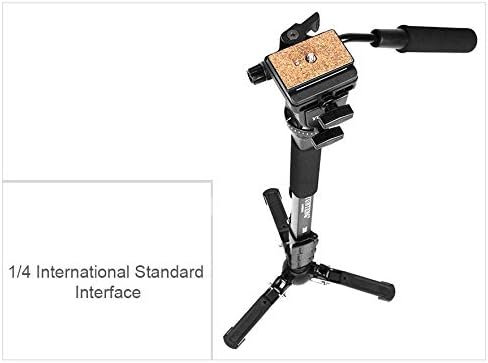
Figure 4: The quick-release plate featuring a 1/4 inch international standard interface for camera attachment.
Setup Instructions
- Unfold the Mini Tripod Base:
Locate the buttons on each leg of the mini tripod base. Press these buttons to release and unfold the legs until they click into place, ensuring a stable foundation.
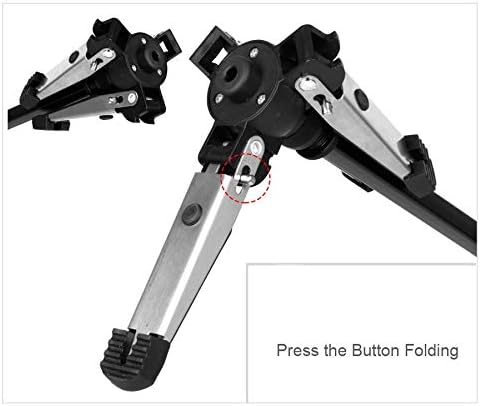
Figure 5: Demonstrating how to press the button to unfold the mini tripod legs for deployment.
- Extend the Monopod Sections:
Unlock the quick-release levers on each section of the monopod. Extend the sections to your desired height and then firmly lock the levers to secure them. The monopod has 4 sections and can reach a maximum height of 1.48 meters.
- Attach the Ball Head:
Ensure the ball head is securely screwed onto the top of the monopod. The ball head can also be detached and mounted directly onto the mini tripod base for a low-profile setup.
- Mount Your Camera:
Attach your camera or camcorder to the quick-release plate on the ball head. Ensure the camera is firmly secured before use. The ball head features a 1/4 inch thread for universal compatibility.
Operating Instructions
- Adjusting Height:
To adjust the monopod's height, unlock the section levers, extend or retract the sections, and then re-lock the levers. Always ensure all sections are securely locked before placing a camera on top.
- Using the Ball Head:
Loosen the control knob on the ball head to adjust your camera's angle. The bi-directional ball head allows for precise positioning. Tighten the knob firmly once the desired angle is achieved.
- 360° Panning:
The monopod's base allows for 360° rotation. If the mini tripod base is unscrewed from the main monopod shaft, it enables a smooth panning effect without moving the entire setup.
- Using as a Mini Table Tripod:
For low-angle shots or tabletop use, detach the monopod shaft from the mini tripod base. Then, directly attach the ball head to the mini tripod base. This creates a compact and stable table tripod.
- Carrying and Transport:
Utilize the integrated wrist rope for secure carrying. When transporting, fold the monopod completely and store it in the provided storage case to protect it from damage.

Figure 6: The monopod featuring a considerate wrist rope for enhanced security and ease of carrying.
Maintenance
- Cleaning: Wipe the monopod with a soft, dry cloth after each use to remove dust and dirt. For stubborn grime, use a slightly damp cloth and then dry thoroughly. Avoid harsh chemicals or abrasive cleaners.
- Storage: Store the monopod in its protective case in a cool, dry place away from direct sunlight and extreme temperatures.
- Lubrication: Do not lubricate the monopod sections or locking mechanisms unless specifically instructed by the manufacturer. Lubricants can attract dust and interfere with proper operation.
- Inspection: Periodically check all screws, levers, and joints for tightness. Tighten any loose components to ensure safe operation.
Troubleshooting
Issue: Monopod sections do not lock securely.
Solution: Ensure the quick-release levers are fully engaged and tightened. If the issue persists, inspect the levers for any damage or obstruction.
Issue: Camera feels unstable on the ball head.
Solution: Verify that the quick-release plate is securely attached to your camera and that the camera is firmly seated and locked onto the ball head. Ensure the ball head's control knob is tightened.
Issue: Mini tripod legs do not unfold or fold smoothly.
Solution: Check for any debris or obstruction in the folding mechanism. Ensure the release buttons are fully pressed when attempting to fold or unfold the legs.
Specifications
| Model Name | VCT-288 |
| Maximum Height | 148 Centimeters (58.3 inches) |
| Folded Length | 57 Centimeters (22.4 inches) |
| Weight Limit | 3 Kilograms (6.6 pounds) |
| Item Weight | 1300 Grams (2.87 pounds) |
| Material | Rubber (for grip/feet), Metal (for structure) |
| Monopod Sections | 4 |
| Tripod Head Type | Ball Head (Bi-directional) |
| Mounting Screw | 1/4 inch standard |
| Product Dimensions | 22.44 x 0.91 x 4.8 inches (folded) |

Figure 7: Detailed dimension diagram of the Yunteng VCT-288 Monopod in both extended and folded configurations.
Warranty and Support
For warranty information and technical support, please refer to the documentation provided with your purchase or contact the manufacturer directly. Keep your proof of purchase for any warranty claims.
Manufacturer: Yunteng
Related documentsVCT-288

Ask a question about this manual
Ask about setup, troubleshooting, compatibility, parts, safety, or missing instructions. Manuals+ will review the question and use this page’s manual context to help answer it.