
Introduction and Overview
The Hover-1 Kart Buggy Attachment transforms your compatible electric hoverboard into an exciting go-kart. Designed for stability and control, this attachment provides a fun and enjoyable riding experience for various ages. It features a comfortable bucket seat, dual hand-operated joysticks for maneuverability, and an adjustable frame to accommodate different rider heights.
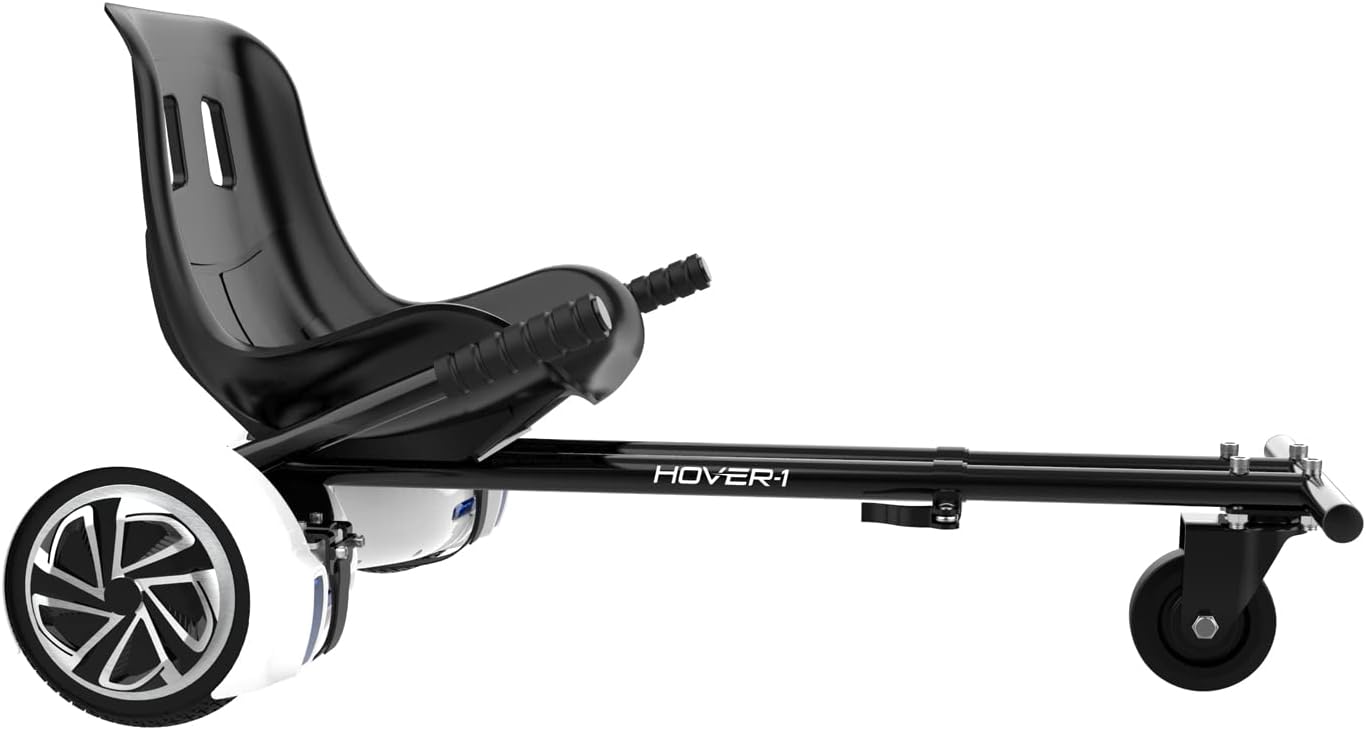
The Hover-1 Kart Buggy Hoverboard Attachment, shown connected to a hoverboard, ready for use.
Key Features
- Hoverboard Transformation: Converts compatible 6.5" and 8" electric hoverboards into a go-kart.
- Full Control and Stability: Hand-operated joysticks provide complete control and easy maneuverability, enabling quick turns and forward/reverse driving.
- Adjustable Design: Features an adjustable frame length for customized and comfortable riding, suitable for various rider sizes.
- Secure Attachment: Adjustable straps with rubber protectors securely fasten the buggy to your hoverboard, ensuring safety during operation.
- Easy Assembly: Includes all necessary mounting hardware and a step-by-step installation guide for straightforward setup.
- Comfortable Seating: Equipped with a comfortable molded bucket seat for extended riding comfort.

A young rider demonstrating the Hover-1 Kart's compatibility and ease of use.

The Hover-1 Kart provides an engaging riding experience for children.

Adults can also enjoy the Hover-1 Kart, highlighting its adjustable design.
Included Components
Your Hover-1 Kart Buggy Hoverboard Attachment package includes:
- Hover-1 Kart Buggy Frame with Seat
- Instruction Manual
- Necessary mounting gear (screws, wrenches, nuts, washers, and other spare parts)
- Two extra straps for hoverboard attachment

An overhead view of the Hover-1 Kart Buggy Attachment, showing its main components.
Safety Information
Safety is paramount when operating the Hover-1 Kart Buggy. Always adhere to the following guidelines:
- Always use appropriate safety gear, including a helmet, knee pads, and elbow pads. These items are sold separately.
- Ensure the Hover-1 Kart is securely attached to the hoverboard using all provided straps and hardware before each use.
- Operate the Kart on flat, stable surfaces free from obstacles, traffic, or pedestrians.
- Supervise children at all times when they are using the Hover-1 Kart.
- Do not exceed the recommended weight limit for the hoverboard or the Kart attachment.
- Avoid operating in wet conditions, on steep inclines, or at excessive speeds.
- Familiarize yourself with the controls and practice in a safe, open area before attempting more complex maneuvers.
Setup Instructions
Follow these steps to assemble and attach your Hover-1 Kart Buggy:
- Unpack Components: Carefully remove all parts from the packaging and verify that all included components are present as listed in the 'Included Components' section.
- Assemble Frame: Connect the frame sections as per the diagrams in the included manual, securing them with the provided screws and wrenches. Ensure all connections are tight and stable.
- Attach Seat: Secure the bucket seat to the main frame using the designated hardware.
- Adjust Footrest Length: The footrest length is adjustable. Loosen the adjustment mechanism, slide the footrest to the desired length for the rider, and securely tighten it.
- Attach to Hoverboard: Place your hoverboard on a flat surface. Position the Hover-1 Kart's attachment points over the hoverboard's footpads. Use the adjustable straps with rubber protectors to firmly secure the Kart to the hoverboard. Ensure the straps are pulled very snug to prevent movement during operation.
- Final Check: Before riding, double-check all connections, straps, and adjustments to ensure everything is secure and properly aligned.

An angled view of the Hover-1 Kart, illustrating its structure for assembly.
Operating Instructions
Operating the Hover-1 Kart is intuitive and provides full control over your hoverboard's movement:
- Mounting: Sit comfortably in the seat with your feet placed on the footrests.
- Forward Movement: To move forward, gently push both hand-operated joysticks forward simultaneously. The further you push, the faster the Kart will accelerate.
- Reverse Movement: To move backward, gently pull both joysticks backward simultaneously.
- Turning: To turn, push one joystick forward while pulling the other backward. For example, to turn left, push the right joystick forward and pull the left joystick backward. To turn right, push the left joystick forward and pull the right joystick backward.
- Stopping: To stop, return both joysticks to the neutral (vertical) position.
- Maneuvering: The independent rear wheel control allows for quick and precise turns. Practice in an open area to become familiar with the steering.
Maintenance
Regular maintenance will ensure the longevity and safe operation of your Hover-1 Kart Buggy:
- Cleaning: Wipe down the frame and seat with a damp cloth after each use to remove dirt and debris. Avoid using harsh chemicals.
- Strap Inspection: Periodically inspect the attachment straps for any signs of wear, fraying, or damage. Replace worn straps immediately.
- Hardware Check: Regularly check all screws, bolts, and connections to ensure they remain tight. Tighten any loose hardware.
- Wheel Inspection: Check the rear wheels for wear and ensure they spin freely.
- Storage: Store the Hover-1 Kart in a dry, cool place away from direct sunlight and extreme temperatures when not in use.
Troubleshooting
If you encounter issues with your Hover-1 Kart Buggy, consider the following common troubleshooting steps:
- Kart Not Moving/Responding:
- Ensure the hoverboard is fully charged and powered on.
- Verify that the attachment straps are securely fastened and the Kart is properly seated on the hoverboard's footpads. The hoverboard's sensors need to be engaged by the Kart's weight.
- Check that the joysticks are returning to the neutral position when not in use.
- Difficulty Turning:
- Ensure the joysticks are being operated correctly for turns (one forward, one backward).
- Check for any obstructions around the rear wheels or the hoverboard's wheels.
- Unstable Ride:
- Confirm all frame connections are tight and secure.
- Re-check the tightness of the hoverboard attachment straps.
- Ensure the riding surface is smooth and level.
For persistent issues, please refer to the 'Warranty and Support' section for contact information.
Specifications
| Attribute | Value |
|---|---|
| Model Name | Kart |
| Part Number | HY-H1-BGY |
| Brand | Hover-1 |
| Color | Black |
| Material | Aluminum, Plastic |
| Item Weight | 15.3 Pounds |
| Item Dimensions (LxWxH) | 23 x 9 x 19 inches |
| Compatible Hoverboard Wheel Sizes | 6.5" & 8" |
| Suggested Users | Unisex-adult |
Warranty and Support
The Hover-1 Kart Buggy Hoverboard Attachment comes with a 90-day warranty from the date of purchase. This warranty covers manufacturing defects under normal use.
For any troubleshooting, technical assistance, or warranty claims, please contact Hover-1 support. Many common issues can be resolved with simple solutions, and the support team is available to assist you.
Please retain your proof of purchase for warranty validation.


