
Introduction
This manual provides detailed instructions for the installation, operation, and maintenance of your NEWTRY Wireless Crane Remote Control System. This system is designed for industrial hoist and bridge crane applications, offering reliable and efficient control.
Please read this manual thoroughly before using the product to ensure safe and optimal performance.
Package Contents
- 1 x Wireless Transmitter (12-button)
- 1 x Receiver (DC 12V)
- User Manual (this document)

Figure 1: Overview of the NEWTRY Wireless Crane Remote Control System, including the handheld transmitter and the receiver unit with its wiring harness.
Setup and Installation
1. Receiver Wiring
The receiver unit comes with a 1.3m high-quality pure copper cable with recognizable wire numbers and U-shaped terminals for quick wiring. Refer to the wiring diagram below for proper connection to your industrial crane or hoist system.

Figure 2: Detailed wiring diagram for the receiver unit. Ensure all connections are secure and match the corresponding functions of your crane system.
- Power Supply (AC-1, AC-2, MAIN-IN): Connect the appropriate power lines to the receiver. This model operates on DC 12V.
- Control Outputs (UP, DOWN, EAST, WEST, SOUTH, NORTH, R1-R4, RO/START): Connect these outputs to the corresponding control inputs of your crane's motor or control panel.
- Common (COM1): Connect the common line as indicated in the diagram.
2. Transmitter Battery Installation
The transmitter is powered by 2 AA batteries (not included). Open the battery compartment on the back of the transmitter and insert the batteries, ensuring correct polarity.
Operating Instructions
1. Power On/Off
- To power on the transmitter, turn the safety key switch to the 'ON' position.
- To power off, turn the safety key switch to the 'OFF' position. In emergencies, pull out the safety key to immediately stop operations.

Figure 3: The safety key switch on the transmitter. Pulling it out provides an immediate emergency stop function.
2. Basic Operation
The transmitter features 12 high-performance metal contact buttons for high sensitivity and durability. The remote control offers strong penetration, eliminating the need for precise aiming.

Figure 4: The transmitter in use, demonstrating its effective control range of up to 100 meters (328 feet) in open areas.
- Directional Buttons (UP, DOWN, EAST, WEST, SOUTH, NORTH): Press the corresponding button to move the crane or hoist in the desired direction.
- Numbered Buttons (1, 2, 3, 4): These buttons can be assigned to specific functions of your crane.
- STOP Button: Press this button to immediately stop all crane movements.
- ALARM Button: Activates an alarm function, if configured.
3. Indicator Light
The transmitter is equipped with an indicator light. This light will warn you if there is an issue with the operation or if the battery power is sufficient.
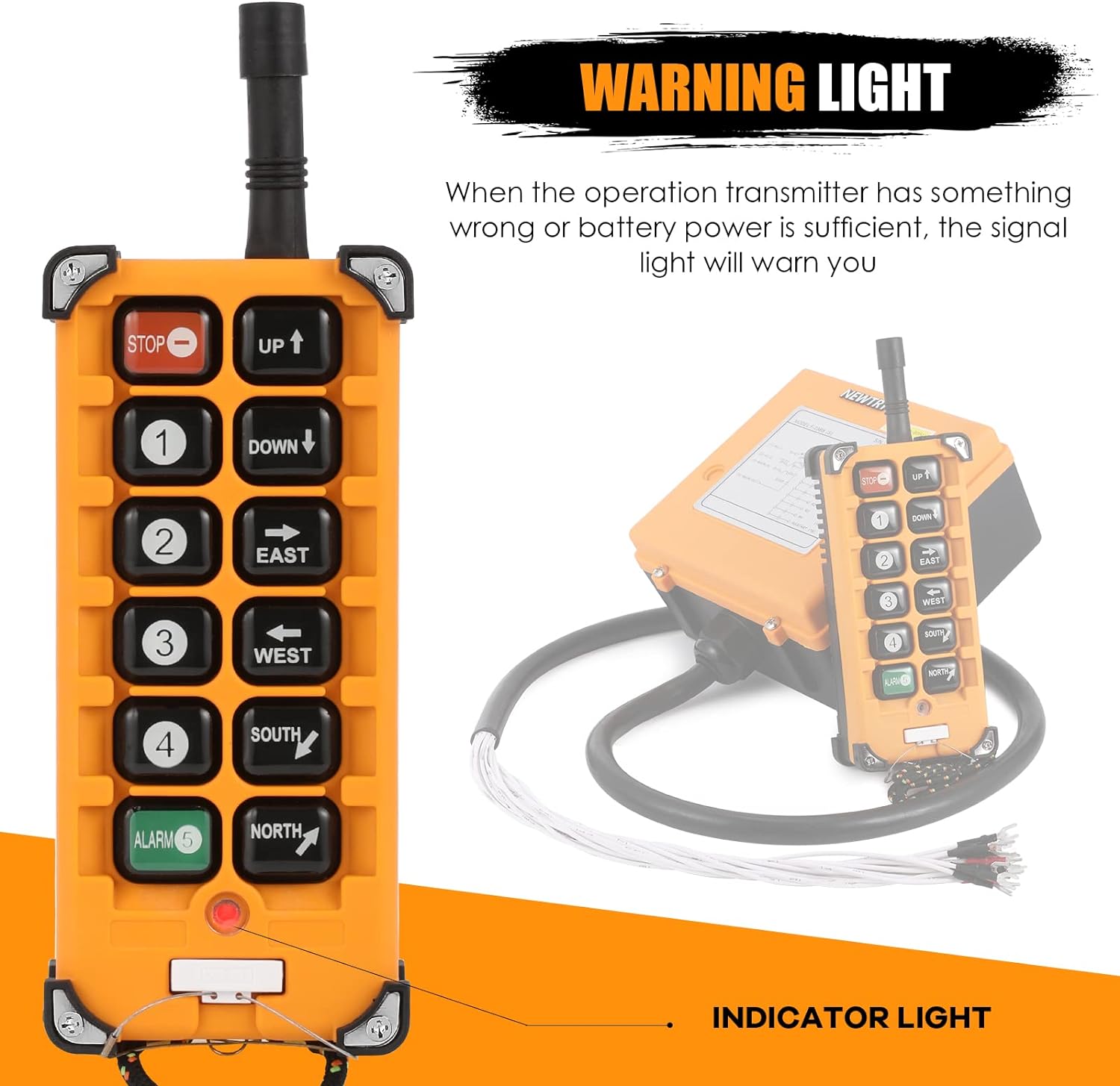
Figure 5: Location of the indicator light on the transmitter, which provides status feedback.
4. Key Function Customization
The function of the keys can be customized. Connect the transmitter to software on a Win7/XP system via an exclusive data line (data line needs to be purchased separately) to set the key functions according to your specific needs.
Maintenance
- Cleaning: Regularly clean the transmitter and receiver with a soft, dry cloth. Do not use abrasive cleaners or solvents.
- Battery Replacement: Replace the AA batteries in the transmitter when the indicator light signals low power or when performance degrades.
- Environmental Protection: The product shell is constructed with reinforced PA66 flame-retardant nylon, offering strong resistance against pressure and corrosion. It is rated IP65 for protection against dust and water jets. Equipped with a waterproof jacket, it provides double waterproofing.
- Fall Resistance: The 4 corners of the remote control are protectively wrapped, and the solid shell combined with the matching safety rope and anti-collision angle protect the remote control from damage due to falls.

Figure 6: The robust design of the transmitter, emphasizing its IP65 waterproof rating and enhanced fall resistance features.
- Storage: Store the unit in a dry, cool place when not in use for extended periods.
Troubleshooting
| Problem | Possible Cause | Solution |
|---|---|---|
| Transmitter not responding | Low or dead batteries. Safety key switch in 'OFF' position. Out of range. Interference. | Replace AA batteries. Turn safety key switch to 'ON'. Move closer to the receiver (within 100m). Check for strong electromagnetic interference. |
| Crane not moving as expected | Incorrect wiring. Receiver power issue. Key function not configured correctly. | Verify all wiring connections against the diagram. Check power supply to the receiver. Review key function customization settings via software. |
| Indicator light flashing/warning | Low battery. Signal issue. | Replace transmitter batteries. Ensure clear line of sight and reduce distance if possible. |
Specifications
| Brand | NEWTRY |
| Model | + DC 12V Receiver |
| Product Name | Wireless Crane Remote Control System |
| Transmitter Buttons | 12 (including directional, numbered, STOP, ALARM) |
| Control Distance | Up to 100 meters (328 feet) without interference |
| Transmitter Power Supply | 2 x AA Batteries (not included) |
| Receiver Power Supply | DC 12V |
| Material | Reinforced PA66 Flame-Retardant Nylon (shell), Metal (buttons) |
| Protection Level | IP65 (Dust and water jet resistant) |
| Dimensions (Package) | 33.71 x 22.5 x 20.29 cm |
| Weight (Item) | 2.05 Kilograms |
| Compatible Devices | Industrial Cranes, Hoists |
Warranty and Support
For information regarding product warranty, please refer to the documentation included with your purchase or contact NEWTRY customer support directly. Specific warranty terms may vary by region and retailer.
For technical support or inquiries, please visit the official NEWTRY website or contact their customer service department. Contact details are typically available on the product packaging or the brand's official online presence.