
1. Introduction
This manual provides detailed instructions for assembling your JEKCA Black Cat Building Blocks, Model ST19CA09-M02. This kit is designed for individuals aged 14 and above, offering a rewarding building experience with its unique interlocking brick-through system. Please read all instructions carefully before beginning assembly.
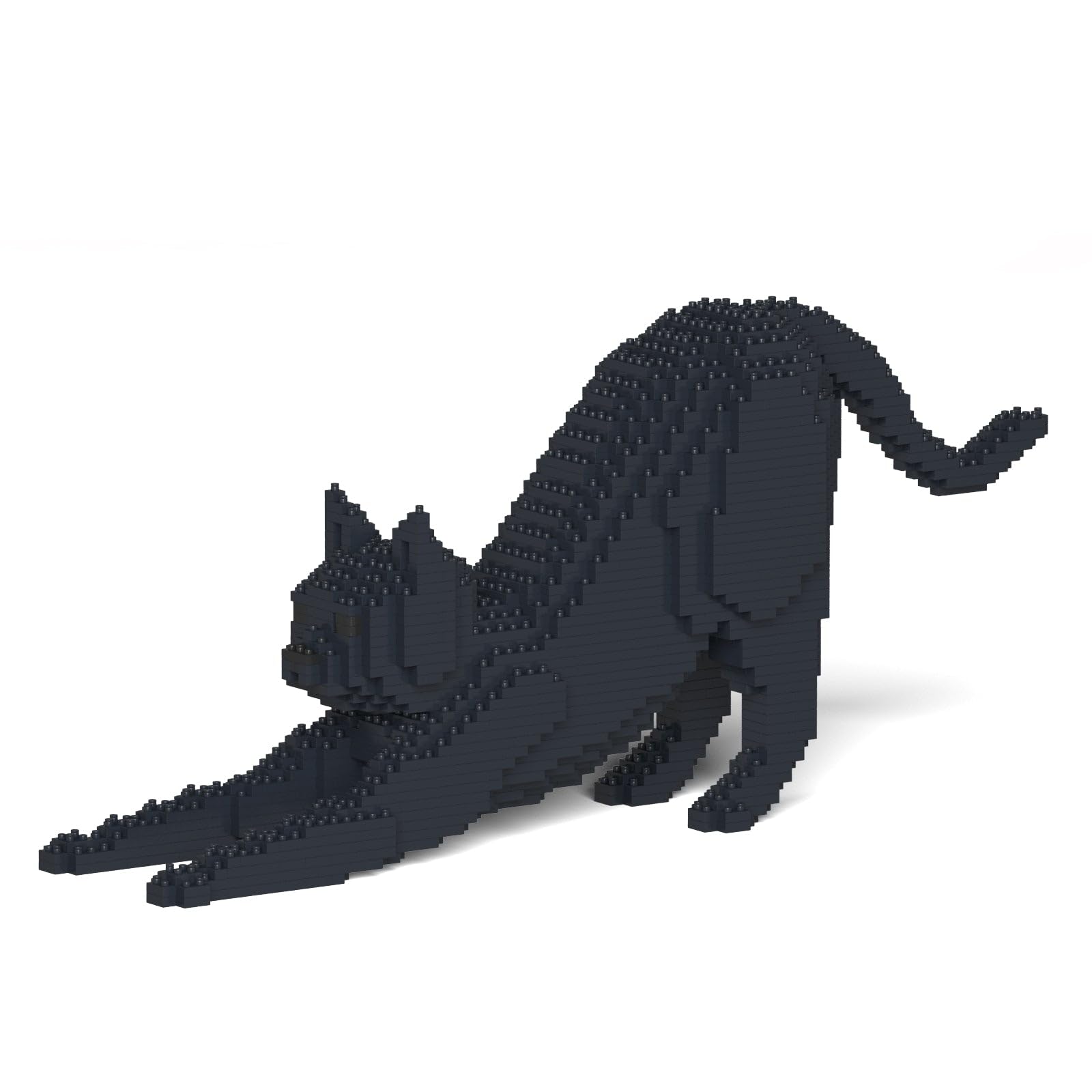
Image 1.1: The completed JEKCA Black Cat model, showcasing its detailed design and stretching posture.
2. What's in the Box
Carefully unpack the contents and verify that all components are present:
- Instruction Manual
- Building Bricks (over 1350 pieces)
- Pins (for interlocking system)
- Pin Driver (screwdriver tool)
- Quick Guide
3. Safety Information
WARNING: CHOKING HAZARD - Small Parts. Not for children under 3 years.
- This product contains small parts and is recommended for ages 14 and above.
- Keep all small components away from young children and pets to prevent accidental ingestion.
- Always use the provided Pin Driver carefully to avoid injury.
- Dispose of packaging materials responsibly.
4. Assembly Instructions
The JEKCA building blocks utilize a patented interlocking brick-through system for enhanced stability. Follow these steps to assemble your model:
- Understand the Interlocking System: JEKCA bricks are designed to be secured with pins. Each brick has holes that align with pins to create a sturdy connection.
- Layer-by-Layer Construction: The instruction manual provided in your kit will guide you through the assembly process layer by layer. Identify the required bricks for each step.
- Align and Place Bricks: Position the bricks according to the manual's diagrams. Ensure the holes on the bricks are aligned for pin insertion.
- Insert Pins: Once bricks are correctly placed, insert the provided pins into the aligned holes.
- Secure with Pin Driver: Use the Pin Driver tool to push and secure the pins firmly into place. The pins should be inserted at a 90-degree angle to ensure a tight lock. This unique method ensures the model is sturdy and less prone to falling apart.
- Review and Correct: Periodically review your progress against the manual. If a mistake is made, the pins allow for disassembly and correction, ensuring accuracy.

Image 4.1: Visual guide to the JEKCA interlocking brick-through system. Step 1 shows two bricks being aligned. Step 2 illustrates pins being placed into the aligned bricks. Step 3 demonstrates using the pin driver to secure the pins at a 90-degree angle.

Image 4.2: Demonstrating the use of the pin driver to secure JEKCA bricks during assembly.
For detailed step-by-step visual guidance, refer to the comprehensive building manual included in your product box.
5. Operating Instructions (Building Process)
The primary operation of this product is the building process itself. Engage with the model by following the provided manual's sequence. The interlocking system ensures that once a section is built and pinned, it remains stable, allowing for complex and durable structures.
- Patience is Key: Building intricate models requires patience and attention to detail.
- Organize Your Bricks: Sorting bricks by color or size can streamline the building process.
- Enjoy the Process: The satisfaction comes from the careful construction and the final, sturdy model.
6. Maintenance
To ensure the longevity and appearance of your JEKCA model:
- Cleaning: Dust the model regularly with a soft, dry cloth or a soft brush. For deeper cleaning, gently wipe with a damp cloth and mild soap, then dry thoroughly. Avoid harsh chemicals.
- Storage: Store the assembled model in a stable location away from direct sunlight and extreme temperatures to prevent material degradation or discoloration.
- Disassembly: If you need to disassemble the model, carefully remove the pins using the Pin Driver. Avoid forcing bricks apart without first removing the pins to prevent damage.
7. Troubleshooting
- Difficulty Following Instructions: If the instruction pictures appear too small or unclear, try using a magnifying glass or taking a photo with your phone and zooming in. JEKCA manuals are generally detailed, but some steps may require closer inspection.
- Missing Pieces: While JEKCA typically provides extra pieces, if you find a critical piece missing, please contact JEKCA customer support with your product model number and details of the missing part.
- Model Not Sturdy: Ensure all pins are fully inserted and secured with the Pin Driver. The interlocking system relies on these pins for structural integrity. Re-check any wobbly sections to confirm proper pin placement.
- Pins Difficult to Insert/Remove: Apply gentle, consistent pressure. If a pin is stuck, ensure it is aligned correctly. The Pin Driver is designed to assist with this process.
8. Specifications
| Product Dimensions (Assembled) | Length: 46.9 cm (18.46 inches), Width: 10.6 cm (4.17 inches), Height: 20.8 cm (8.19 inches) |
| Item Weight | 2.31 pounds |
| Model Number | ST19CA09-M02 |
| Recommended Age | 14 years and up |
| Number of Pieces | Greater than 1350 pieces |
| Material | Plastic |

Image 8.1: Dimensional overview of the JEKCA Black Cat model when fully assembled.
9. Warranty and Support
JEKCA products are manufactured to high standards. For any inquiries regarding missing parts, assembly issues, or product defects, please contact JEKCA customer support directly. While specific warranty details are not provided in this manual, JEKCA is committed to customer satisfaction.
For further assistance, please visit the official JEKCA website or refer to the contact information provided on your product packaging.
