1. Overview
The Sennheiser XSW-D Lavalier Set is a digital wireless audio system designed for clear and reliable sound capture. This omnidirectional lavalier system is ideal for presentations, video recording, voice recording, and video conferencing. It operates on a license-free 2.4 GHz frequency band, ensuring worldwide compatibility and automatic interference management.
Key features include:
- Pre-paired Components: Sets are pre-paired for immediate use upon unboxing.
- Worldwide Compatibility: Utilizes license-free 2.4 GHz frequency.
- Automatic Channel Allocation: System automatically manages interference for stable connection.
- Compact and Lightweight: Designed for easy transport and discreet placement.
- Rechargeable Batteries: Devices can be charged during operation or breaks, with 1 hour charging for 50% battery and up to 5 hours total battery time for the receiver, and up to 15 hours for the transmitter.
2. What's in the Box
Your Sennheiser XSW-D Lavalier Set includes the following components:
- (1) ME2-II clip-on lapel microphone
- (1) XSW-D MINI JACK TX (3.5mm) transmitter
- (1) XSW-D XLR MALE RX receiver
- (1) Beltpack clip
- (1) USB charging cable
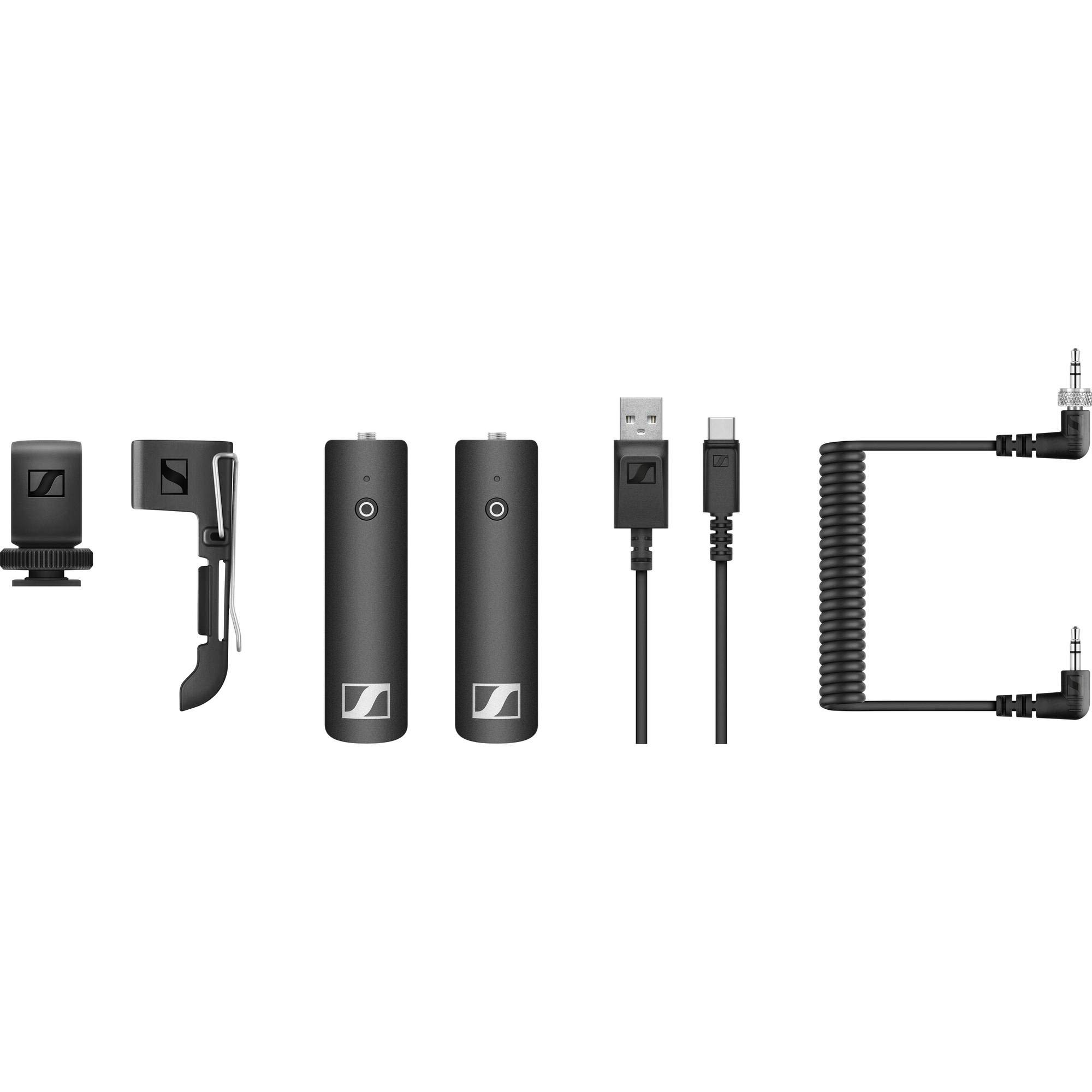
Image: The complete Sennheiser XSW-D Lavalier Set, showcasing the ME2-II lavalier microphone, the mini jack transmitter, and the XLR male receiver, along with accessories.
3. Setup
Follow these steps to set up your Sennheiser XSW-D Lavalier Set:
- Charge the Devices: Connect the XSW-D MINI JACK TX (transmitter) and XSW-D XLR MALE RX (receiver) to the USB charging cable. Ensure both devices are fully charged before first use. A 1-hour charge provides 50% battery life.
- Connect Lavalier Microphone: Plug the ME2-II clip-on lapel microphone into the 3.5mm input jack on the XSW-D MINI JACK TX transmitter. Ensure a secure connection.
- Attach Transmitter: Use the provided beltpack clip to attach the transmitter discreetly to clothing or a belt.
- Connect Receiver: Plug the XSW-D XLR MALE RX receiver directly into the XLR input of your camera, audio recorder, or mixing console. If your device uses a 3.5mm input, use an appropriate XLR to 3.5mm adapter (not included in this set).
- Power On: Press and hold the power button on both the transmitter and receiver until the indicator lights illuminate. The devices are pre-paired and should automatically connect.
- Adjust Audio Levels: On the receiver, use the AF Out button to toggle between four different output volume levels to match your recording device's input sensitivity. Monitor your audio levels on your recording device to prevent clipping.

Image: Close-up view of the Sennheiser XSW-D XLR Male Receiver, highlighting its compact design and XLR connector for direct integration with professional audio equipment.
4. Operating Instructions
The Sennheiser XSW-D system is designed for intuitive operation:
- Power On/Off: Press and hold the power button on both the transmitter and receiver to turn them on or off.
- Automatic Pairing: The transmitter and receiver are factory-paired. If re-pairing is needed, consult the full user manual for detailed instructions.
- Mute Function: The transmitter features a mute slide switch for quick audio muting.
- Automatic Frequency Management: The system automatically scans for and selects the clearest frequency within the 2.4 GHz band, minimizing interference.
- Battery Life: The receiver provides approximately 4 hours of operation, while the transmitter can last up to 15 hours. Monitor battery indicators to ensure continuous operation.
Video: Official Sennheiser overview of the XSW-D Wireless Lavalier Microphone Set (Model 508485), demonstrating its features and ease of use.
5. Maintenance
To ensure the longevity and optimal performance of your Sennheiser XSW-D Lavalier Set, follow these maintenance guidelines:
- Cleaning: Use a soft, dry cloth to clean the devices. Avoid using harsh chemicals or abrasive materials.
- Storage: Store the system in a cool, dry place away from direct sunlight and extreme temperatures.
- Battery Care: Fully charge the batteries before extended storage. If storing for a long period, periodically recharge the batteries to maintain their health.
- Microphone Care: Handle the ME2-II lavalier microphone with care. Avoid pulling on the cable excessively.
6. Troubleshooting
If you encounter issues with your Sennheiser XSW-D Lavalier Set, refer to the table below for common problems and solutions:
| Problem | Possible Cause | Solution |
|---|---|---|
| No audio output | Transmitter or receiver not powered on; Mute function activated; Low battery; Out of range; Interference | Ensure both devices are on; Check mute switch; Recharge batteries; Reduce distance between devices; System automatically manages interference. |
| Poor audio quality (static, dropouts) | Interference; Out of range; Low battery; Incorrect audio levels | Move away from other 2.4 GHz devices; Reduce distance; Recharge batteries; Adjust AF Out level on receiver and input gain on recording device. |
| Devices not pairing | Pairing mode not activated; Existing pairing issue | Refer to the full user manual for re-pairing instructions. |
7. Specifications
| Feature | Specification |
|---|---|
| Model Name | XSW-D LAVALIER SET |
| Item Model Number | 508485 |
| Brand | Sennheiser |
| Microphone Form Factor | Lavalier |
| Polar Pattern | Omnidirectional |
| Frequency Response | 2400 MHz (2.4 GHz) |
| Signal-to-Noise Ratio | ≥ 106 dB |
| Audio Sensitivity | 106 Decibels |
| Power Source | Battery Powered (Lithium Ion) |
| Receiver Battery Life | Approx. 4 hours |
| Transmitter Battery Life | Up to 15 hours |
| Item Weight | 11.2 ounces (0.7 Pounds) |
| Product Dimensions (L x W x H) | 9.4 x 4.5 x 2.8 inches |
| Material | Plastic |
| Connectivity Technology | XLR |
| Connector Type | 3.5 mm Jack, USB, XLR |
| Recommended Uses | Video Recording, Voice Recording, Video Conference |
8. Warranty and Support
Sennheiser products typically come with a manufacturer's warranty. For specific warranty details, registration, and technical support, please visit the official Sennheiser website or contact their customer service. Keep your proof of purchase for warranty claims.
For additional support, you may visit the Sennheiser Store on Amazon.


