
Introduction
Welcome to your new BLACK+DECKER Personal Desktop Heater. This manual provides essential information for the safe and efficient operation of your heater. Please read all instructions carefully before use and retain this manual for future reference.
Important Safety Information
General Safety Precautions
- Always plug heaters directly into a wall outlet/receptacle. Never use with an extension cord or relocatable power tap (outlet/power strip).
- This heater is hot when in use. To avoid burns, do not let bare skin touch hot surfaces. Use handles when moving this heater.
- Keep combustible materials, such as furniture, pillows, bedding, papers, clothes, and curtains at least 3 feet (0.9 m) from the front of the heater and keep them away from the sides and rear.
- Extreme caution is necessary when any heater is used by or near children or individuals with reduced physical, sensory, or mental capabilities, and whenever the heater is left operating and unattended.
- Do not operate any heater with a damaged cord or plug or after the heater malfunctions, has been dropped or damaged in any manner. Discard heater or return to an authorized service facility for examination and/or repair.
- Do not use outdoors.
- This heater is not intended for use in bathrooms, laundry areas, and similar indoor locations. Never locate heater where it may fall into a bathtub or other water container.
- Do not run cord under carpeting. Do not cover cord with throw rugs, runners, or similar coverings. Do not route cord under furniture or appliances. Arrange cord away from traffic area and where it will not be tripped over.
- To disconnect heater, turn controls to OFF, then remove plug from outlet.
- Do not insert or allow foreign objects to enter any ventilation or exhaust opening as this may cause an electric shock or fire, or damage the heater.
- To prevent a possible fire, do not block air intakes or exhaust in any manner. Do not use on soft surfaces, like a bed, where openings may become blocked.
- A heater has hot and arcing or sparking parts inside. Do not use it in areas where gasoline, paint, or flammable vapors or liquids are used or stored.
- Use this heater only as described in this manual. Any other use not recommended by the manufacturer may cause fire, electric shock, or injury to persons.
Safety Features
- Automatic Tip-Over Shutoff: The heater is equipped with a safety switch that automatically turns the unit off if it is accidentally tipped over. The heater will resume operation once placed upright on a flat, stable surface.
- Overheat Protection: The heater features an internal safety fuse and an automatic overheat shutoff protection system to prevent overheating.
- Cool-Touch Exterior: The front grille remains cool to the touch during operation, reducing the risk of accidental burns.
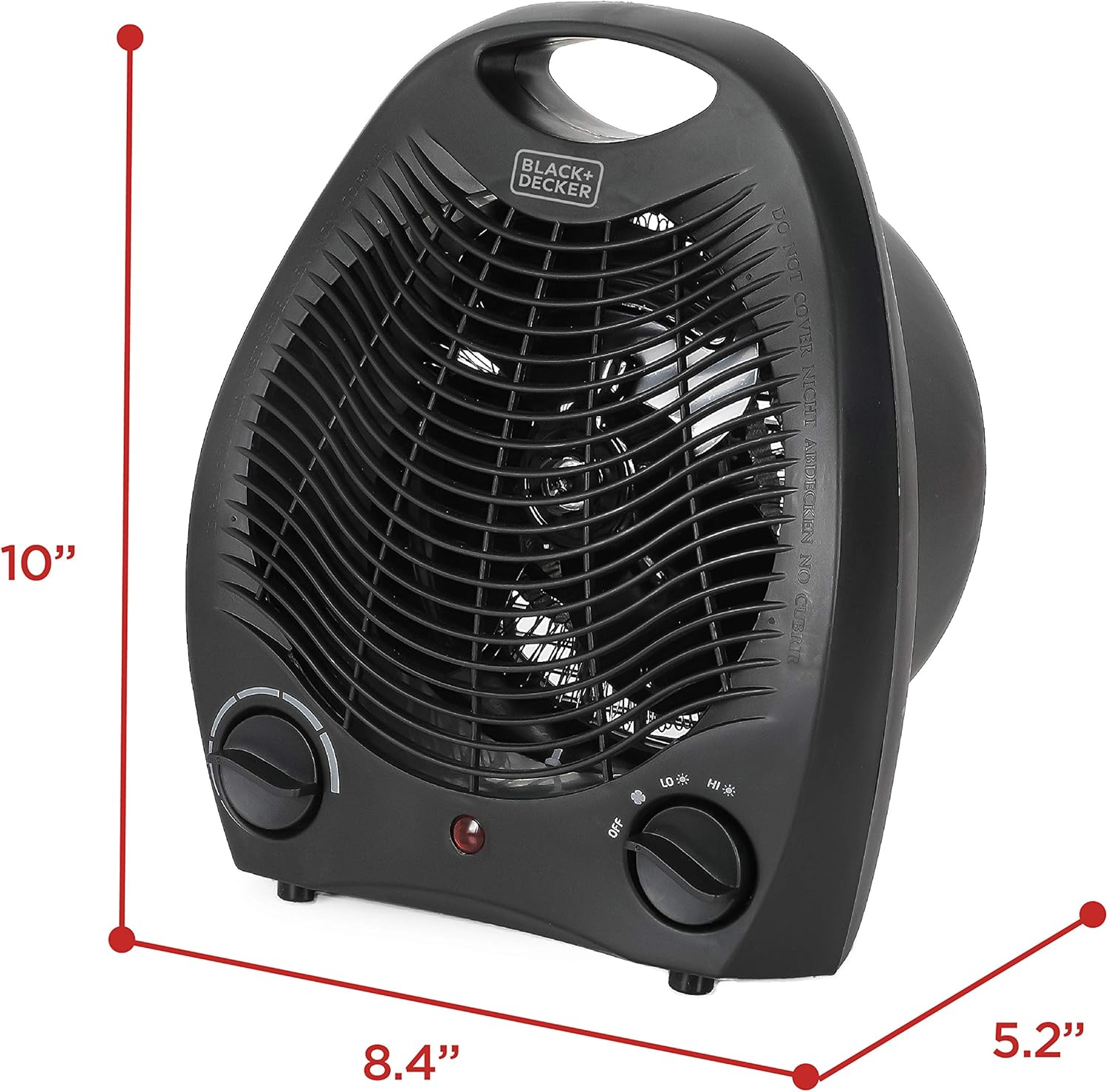
Image: The BLACK+DECKER Personal Desktop Heater illustrating its tip-over protection feature, showing the unit automatically shutting off when tilted.
Product Overview
Components
- Heat/Fan Mode Selector Dial
- Adjustable Thermostat Control Dial
- Power Indicator Light
- Front Grille
- Integrated Carrying Handle
- Tip-Over Safety Switch (located on the bottom)
Features
- Compact and Portable Design: Lightweight at only 2 lbs with an easy-carry handle.
- Dual Heat Settings: Low (750 Watts) and High (1500 Watts) for personalized comfort.
- Fan Only Setting: Allows for air circulation without heat.
- Adjustable Thermostat: Manual controls for precise temperature management.
- Multiple Safety Features: Includes safety interior fuse, automatic tip-over shutoff, and overheat shutoff protection.

Image: A hand holding the BLACK+DECKER Personal Desktop Heater by its integrated handle, highlighting its portability.
Setup
Unpacking
Carefully remove the heater from its packaging. Ensure all packing materials are removed before use. Retain the packaging for storage or shipping if needed.
Placement
Place the heater on a firm, level surface. Ensure there is at least 3 feet (0.9 meters) of clear space around the heater to allow for proper airflow and to prevent fire hazards. Do not place the heater on soft surfaces like rugs or carpets that could block the air intake.

Image: The BLACK+DECKER Personal Desktop Heater (Model BHD101B) positioned on a desk, illustrating its compact size and suitable placement for personal use.
Operating Instructions
Powering On/Off
- Plug the heater into a standard 120V AC electrical outlet.
- Turn the Heat/Fan Mode Selector Dial (right dial) from "OFF" to your desired setting: "FAN" (fan only), "LO" (low heat, 750W), or "HI" (high heat, 1500W). The power indicator light will illuminate.
- To turn off the heater, turn the Heat/Fan Mode Selector Dial to "OFF". Unplug the heater from the outlet when not in use.
Adjusting Temperature
- Once a heat setting ("LO" or "HI") is selected, use the Adjustable Thermostat Control Dial (left dial) to set your desired room temperature.
- Turn the dial clockwise for a higher temperature setting and counter-clockwise for a lower temperature setting.
- The heater will cycle on and off to maintain the set temperature.

Image: A hand adjusting the thermostat dial on the BLACK+DECKER Personal Desktop Heater, demonstrating the manual control for temperature settings.

Image: The BLACK+DECKER Personal Desktop Heater displaying its three mode settings: Fan Only, Low Heat (750W), and High Heat (1500W).
Video: An official product video from Equity Brands demonstrating the features and operation of the BLACK+DECKER Personal Desktop Heater, Model BHD101B.
Maintenance
Cleaning
- Always unplug the heater from the power outlet and allow it to cool completely before cleaning.
- Use a soft, damp cloth to wipe the exterior surfaces of the heater. Do not use abrasive cleaners or solvents.
- Gently vacuum the air intake and exhaust grilles to remove dust and lint buildup. Ensure no foreign objects enter the heater.
- Never immerse the heater in water or any other liquid.
Storage
When storing the heater, keep it in a cool, dry place. It is recommended to store it in its original packaging to protect it from dust and damage.
Troubleshooting
| Problem | Possible Cause | Solution |
|---|---|---|
| Heater does not turn on. | No power to the unit. | Ensure the heater is securely plugged into a working 120V outlet. Check if the outlet is active by plugging in another appliance. |
| Heater stops working unexpectedly. | Tip-over safety switch activated. | Ensure the heater is on a flat, stable surface. If it was tipped, place it upright; it should resume operation. |
| Heater stops working unexpectedly. | Overheat protection activated. | Unplug the heater and allow it to cool for at least 10 minutes. Check for any obstructions to the air intake or exhaust grilles. Remove any dust or lint. Plug it back in and restart. |
| Heater produces a burning smell. | Initial use or dust buildup. | A slight odor may occur during the first few uses as manufacturing residues burn off. This is normal. If the smell persists or is strong, unplug the unit and clean the grilles. Ensure proper ventilation. |
| Heater is on but no heat is produced. | Fan-only mode selected. | Ensure the Heat/Fan Mode Selector Dial is set to "LO" or "HI" for heat output. |
Specifications
| Feature | Detail |
|---|---|
| Model Number | BHD101B |
| Brand | BLACK+DECKER |
| Power Output | Low: 750 Watts, High: 1500 Watts |
| Voltage | 120 Volts |
| Amperage | 12.5 Amps |
| Dimensions (D x W x H) | 5.2" x 8.4" x 10" |
| Item Weight | 2 pounds |
| Cable Length | 6.5 Feet |
| Special Features | Portable, Adjustable Thermostat, Overheat Protection, Tip-Over Shutoff |
| Indoor/Outdoor Usage | Indoor |
| Room Type | Bedroom, Home Office, Study Room |
| UPC | 819813017026 |

Image: A visual representation of the BLACK+DECKER Personal Desktop Heater's dimensions (10"H x 8.4"W x 5.2"D) and key features like wattage and fan function.
Warranty and Support
This BLACK+DECKER Personal Desktop Heater (Model BHD101B) comes with a 1-Year Manufacturer's Warranty. For warranty claims, technical support, or service inquiries, please refer to the contact information provided in your product packaging or visit the official BLACK+DECKER website.
For additional information and support, you may visit the BLACK+DECKER Store on Amazon.


