
1. Introduction
This manual provides detailed instructions for the setup, operation, and maintenance of your Airpulse A300 Hi-Res Audio Certified Active Speaker System. Designed by audio engineer Phil Jones, the A300 system delivers a high-fidelity audio experience with versatile connectivity options.
Key features include:
- High-resolution audio certification for superior sound quality.
- Horn-loaded aluminum ribbon tweeters for detailed high frequencies.
- 6.5-inch aluminum cone woofers for powerful and clear bass.
- Built-in amplifier in one speaker for direct connection to audio sources.
- Multiple input options: Optical, Coaxial, Bluetooth 5.0 aptX, RCA, AUX, and USB.
- Rigid MDF cabinet with acoustic foam for optimal sound performance.
2. Product Overview
The Airpulse A300 system consists of two active speakers, one with a built-in amplifier and controls, and a remote control for convenient operation.
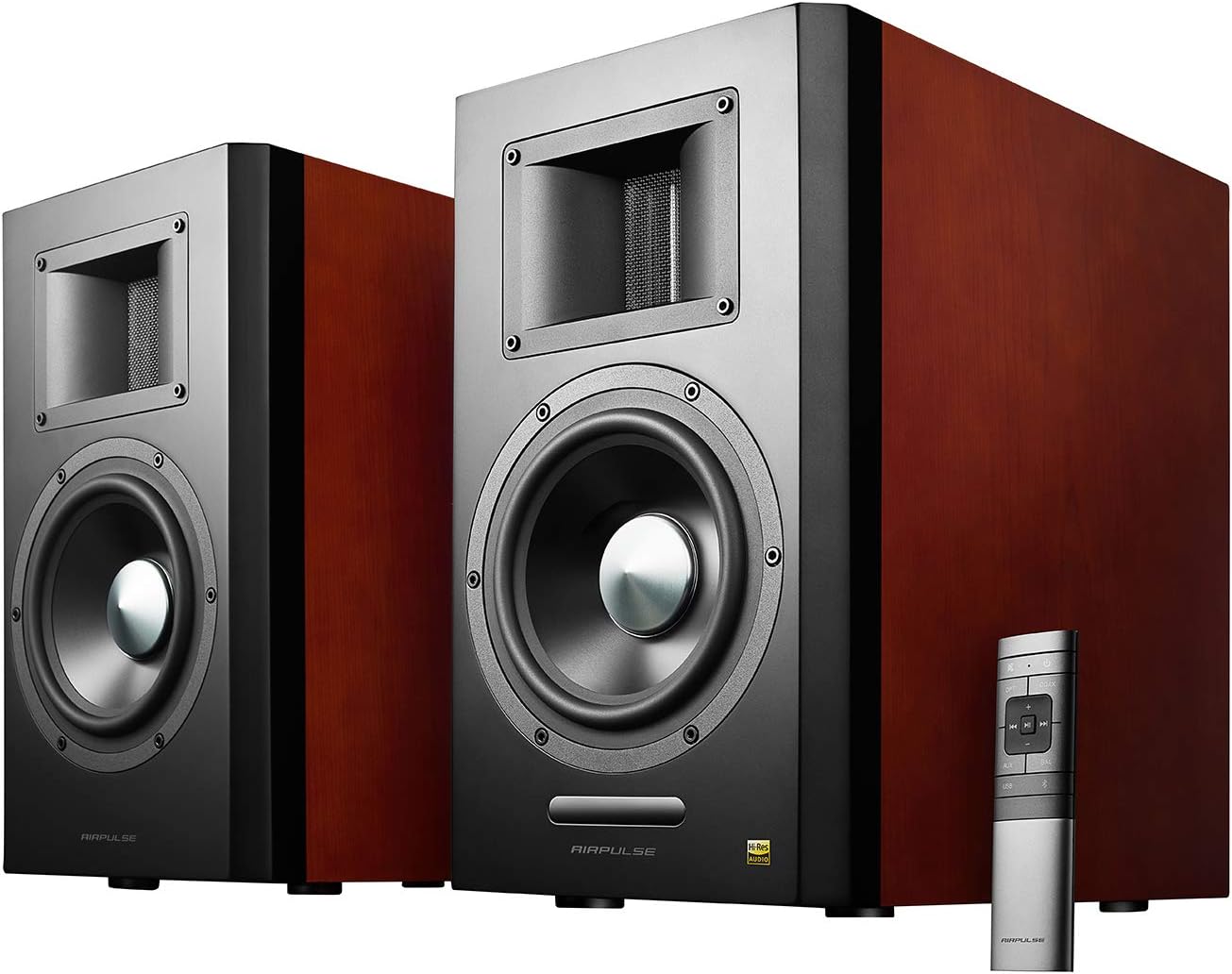
Figure 2.1: The Airpulse A300 active speaker system, showcasing both speakers and the included remote control. The speakers feature a dark finish with wood-grain side panels.

Figure 2.2: Rear panel of the active Airpulse A300 speaker, displaying various input ports (RCA, AUX, USB, Optical, Coaxial, Balanced XLR), volume/input, bass, and treble controls, and the power switch. The front of the passive speaker is also visible.

Figure 2.3: An Airpulse A300 speaker positioned next to a turntable, illustrating a typical setup for vinyl playback. The speaker's elegant design complements home audio environments.
Product Features Video
Video 2.1: An official overview of the Airpulse A300 Active Speaker System, highlighting its design, components like ribbon tweeters and woofers, various input options, and the included wireless remote control. This video provides a visual guide to the speaker's features and capabilities.
3. Setup
Follow these steps to set up your Airpulse A300 speaker system:
- Placement: Position the speakers on a stable, flat surface, ideally at ear level when seated. Ensure adequate space around each speaker for optimal sound dispersion and heat dissipation.
- Connect Speakers: Connect the active speaker (with controls) to the passive speaker using the provided speaker cable. Ensure a secure connection for both left and right channels.
- Power Connection: Connect the active speaker to a power outlet using the supplied AC power cable.
- Audio Source Connection: Choose your desired audio input method (Optical, Coaxial, Bluetooth, RCA, AUX, or USB) and connect your audio source (e.g., computer, TV, record player) to the corresponding input port on the active speaker's rear panel.
- Power On: Flip the power switch on the rear panel of the active speaker to the "ON" position.
4. Operating Instructions
The Airpulse A300 offers multiple ways to control your audio experience:
4.1. Input Selection
You can select your audio input source using the remote control or the input/volume knob on the rear panel of the active speaker. Available inputs include:
- Optical (OPT): For digital audio from TVs, game consoles, etc.
- Coaxial (COAX): Another digital audio input option.
- Bluetooth (BT): For wireless streaming from compatible devices.
- RCA (L/R): Standard analog input for various audio devices.
- AUX (3.5mm): Auxiliary input for portable devices.
- USB: For direct digital audio connection from a computer.
- Balanced In (XLR): Professional audio input for balanced connections.
4.2. Bluetooth Pairing
To pair a Bluetooth device:
- Select the Bluetooth input on the speakers.
- On your device, search for "Airpulse A300" in the Bluetooth settings.
- Select the speaker to pair. Once connected, the indicator light on the speaker will confirm the connection.
4.3. Volume, Bass, and Treble Adjustment
Adjust the master volume using the remote control or the "Volume/Input" knob on the active speaker. Separate knobs for "Bass" and "Treble" on the rear panel allow for fine-tuning of the sound profile to your preference.
4.4. Remote Control Functions
The included wireless remote control provides convenient access to various functions:
- Power On/Off
- Volume Up/Down
- Input Selection (OPT, COAX, Bluetooth, AUX, USB, BAL)
- Mute
- Playback controls (Play/Pause, Next/Previous Track) for Bluetooth and USB inputs.
5. Maintenance
To ensure the longevity and optimal performance of your Airpulse A300 speakers, follow these maintenance guidelines:
- Cleaning: Use a soft, dry cloth to wipe the speaker cabinets. Avoid using abrasive cleaners, waxes, or solvents.
- Environment: Keep speakers away from direct sunlight, excessive heat, humidity, and dust. Ensure proper ventilation around the speakers.
- Handling: Handle speakers with care. Avoid dropping them or exposing them to strong impacts.
- Cables: Periodically check all cable connections for tightness and wear.
6. Troubleshooting
If you encounter issues with your Airpulse A300 speakers, refer to the following common problems and solutions:
| Problem | Possible Cause | Solution |
|---|---|---|
| No sound |
|
|
| Bluetooth pairing failure |
|
|
| Distorted sound |
|
|
If the problem persists, please contact customer support.
7. Specifications
| Feature | Detail |
|---|---|
| Model Name | A300 |
| Speaker Type | Bookshelf, Active |
| Mounting Type | Shelf Mount |
| Woofer Diameter | 6.5 Inches (Aluminum Cone) |
| Tweeter Type | Horn-loaded Aluminum Ribbon |
| Speaker Maximum Output Power | 160 Watts |
| Frequency Response | 40 Hz (Lower limit, full range not specified) |
| Connectivity Technology | Auxiliary, Bluetooth, Coaxial, Optical, RCA, USB |
| Wireless Communication Technology | Bluetooth 5.0 aptX |
| Bluetooth Range | 10 Meters |
| Control Method | Remote |
| Product Dimensions | 8.9 x 15.2 x 14.1 inches |
| Item Weight | 52.8 pounds (Pair) |
| Color | Cherry |
| Power Source | Corded Electric |
8. Warranty and Support
The Airpulse A300 Active Speaker System comes with a 2-year warranty covering parts and labor in the USA and Canada. This warranty ensures high quality and reliability.
For technical support, warranty claims, or further assistance, please refer to the contact information provided with your product packaging or visit the official Airpulse website.


