
Introduction
This manual provides essential information for the setup, operation, and maintenance of your Easytry123 replacement remote control. Please read this manual thoroughly before using the remote control to ensure proper function and longevity.
This is an infrared (IR) replacement remote control designed for specific GREE Split Type Air Conditioners, including models GWC12MB-D3DNA3D, GWC18MC-D3DNA5F, GWC18MC-D3DNA8D, GWC18MC-D3DNC1D, and GWC18MC-D3DND3D. It is important to note that this remote may not support all functions of the original remote control. Please refer to the button layout provided in this manual to confirm compatibility. Batteries and printed instructions are not included with the product; this document serves as your comprehensive guide.
Product Overview
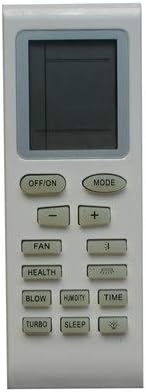
Figure 1: Front View of the Remote Control. This image displays the front of the remote control, showing the LCD screen at the top and an array of buttons including OFF/ON, MODE, temperature adjustments (+/-), FAN, HEALTH, BLOW, HUMIDITY, TIME, TURBO, and SLEEP.

Figure 2: Back View of the Remote Control. This image shows the rear of the remote control, highlighting the battery compartment cover with an "OPEN" indicator, and two small screw holes at the top.
Setup
1. Battery Installation
The remote control requires 2 AAA batteries (not included). Follow these steps to install them:
- Locate the battery compartment on the back of the remote control (refer to Figure 2).
- Slide the battery compartment cover downwards or press the "OPEN" tab and lift to remove it.
- Insert two AAA batteries, ensuring the positive (+) and negative (-) terminals align correctly with the markings inside the compartment.
- Replace the battery compartment cover by sliding it back into place until it clicks securely.
Note: Always use new batteries of the same type. Do not mix old and new batteries, or different types of batteries. Remove batteries if the remote control will not be used for an extended period.
Operating Instructions
This remote control is designed to operate specific GREE Split Type Air Conditioners. Point the remote control directly at the air conditioner's receiver when operating.
Key Functions:
| Button | Function |
|---|---|
| OFF/ON | Powers the air conditioner on or off. |
| MODE | Cycles through operating modes (e.g., Cool, Heat, Fan, Dry, Auto). |
| +/- | Adjusts temperature settings. |
| FAN | Adjusts fan speed. |
| HEALTH | Activates or deactivates health-related functions (if supported by AC unit). |
| BLOW | Controls the air blow direction or function. |
| HUMIDITY | Manages humidity settings (if supported by AC unit). |
| TIME | Sets timer functions (e.g., auto on/off). |
| TURBO | Activates rapid cooling/heating mode. |
| SLEEP | Activates sleep mode for quiet and energy-efficient operation. |
For detailed operation of specific modes and advanced functions, please refer to the user manual of your GREE Split Type Air Conditioner.
Maintenance
Cleaning the Remote Control
- Wipe the surface of the remote control with a soft, dry cloth.
- For stubborn dirt, slightly dampen the cloth with water and a mild detergent, then wipe dry immediately.
- Do not use abrasive cleaners, alcohol, or corrosive liquids, as these may damage the surface or internal components.
Battery Care
- Replace batteries when the remote control's range decreases or it becomes unresponsive.
- Remove batteries if the remote control will not be used for an extended period (e.g., several months) to prevent leakage.
- Dispose of used batteries according to local regulations.
Troubleshooting
| Problem | Possible Cause | Solution |
|---|---|---|
| Remote control not working. | Batteries are dead or incorrectly installed. | Replace batteries with new ones, ensuring correct polarity (+/-). |
| Remote control range is poor. | Weak batteries; Obstruction between remote and AC unit. | Replace batteries. Ensure a clear line of sight to the air conditioner's receiver. |
| Certain functions do not work. | This is a replacement remote; the specific function may not be supported by this model. | Verify the remote's compatibility with your specific AC model's functions. Not all original functions may be replicated. |
| LCD display is dim or blank. | Low batteries. | Replace batteries. |
If the problem persists after trying these solutions, please contact customer support.
Specifications
- Model: Easytry3772
- Brand: Easytry123
- Compatible Devices: GREE GWC12MB-D3DNA3D, GWC18MC-D3DNA5F, GWC18MC-D3DNA8D, GWC18MC-D3DNC1D, GWC18MC-D3DND3D Split Type Air Conditioners
- Connectivity Technology: Infrared (IR)
- Power Source: 2 x AAA Batteries (not included)
- Special Feature: Replacement item, may not work with all functions as original.
Warranty and Support
Warranty Information
This product is a replacement remote control. Specific warranty details are typically provided by the seller at the time of purchase. As per the product description, this item is sold without specific instructions or warranty information included in the package.
For return or replacement policies, please refer to the purchase platform's (e.g., Amazon.ca) return policy, which typically allows for returns within a specified period (e.g., 30 days).
Customer Support
For any issues or inquiries regarding this replacement remote control, please contact the seller directly through the platform where the purchase was made. Provide your order number and a detailed description of the issue for prompt assistance.
Seller: Easytry123